
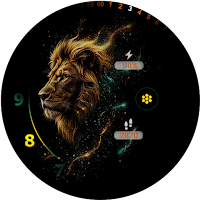
Light Effect WatchFace
Personalization
Light Effect Watch Face – Power & Elegance on Your Wrist
- Downloads
- 16+
- on Google Play
- Price
- $1.49
- No in-app purchases
- Updated
- Oct 10
- 2025
Screenshots

About Light Effect WatchFace
🔥 Light Effect Watch Face – Power & Elegance on Your Wrist
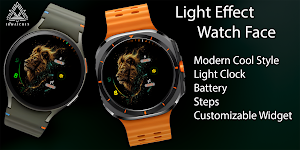
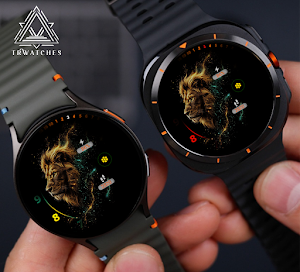
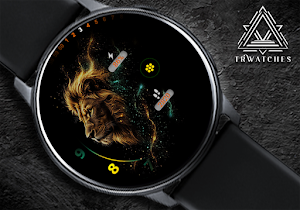
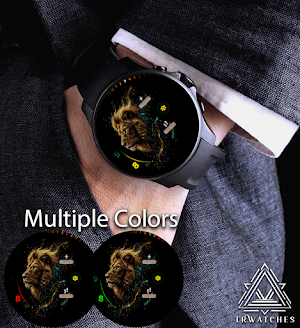
Bring your smartwatch to life with Light Effect Watch Face — a stunning futuristic design featuring a majestic lion surrounded by glowing particle effects. Whether you’re into style, performance, or functionality, this watch face has it all.
🌟 Key Features:
🦁 Futuristic Art Design – Featuring a detailed, powerful lion with glowing energy trails for a premium sci-fi aesthetic.
🔋 Battery Indicator – Always know your battery level with a clear, stylish percentage gauge.
👣 Step Counter – Track your daily activity directly from your wrist.
📱 Complication Widget Support – Add your favorite Wear OS complication (weather, calendar, heart rate, etc.) for extra info at a glance.
⏱️ Bold Time Display – Easy to read in both daylight and dark environments.
💡 Why Choose Light Effect?
Designed for those who demand more from their watch face — this is not just a utility, it's a statement. Perfectly balances beauty, minimalism, and data at a glance.
📌 Compatible with:
Wear OS 3.0+
Devices such as Samsung Galaxy Watch series, Google Pixel Watch, and others
--------------------------------------------------------------------------------------------------------
Watch face installation notes on smart watch:
Phone app serves only as a placeholder to make it easier to install & find the watch face on your Wear OS watch. You have to select your watch device from the install dropdown menu.
If you download the helper directly with the phone , you need to open application and touch on the display or the download button. -> will start to install on the watch.
A wear os watch need to be connected.
If not working in that way , you can copy that link into your phone chrome browser and click on arrow down from right , and you choose the watch face to install.
..............................................
After installation you need to set that watch face to your screen , from wear OS app , go down at downloaded watch faces and you will find it.
If you have problems , please contact me on [email protected]
xxxxxxxxxxxxxxxxxxxxxxxxxxxxxxxxxxxxxxxxxxxxxxxx
FOLLOW US AT TELEGRAM : https://t.me/TRWatchfaces
FOLLOW US WEBSITE TO GET FREE COUPONS :
https://trwatches.odoo.com/
xxxxxxxxxxxxxxxxxxxxxxxxxxxxxxxxxxxxxxxxxxxxxxxxx
Try to see others designs in my google profile.
Bring your smartwatch to life with Light Effect Watch Face — a stunning futuristic design featuring a majestic lion surrounded by glowing particle effects. Whether you’re into style, performance, or functionality, this watch face has it all.
🌟 Key Features:
🦁 Futuristic Art Design – Featuring a detailed, powerful lion with glowing energy trails for a premium sci-fi aesthetic.
🔋 Battery Indicator – Always know your battery level with a clear, stylish percentage gauge.
👣 Step Counter – Track your daily activity directly from your wrist.
📱 Complication Widget Support – Add your favorite Wear OS complication (weather, calendar, heart rate, etc.) for extra info at a glance.
⏱️ Bold Time Display – Easy to read in both daylight and dark environments.
💡 Why Choose Light Effect?
Designed for those who demand more from their watch face — this is not just a utility, it's a statement. Perfectly balances beauty, minimalism, and data at a glance.
📌 Compatible with:
Wear OS 3.0+
Devices such as Samsung Galaxy Watch series, Google Pixel Watch, and others
--------------------------------------------------------------------------------------------------------
Watch face installation notes on smart watch:
Phone app serves only as a placeholder to make it easier to install & find the watch face on your Wear OS watch. You have to select your watch device from the install dropdown menu.
If you download the helper directly with the phone , you need to open application and touch on the display or the download button. -> will start to install on the watch.
A wear os watch need to be connected.
If not working in that way , you can copy that link into your phone chrome browser and click on arrow down from right , and you choose the watch face to install.
..............................................
After installation you need to set that watch face to your screen , from wear OS app , go down at downloaded watch faces and you will find it.
If you have problems , please contact me on [email protected]
xxxxxxxxxxxxxxxxxxxxxxxxxxxxxxxxxxxxxxxxxxxxxxxx
FOLLOW US AT TELEGRAM : https://t.me/TRWatchfaces
FOLLOW US WEBSITE TO GET FREE COUPONS :
https://trwatches.odoo.com/
xxxxxxxxxxxxxxxxxxxxxxxxxxxxxxxxxxxxxxxxxxxxxxxxx
Try to see others designs in my google profile.
Alternatives to Light Effect WatchFace
Looking for apps like Light Effect WatchFace? Here are 6 similar Android apps on Google Play.
-
Chicken Road
-
Jungle Watch Face 104
-
GS048 - Leo Watch Face
-
Wolf Watch Face: Wear OS PRO
-
Tiger Fire Watch Face
-
Royal Lion Animation WatchFace
| App | Rating | Price | Installs | Last updated | Compare |
|---|---|---|---|---|---|
| Light Effect WatchFace | – | $1.49 | 10+ | Oct 10, 2025 | |
| Chicken Road | – | 1.49 USD | 1+ | Jan 10, 2026 | Compare |
| Jungle Watch Face 104 | – | 2.49 USD | 100+ | – | Compare |
| GS048 - Leo Watch Face | – | 1.49 USD | 10+ | Aug 18, 2026 | Compare |
| Wolf Watch Face: Wear OS PRO | – | 3.99 USD | 50+ | Oct 18, 2025 | Compare |
| Tiger Fire Watch Face | – | 1.49 USD | 50+ | Oct 9, 2023 | Compare |
| Royal Lion Animation WatchFace | – | 0.49 USD | 5+ | Mar 7, 2026 | Compare |
Similar apps on Google Play
- Chicken Road
- Jungle Watch Face 104
- GS048 - Leo Watch Face
- Wolf Watch Face: Wear OS PRO
- Tiger Fire Watch Face
- Royal Lion Animation WatchFace
- Tiger HD Watchface Wear OS PRO
- Get Rich Tiger ZKin Watch
- PW94 Animals Tiger Watch Face
- DM113 Modern Animal Face
- Oranje 2026 WK Watch Face
- LEO: Zodiac Watch Face
- Enigma: Luxury Gold watch face
- ART019 King Of The Jungle
- FLW058 The King Gallery
- Metal Lion Watch Face
- LION MFT WF 13
- KZY010
- KZY071
- ML2U 196 Watch Face
- Lion Watchface for Wear OS PRO
- Reddice Leo SH5
- KZY153
- Crazy Animals Watch Face
- Lion Watchface ULTRA SGW7
- Dark Led Watch Face
- Cancer SH4
- Lion WatchFace: England Fan 3D