

AI Voice Cloner 432Hz Player
Music & Audio In-app purchases Contains ads
Video Dubbing Voice Clone TTS eBook Reader 432Hz Player Translation EPUB PDF TXT
- Rating
- 3.9
- 136 ratings
- Downloads
- 10.9K+
- on Google Play
- Price
- Free
- In-app purchases
- Updated
- Sep 29
- 2026 · v21.3
Screenshots



About AI Voice Cloner 432Hz Player
Kokoro TTS / Google TTS
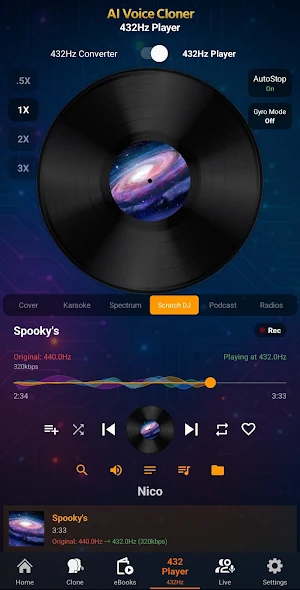
Covers, Lyrics, Spectrum, Scratch DJ.
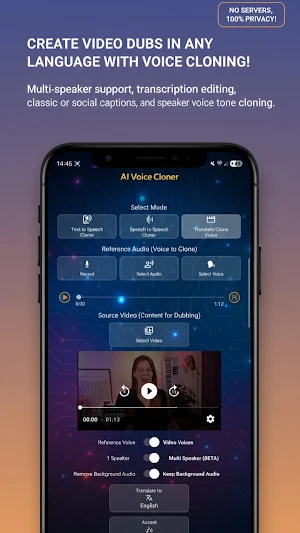
AI Voice Cloner - AI Dubbing: Video dubbing from one language to another with voice cloning from the video itself or a reference audio.
Convert to 432Hz your music and videos.
Clone Voice to Voice and TTS, and translate audio to many languages with neural tech. Convert your own voice audio into any voice you choose.
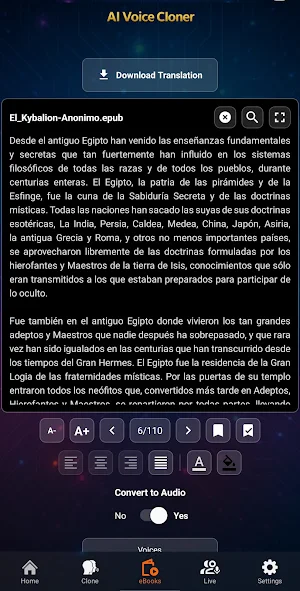
(EPUB, PDF, DOCX andTXT) Ebook and documents reader with translation and, create audiobooks easily!
It’s multilingual—use audio in any language and apply any desired voice regardless of language. For example, if you have your voice in English and want to apply a French voice, it will clone the tone from any language to your target audio, and you can translate spoken audio too—even if source and destination are in different languages—thanks to our neural audio extraction tech. Turn a spoken video from one language into another.
You can save voices to use later, either as Reference (tone extracted) or as Source Audio (tone applied).
Once the cloned / translated video or audio is generated, you can share it in any app like Messenger, WhatsApp, etc.
How to use:
The Reference Audio is the audio from which the voice will be cloned. It must last at least 10 seconds and up to 5 minutes. If longer, the app will use the first 5 minutes.
The Source Audio is the audio to which the cloned voice tone will be applied.
The first mode is Text-to-Speech with optional cloning and translation. The second is Voice-to-Voice with cloning, and Voice Translation with optional cloning. The third is video dubbing mode: you can upload a video up to 5 minutes and it will be dubbed in the language you choose. You can now translate the audio of your videos, with voice cloning from the video or from Reference Audio.
Record, select an audio, choose a previously saved voice or share a voice audio from another app like WhatsApp, then select AI Voice Cloner and choose whether to use it for Reference or Source.
If for video dubbing to another language you can share videos from apps like WhatsApp or upload a video in Video mode; you can use a Reference Voice to clone or use the same voice from the video.
When you have a selected audio in Reference or Source, you can save the voice to reuse later in Reference or Source. (To save a voice as Source, it must last at least 10 seconds.) If you upload a video of more than 10 seconds you can enable the “Voice of Video” switch and it will load it as Reference Audio; once loaded, you can save the video’s voice to reuse in later clonings.
If you select Text-to-Speech mode, with Reference Audio loaded, enter text, choose target language, translate the text, and press Start to get a Text-to-Speech audio in the reference voice and translated to the selected language.
If you select Voice-to-Voice mode, once you have both audios selected, press Generate Cloned Audio. Or you can enable the “Translate” switch, pick a language, and it will generate translated audio from the Source Audio; if you enable “Voice of Source Audio” switch it’s not necessary to load Reference Audio because it will use the same Source Audio voice.
If you select Video mode, choose a video and you can enable the “Voice of Video” switch; it will use as Reference Voice the video’s voice (voice should be clear and without much background noise, and a single speaker in the video for best results), or you can disable the switch and upload your own Reference Voice. Then choose whether you want the translated video to retain the original background audio or remove it entirely and leave only the dubbing. Select the language to which you want to translate the video and press Start. You will get the dubbing of the video in that language.
Use responsibly; this is an entertainment app. We are not responsible for misuse. Do not use voices without prior consent.
What’s new
Version 21.3 · Updated September 29, 2026
- 🗣️ New voice cloning and streaming chat cloning in Text to Speech, plus Live cloning with cloning in the Player. - 🚗 New interface in Android Auto. - 🎵 432Hz Player with playlist editing. - 🎤 With local music, Karaoke mode has 3 options: automatic Lyrics, edit Lyrics, and create Lyrics. You can now download Lyrics as .lrc, .txt, or .pdf. - 📺 Cast to TV option with Lyrics in Karaoke, Radios "Info", and real-time Translations.
User reviews

nice

the best voice cloner I've ever used! high praise.

Nice App 👍✅ For Clone Voice

Amazing!!!!
Alternatives to AI Voice Cloner 432Hz Player
Looking for apps like AI Voice Cloner 432Hz Player? Here are 6 similar Android apps on Google Play. The highest rated is Clever AI Hub - Pro AI Agents (4.6/5), and 4 of the 6 are free to download.
-
AI Transcribe. Speech to Text 4.4
-
AI Cover & Songs: Music AI 4.1
-
Clever AI Hub - Pro AI Agents 4.6
-
TikTak Metronome
-
Meowz: Cat Training & Pet care 4.4
-
Flip Sampler 4.0
| App | Rating | Price | Installs | Last updated | Compare |
|---|---|---|---|---|---|
| AI Voice Cloner 432Hz Player | 3.9 / 5 | Free | 10,000+ | Sep 29, 2026 | |
| AI Transcribe. Speech to Text | 4.4 / 5 | Free | 100,000+ | Oct 7, 2026 | Compare |
| AI Cover & Songs: Music AI | 4.1 / 5 | Free | 1,000,000+ | Sep 28, 2026 | Compare |
| Clever AI Hub - Pro AI Agents | 4.6 / 5 | Free | 50,000+ | Oct 14, 2026 | Compare |
| TikTak Metronome | – | – | 10+ | Oct 26, 2026 | Compare |
| Meowz: Cat Training & Pet care | 4.4 / 5 | Free | 100,000+ | Jun 30, 2026 | Compare |
| Flip Sampler | 4.0 / 5 | 9.49 USD | 10,000+ | Mar 25, 2026 | Compare |
Similar apps on Google Play
- AI Transcribe. Speech to Text
- AI Cover & Songs: Music AI
- Clever AI Hub - Pro AI Agents
- TikTak Metronome
- Meowz: Cat Training & Pet care
- Flip Sampler
- Clony: AI Voice & Face Cloning
- Rap Battles & Freestyle
- Singing Machine Karaoke
- RecCloud - AI Speech to Text
- Offtop Rap Studio & Song Maker
- AI Song Generator - Mozart AI
- Letterly: Write by Voice & AI
- LANDR - Master & Release Music
- Sage AI - AI Coach & Assistant
- Splice: Make music now
- Chaos Audio
- Oji: AI Avatar Photo Generator
- TicNote: AI Recorder & Agent
- Voice Changer - Audio Effects
- Soothe: Wellness On Demand
- AI Video Generator: Voiser AI
- Volcom
- RizzGPT: AI Dating Advice
- Funny Voice Reverse Singing
- Fireflies: AI notetaker
- Krisp AI Meeting Note Taker
- Jamzone - Sing & Play Along
- Pinwheel Caregiver
- OurRitual: Couples Support
- Rogervoice Phone Call Captions
- ElevenLabs: AI Voice Generator
- PicLumen
- Ooma Office Business Phone App
- Quo (formerly OpenPhone)