

Build Master
360PURPOSE LTD Tools
Build Master – Plan, track, and finish your construction project with ease
- Downloads
- 1K+
- on Google Play
- Price
- Free
- No in-app purchases
- Updated
- May 4
- 2026 · v1.0
Screenshots



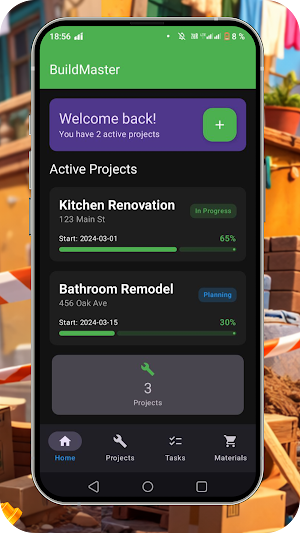

About Build Master
Welcome to Build Master, the straightforward construction planning app designed to keep your projects on track. No spreadsheets, no confusing tools—just a clear space to organize every phase of your build.
Key Features:
Project Setup: Create a new project in seconds. Add a name, location, start and end dates, and you’re ready.
Task Management: Break down your build into manageable tasks. Assign each to team members, set due dates, and mark progress as you go. See what’s done, what’s pending, and what’s overdue at a glance.
Gantt-Style Timeline: Visualize your entire schedule on an interactive timeline. Drag and drop to adjust phases, spot gaps, and ensure everything flows logically from foundation work to finishing touches.
Daily Log: Keep a journal of on-site activities. Note weather conditions, work completed, delays, and site visitors. Photos can be attached to each log entry, creating a visual record of progress.
Material & Equipment Checklist: Create lists of needed materials and tools. Check off items as they arrive or get used. Never lose track of what’s required for each stage.
Team Collaboration: Invite workers, subcontractors, or family members to the project. Everyone can view tasks, update statuses, and share notes in real time. Built-in messaging keeps communication in one place—no scattered text messages.
Smart Reminders: Get notified before deadlines, when a task is completed, or if a phase is falling behind. Customize alerts to fit your workflow.
Progress Photos: Snap and store photos directly within each task or milestone. Compare week-by-week images to see how far you’ve come.
Offline Mode: Many job sites have spotty internet. Use the app fully offline; all changes sync automatically once you’re back online.
Simple Reporting: Generate a clean PDF summary of project status, completed tasks, and upcoming deadlines. Great for sharing with clients or partners—without any complex analytics.
Stay organized, avoid miscommunication, and deliver on time. Download BuildFlow and bring clarity to your construction planning today.
Key Features:
Project Setup: Create a new project in seconds. Add a name, location, start and end dates, and you’re ready.
Task Management: Break down your build into manageable tasks. Assign each to team members, set due dates, and mark progress as you go. See what’s done, what’s pending, and what’s overdue at a glance.
Gantt-Style Timeline: Visualize your entire schedule on an interactive timeline. Drag and drop to adjust phases, spot gaps, and ensure everything flows logically from foundation work to finishing touches.
Daily Log: Keep a journal of on-site activities. Note weather conditions, work completed, delays, and site visitors. Photos can be attached to each log entry, creating a visual record of progress.
Material & Equipment Checklist: Create lists of needed materials and tools. Check off items as they arrive or get used. Never lose track of what’s required for each stage.
Team Collaboration: Invite workers, subcontractors, or family members to the project. Everyone can view tasks, update statuses, and share notes in real time. Built-in messaging keeps communication in one place—no scattered text messages.
Smart Reminders: Get notified before deadlines, when a task is completed, or if a phase is falling behind. Customize alerts to fit your workflow.
Progress Photos: Snap and store photos directly within each task or milestone. Compare week-by-week images to see how far you’ve come.
Offline Mode: Many job sites have spotty internet. Use the app fully offline; all changes sync automatically once you’re back online.
Simple Reporting: Generate a clean PDF summary of project status, completed tasks, and upcoming deadlines. Great for sharing with clients or partners—without any complex analytics.
Stay organized, avoid miscommunication, and deliver on time. Download BuildFlow and bring clarity to your construction planning today.
Alternatives to Build Master
Looking for apps like Build Master? Here are 6 similar Android apps on Google Play. The highest rated is Secure VPN - Saw VPN (4.2/5), and all 6 are free to download.
-
澳門消費助手
-
QBarLens: QR Barcode Scanner
-
Secure VPN - Saw VPN 4.2
-
PhotoRecover Master & Restore
-
Shamna Ultra Pro Player
-
Code Converter Master
| App | Rating | Price | Installs | Last updated | Compare |
|---|---|---|---|---|---|
| Build Master | – | Free | 1,000+ | May 4, 2026 | |
| 澳門消費助手 | – | Free | 1,000+ | Jun 5, 2026 | Compare |
| QBarLens: QR Barcode Scanner | – | Free | 5+ | – | Compare |
| Secure VPN - Saw VPN | 4.2 / 5 | Free | 10,000+ | – | Compare |
| PhotoRecover Master & Restore | – | Free | 100,000+ | – | Compare |
| Shamna Ultra Pro Player | – | Free | 10+ | May 24, 2026 | Compare |
| Code Converter Master | – | Free | 1,000+ | Oct 22, 2026 | Compare |
Compare Build Master with the top alternatives: ratings, updates, ASO score and keyword gaps →
Similar apps on Google Play
- 澳門消費助手
- QBarLens: QR Barcode Scanner
- Secure VPN - Saw VPN
- PhotoRecover Master & Restore
- Shamna Ultra Pro Player
- Code Converter Master
- Convertit
- AI Translate: Photo Translator
- 시대인재 마이클래스 학부모
- Star File Management
- Efficient QR Code Scanning
- Lovat Dashboard
- Core Cleaner
- Zaman Sayacı
- Retro Watch Complication
- Doc AI
- AI Printer App & Doc Scanner
- BluSi
- PocketAI (Offline AI)
- Murmur
- Trust pilot
- Smart Notification Manager
- File Manager Master
- Collectibles Item Scanner
- WA Unblock: How to Unblock WP