
TourBox Console
TourBox Tech Inc. Tools
TourBox Elite Plus: The Ultimate Console Now compatible with Android Tablets!
- Rating
- 2.5
- 19 ratings
- Downloads
- 1K+
- on Google Play
- Price
- Free
- No in-app purchases
- Updated
- Sep 16
- 2026 · v1.4.2
Screenshots
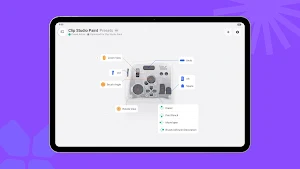


About TourBox Console
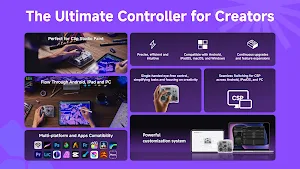
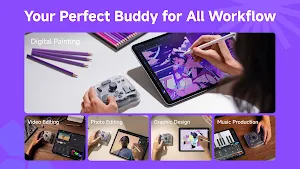
• Multi-Platform Creation, Seamless Flow
TourBox Elite Plus is now compatible across 4 platforms—Windows, macOS, iPadOS, and Android—bridging desktop and mobile creative workflow. No matter where you are, you can maintain consistent workflow and enjoy a smooth, coherent, and seamless creative experience.
• Comprehensive CSP Built-in Preset, Ready to Go
Too lazy for step up? TourBox Console Android 1.0 comes built-in CSP preset with built-in functions, covering all configurable options provided by CSP by default. Just one click, and you’re ready to go.
For functions beyond the default settings, you can also expand them with CSP+. After configuring in the software, sync to TourBox with one click to enable advanced actions like brush pigment, hardness, thickness, angle, particle size, and canvas horizontal/vertical flipping—keeping your creative workflow consistent between tablet and PC.
• Highly Customizable, Supporting Multiple Apps
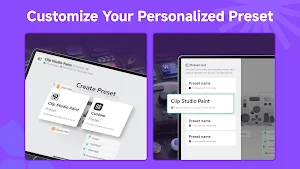
TourBox Console Android 1.0 offers customizable presets, allowing you to freely map functions in creative software. Tailor shortcuts and operational logic to your personal workflow, making TourBox fully adapt to your creative rhythm.
• Key Combinations, Unlocking More Possibilities
TourBox Console Android 1.0 predefines various basic combinations for your 14 TourBox keys, covering single-click, double-click, long-press, and more. You can also freely create more key combos and choose diverse key-sending modes, expanding operations to over 150 variations. From basic actions to complex workflows, configure TourBox to match your workflow and make control more engaging.
• Multi-Mode for Keys, All You Need
To deeply adapt to all apps, we’ve designed 4 key modes for TourBox—Standard, UP, AB, and Rotate—catering to personalized needs as your creative process evolves.
• Finer Knob Adjustments
Rotary keys support multi-speed settings and haptic feedback adjustments, allowing flexible fine-tuning of feel and responsiveness to match your creative flow.
• Continuous Evolution, Elevating Your Creative Experience
We will keep updating and upgrading the software, developing more innovative features to ensure your creative experience keeps improving.
TourBox Elite Plus is now compatible across 4 platforms—Windows, macOS, iPadOS, and Android—bridging desktop and mobile creative workflow. No matter where you are, you can maintain consistent workflow and enjoy a smooth, coherent, and seamless creative experience.
• Comprehensive CSP Built-in Preset, Ready to Go
Too lazy for step up? TourBox Console Android 1.0 comes built-in CSP preset with built-in functions, covering all configurable options provided by CSP by default. Just one click, and you’re ready to go.
For functions beyond the default settings, you can also expand them with CSP+. After configuring in the software, sync to TourBox with one click to enable advanced actions like brush pigment, hardness, thickness, angle, particle size, and canvas horizontal/vertical flipping—keeping your creative workflow consistent between tablet and PC.
• Highly Customizable, Supporting Multiple Apps
TourBox Console Android 1.0 offers customizable presets, allowing you to freely map functions in creative software. Tailor shortcuts and operational logic to your personal workflow, making TourBox fully adapt to your creative rhythm.
• Key Combinations, Unlocking More Possibilities
TourBox Console Android 1.0 predefines various basic combinations for your 14 TourBox keys, covering single-click, double-click, long-press, and more. You can also freely create more key combos and choose diverse key-sending modes, expanding operations to over 150 variations. From basic actions to complex workflows, configure TourBox to match your workflow and make control more engaging.
• Multi-Mode for Keys, All You Need
To deeply adapt to all apps, we’ve designed 4 key modes for TourBox—Standard, UP, AB, and Rotate—catering to personalized needs as your creative process evolves.
• Finer Knob Adjustments
Rotary keys support multi-speed settings and haptic feedback adjustments, allowing flexible fine-tuning of feel and responsiveness to match your creative flow.
• Continuous Evolution, Elevating Your Creative Experience
We will keep updating and upgrading the software, developing more innovative features to ensure your creative experience keeps improving.
What’s new
Version 1.4.2 · Updated September 16, 2026
Other optimizations and bug fixes.
Alternatives to TourBox Console
Looking for apps like TourBox Console? Here are 6 similar Android apps on Google Play. The highest rated is Koala Sampler (4.8/5), and 4 of the 6 are free to download.
-
Flip Sampler 4.0
-
Koala Sampler 4.8
-
Ar Drawing & Sketch App
-
Game Booster GFX - No Lag 4.7
-
Splice: Make music now 4.5
-
Flow : Music Therapy 4.4
| App | Rating | Price | Installs | Last updated | Compare |
|---|---|---|---|---|---|
| TourBox Console | 2.5 / 5 | Free | 1,000+ | Sep 16, 2026 | |
| Flip Sampler | 4.0 / 5 | 9.49 USD | 10,000+ | Mar 25, 2026 | Compare |
| Koala Sampler | 4.8 / 5 | 4.99 USD | 100,000+ | Oct 17, 2026 | Compare |
| Ar Drawing & Sketch App | – | Free | 100,000+ | Aug 25, 2026 | Compare |
| Game Booster GFX - No Lag | 4.7 / 5 | Free | 500,000+ | Apr 16, 2026 | Compare |
| Splice: Make music now | 4.5 / 5 | Free | 500,000+ | Dec 15, 2025 | Compare |
| Flow : Music Therapy | 4.4 / 5 | Free | 100,000+ | May 4, 2026 | Compare |
Compare TourBox Console with the top alternatives: ratings, updates, ASO score and keyword gaps →