
WiFi FTP Server Pro
App Labs CO Tools
Share your phone files over Wi-Fi with a fast, secure FTP/FTPS server.
- Downloads
- 33+
- on Google Play
- Price
- $0.49
- No in-app purchases
- Updated
- May 23
- 2026 · v1.0
Screenshots
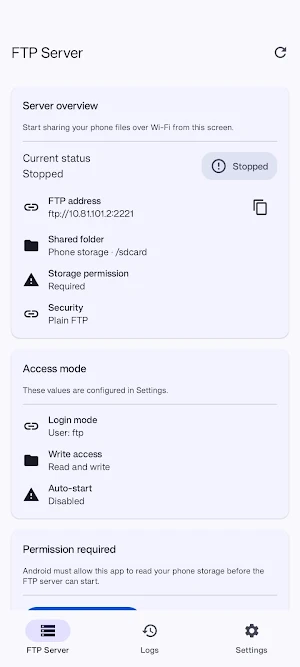
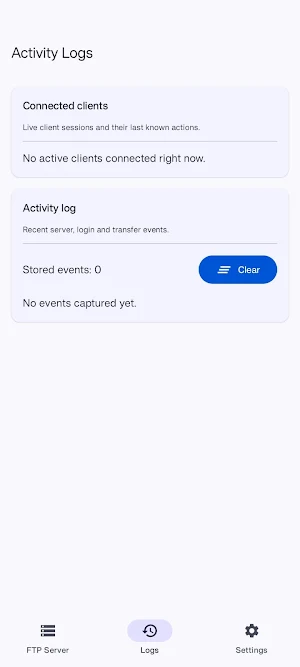
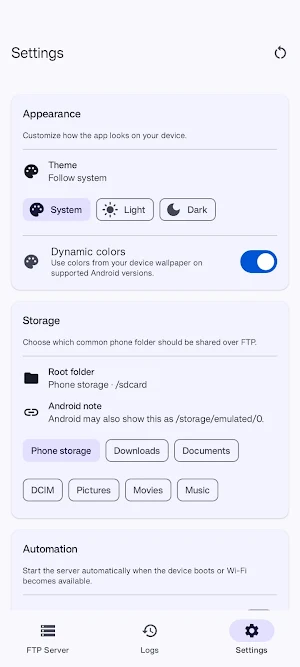
About WiFi FTP Server Pro
Turn your Android device into a simple FTP server and share files with your computer over Wi-Fi.
This app helps you access selected phone storage folders from FTP clients such as FileZilla or desktop file explorers on the same network. It is designed for local file transfer with a clean interface and practical controls.
Features:
- Start an FTP server directly from your phone
- Optional FTPS support for encrypted connections
- Custom port, username, and password settings
- Optional anonymous access
- Read-only mode for safer sharing
- Choose from common phone storage folders to share
- Activity screen with connection and transfer events
- Foreground notification with quick stop action
- Optional auto-start on boot or when Wi-Fi is available
- Light, dark, and system theme options
How it works:
1. Grant storage access in the app
2. Start the server
3. Connect from your computer using the FTP address shown in the app
Important notes:
- Your phone and computer should be on the same Wi-Fi network or hotspot
- This app uses FTP/FTPS, not SFTP
- Some Android versions may show shared storage paths as /storage/emulated/0
- FTPS may require your desktop client to accept a self-signed certificate
This app is intended for local network file sharing and basic FTP server control on Android.
This app helps you access selected phone storage folders from FTP clients such as FileZilla or desktop file explorers on the same network. It is designed for local file transfer with a clean interface and practical controls.
Features:
- Start an FTP server directly from your phone
- Optional FTPS support for encrypted connections
- Custom port, username, and password settings
- Optional anonymous access
- Read-only mode for safer sharing
- Choose from common phone storage folders to share
- Activity screen with connection and transfer events
- Foreground notification with quick stop action
- Optional auto-start on boot or when Wi-Fi is available
- Light, dark, and system theme options
How it works:
1. Grant storage access in the app
2. Start the server
3. Connect from your computer using the FTP address shown in the app
Important notes:
- Your phone and computer should be on the same Wi-Fi network or hotspot
- This app uses FTP/FTPS, not SFTP
- Some Android versions may show shared storage paths as /storage/emulated/0
- FTPS may require your desktop client to accept a self-signed certificate
This app is intended for local network file sharing and basic FTP server control on Android.
Alternatives to WiFi FTP Server Pro
Looking for apps like WiFi FTP Server Pro? Here are 6 similar Android apps on Google Play. All of them are free to download.





| App | Rating | Price | Installs | Last updated | Compare |
|---|---|---|---|---|---|
| WiFi FTP Server Pro | – | $0.49 | 10+ | May 23, 2026 | |
| Rondesk | – | Free | 10+ | Aug 19, 2026 | Compare |
| NetInfo | – | Free | 10+ | Jul 19, 2026 | Compare |
| IR Track | – | Free | 50+ | – | Compare |
| Truck2truck | – | Free | 10+ | Sep 27, 2026 | Compare |
| V-Assistent | – | Free | 10+ | Jul 15, 2026 | Compare |
| Simple Screen Light | – | Free | 10+ | May 13, 2026 | Compare |
Similar apps on Google Play
- Rondesk
- NetInfo
- IR Track
- Truck2truck
- V-Assistent
- Simple Screen Light
- dgvault
- iLight Control
- App Inspector
- Mobile Inspector
- MySolArk Installer
- HC Diffuser
- Cokima
- Hermes: Private PGP
- Finora
- TPC
- Dyleth
- FiberVibe Fiber Optic Explorer
- Gonankirki
- Raimax View
- The Potting Shed
- SiteOwl
- Slomin's Video
- Gold 24K - Digital Gold Mining
- YOOTIN