
CopyLayer - AI Prompt Manager
Latent Divergence Studios Productivity In-app purchases Contains ads
Create, organise & access prompts from any app with a floating overlay.
- Downloads
- 50+
- on Google Play
- Price
- Free
- In-app purchases
- Updated
- Sep 13
- 2026 · v3.1.3
Screenshots

About CopyLayer - AI Prompt Manager
CopyLayer is an AI prompt manager and prompt organizer for developers, writers, marketers, and anyone who uses ChatGPT, Claude, or Gemini daily.
Stop rewriting the same prompts. Stop switching between apps. CopyLayer gives you a floating prompt overlay bubble that lets you access your entire prompt library from any app on your phone — with one tap.
FLOATING PROMPT OVERLAY — ACCESS PROMPTS ANYWHERE
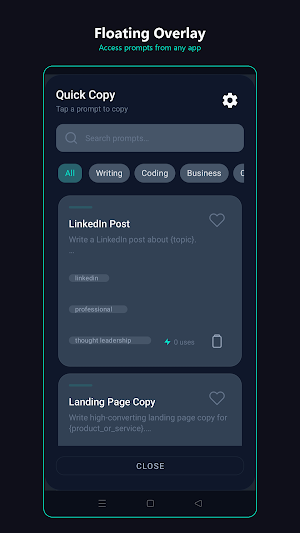
CopyLayer lives as a sleek floating bubble on your screen. Tap it from ChatGPT, Claude, Gmail, Slack, or your browser — and your entire prompt library appears instantly. Copy a prompt shortcut to clipboard, fill in {variables}, or open the editor. Drag the panel anywhere on screen.
SMART VARIABLE SYSTEM
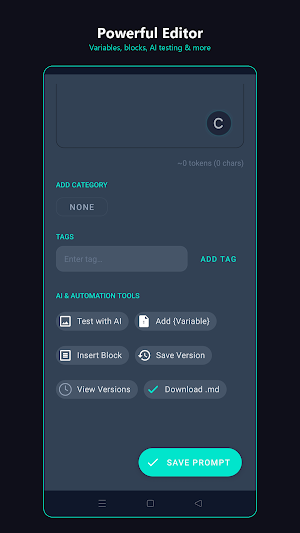
Build reusable ChatGPT prompts and prompt templates with {variables} like {tone}, {audience}, {topic}. When you use a prompt, fill in the blanks or copy it raw. Turn one prompt into hundreds of variations without rewriting.
ORGANISE EVERYTHING
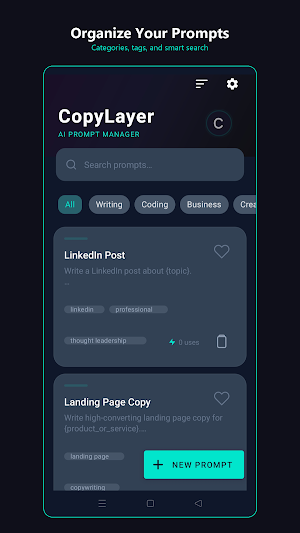
• Categories and subcategories for hierarchical organization
• Tags for cross-cutting labels
• Favorites for quick access
• Sort by recent, alphabetical, most used, date created, or favorites
• Powerful search across titles, content, and tags
• Batch operations — select multiple prompts to delete at once
PROFESSIONAL PROMPT LIBRARY
Get started instantly with 40+ elite expert-crafted prompts across:
• Writing — blog posts, emails, social media, copywriting
• Coding — code review, debugging, documentation, QA audits
• Business — marketing campaigns, sales pitches, analytics, strategy
• Creative — storytelling, poetry, brainstorming
• Education — lesson plans, research, study notes
Each prompt includes structured sections, {variables}, and built-in quality standards for top-tier AI output.
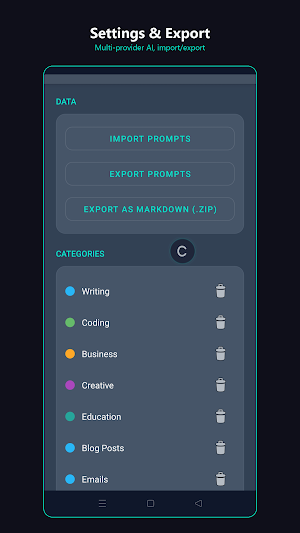
EXPORT AND SHARE
• Export all prompts as JSON for backup
• Export as Markdown (.zip) organized by category folders
• Download individual prompts as .md files
• Import from JSON to restore or share between devices
• Share prompts via any Android share target
VERSION HISTORY AND CLIPBOARD
• Save snapshots of your prompts as you iterate — restore any version instantly
• Automatic clipboard history with one-tap copy, capped at 50 entries
USAGE ANALYTICS
Track which prompts you use most. See total usage stats, weekly trends, and your top 5 most-used prompts.
PRIVACY FIRST — YOUR DATA STAYS ON YOUR DEVICE
• All prompts stored locally — no accounts, no servers, no tracking
BUILT FOR ANDROID
• Material Design 3 dark theme with edge-to-edge display
• Haptic feedback, smooth animations, onboarding for new users
• 15 languages supported
WHO IS THIS FOR?
• Developers reusing code review, debugging, and documentation prompts
• Writers and marketers managing blog, email, and social media templates
• Students and educators building research and study workflows
• Power users who want a text expander / snippet manager inside ChatGPT, Claude, and Gemini
Perfect for prompt engineering, AI workflows, text expander fans, and anyone who needs a clipboard manager with a floating widget overlay.
Download CopyLayer — your AI prompt manager, everywhere you work.
Stop rewriting the same prompts. Stop switching between apps. CopyLayer gives you a floating prompt overlay bubble that lets you access your entire prompt library from any app on your phone — with one tap.
FLOATING PROMPT OVERLAY — ACCESS PROMPTS ANYWHERE
CopyLayer lives as a sleek floating bubble on your screen. Tap it from ChatGPT, Claude, Gmail, Slack, or your browser — and your entire prompt library appears instantly. Copy a prompt shortcut to clipboard, fill in {variables}, or open the editor. Drag the panel anywhere on screen.
SMART VARIABLE SYSTEM
Build reusable ChatGPT prompts and prompt templates with {variables} like {tone}, {audience}, {topic}. When you use a prompt, fill in the blanks or copy it raw. Turn one prompt into hundreds of variations without rewriting.
ORGANISE EVERYTHING
• Categories and subcategories for hierarchical organization
• Tags for cross-cutting labels
• Favorites for quick access
• Sort by recent, alphabetical, most used, date created, or favorites
• Powerful search across titles, content, and tags
• Batch operations — select multiple prompts to delete at once
PROFESSIONAL PROMPT LIBRARY
Get started instantly with 40+ elite expert-crafted prompts across:
• Writing — blog posts, emails, social media, copywriting
• Coding — code review, debugging, documentation, QA audits
• Business — marketing campaigns, sales pitches, analytics, strategy
• Creative — storytelling, poetry, brainstorming
• Education — lesson plans, research, study notes
Each prompt includes structured sections, {variables}, and built-in quality standards for top-tier AI output.
EXPORT AND SHARE
• Export all prompts as JSON for backup
• Export as Markdown (.zip) organized by category folders
• Download individual prompts as .md files
• Import from JSON to restore or share between devices
• Share prompts via any Android share target
VERSION HISTORY AND CLIPBOARD
• Save snapshots of your prompts as you iterate — restore any version instantly
• Automatic clipboard history with one-tap copy, capped at 50 entries
USAGE ANALYTICS
Track which prompts you use most. See total usage stats, weekly trends, and your top 5 most-used prompts.
PRIVACY FIRST — YOUR DATA STAYS ON YOUR DEVICE
• All prompts stored locally — no accounts, no servers, no tracking
BUILT FOR ANDROID
• Material Design 3 dark theme with edge-to-edge display
• Haptic feedback, smooth animations, onboarding for new users
• 15 languages supported
WHO IS THIS FOR?
• Developers reusing code review, debugging, and documentation prompts
• Writers and marketers managing blog, email, and social media templates
• Students and educators building research and study workflows
• Power users who want a text expander / snippet manager inside ChatGPT, Claude, and Gemini
Perfect for prompt engineering, AI workflows, text expander fans, and anyone who needs a clipboard manager with a floating widget overlay.
Download CopyLayer — your AI prompt manager, everywhere you work.
What’s new
Version 3.1.3 · Updated September 13, 2026
- Fixed: in landscape the Settings button sat inside the phone's side gesture strip, so tapping it went back instead of opening Settings.
Alternatives to CopyLayer - AI Prompt Manager
Looking for apps like CopyLayer - AI Prompt Manager? Here are 6 similar Android apps on Google Play. All of them are free to download.
-
Lanly: Local Smart Lights
-
PDF Foundry: Edit, Sign, Merge
-
MeasureME: Measure & Convert
-
LatentSound: Music Studio DAW
-
FixFlix
-
Mole Security Toolkit
| App | Rating | Price | Installs | Last updated | Compare |
|---|---|---|---|---|---|
| CopyLayer - AI Prompt Manager | – | Free | 50+ | Sep 13, 2026 | |
| Lanly: Local Smart Lights | – | Free | 50+ | Sep 14, 2026 | Compare |
| PDF Foundry: Edit, Sign, Merge | – | Free | 1+ | – | Compare |
| MeasureME: Measure & Convert | – | Free | 1+ | Sep 12, 2026 | Compare |
| LatentSound: Music Studio DAW | – | Free | 100+ | Oct 3, 2026 | Compare |
| FixFlix | – | Free | 50+ | Sep 13, 2026 | Compare |
| Mole Security Toolkit | – | Free | 10+ | – | Compare |
Similar apps on Google Play
- Lanly: Local Smart Lights
- PDF Foundry: Edit, Sign, Merge
- MeasureME: Measure & Convert
- LatentSound: Music Studio DAW
- FixFlix
- Mole Security Toolkit
- Latent Studio Image generation
- Peg Like a Pro
- TorrentMe: Torrent Downloader
- Signal Atlas: WiFi Heatmap
- MeMeMe Media - Your Player
- Only Opens: Chess Openings
- Overlevel Me: Master Any Topic
- RedTeam Brain
- Sudoku ∞ - Train your brain
- Evowords: Toddler First Words
- OopSafe - Kids Lock & Play
- Godseed: Look Away
- LifeOps: Asset & Bill Tracker
- Solar Drift: One Tap Reflex
- HabitChain: Habit Tracker
- Chess: Fog of War Strategy