
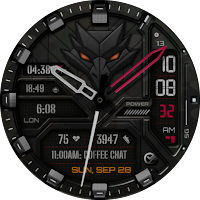
Dragon Ops : Hybrid Watch Face
Personalization
Rugged hybrid watch face with tactical style, 5 complications & customizations.
- Downloads
- 184+
- on Google Play
- Price
- $1.49
- No in-app purchases
- Updated
- Oct 4
- 2026
Screenshots
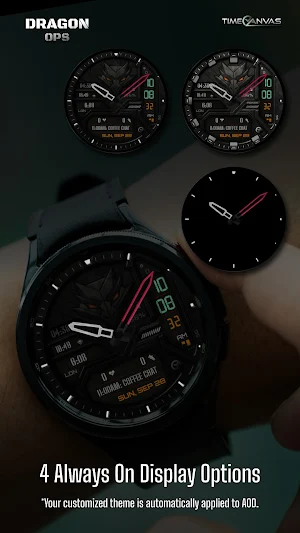


About Dragon Ops : Hybrid Watch Face
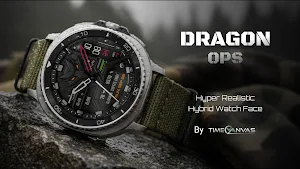
Command your time with Dragon Ops — a bold, rugged hybrid watch face crafted for tactical precision, clarity, and unstoppable performance.
Built for those who demand both strength and sophistication, Dragon Ops brings the power of analog design and digital intelligence together on your wrist.
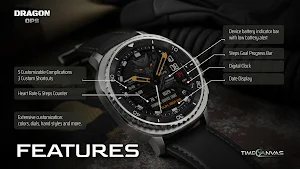
Key Features ⚙️
• 5 Customizable Complications – Personalize your essential data.
• 3 Custom Shortcuts – Access functions instantly with a tap.
• Heart Rate & Steps Counter – Track fitness metrics in real time.
• Digital Clock + Date Display – Clean hybrid layout for instant readability.
• Steps Goal Progress Bar – Stay motivated to hit your targets.
• Battery Indicator Bar with Low-Power Alert
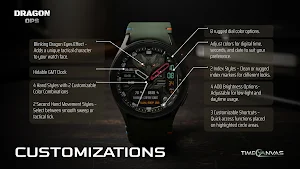
Customization Options 🎨
• Blinking Dragon Eyes Effect – Adds a unique tactical personality to your watch.
• Hidable GMT Clock – Keep your focus on the center of time.
• 4 Hand Styles × 2 Color Combinations – Customize your analog precision.
• 2 Second-Hand Movements – Choose between smooth sweep or tactical tick.
• 8 Rugged Dial Colors – Designed for every environment.
• 2 Index Marker Styles – Pick between clean elegance or rugged definition.
• 4 AOD Brightness Modes – Perfect visibility for both night and daylight.
• 3 Customizable Shortcuts – Quick access where you need it most.
Compatibility:
This watch face is designed for Wear OS devices running on Wear OS API 34+, including the Samsung Galaxy Watch 4, 5, 6, 7 and 8 as well as other supported Samsung Wear OS watches, Pixel Watches, and other Wear OS-compatible models from various brands.
How to Customize:
To customize your watch face, touch and hold the screen, then tap Customize (or the settings/edit icon specific to your watch brand). Swipe left and right to browse customization options and swipe up and down to select styles from the available custom options.
How to Set Custom Complications and Shortcuts:
To set custom complications and shortcuts, touch and hold the screen, then tap Customize (or the settings/edit icon specific to your watch brand). Swipe left until you reach "Complications," then tap on the highlighted area for the complication or shortcut you want to set up.
If you encounter any issues during installation, even with a compatible smartwatch, please refer to the detailed instructions in the companion app. For further assistance, feel free to reach out to us at [email protected].
Note: The phone app serves as a companion to assist you in installing and locating the watch face on your Wear OS watch. You can choose your watch device from the installation drop-down menu and install the watch face directly on your watch. The companion app also offers details about the watch face features and installation instructions. If you no longer need it, you can uninstall the companion app from your phone at any time.
If you like our designs, don’t forget to check out our other watch faces, with more coming soon to Wear OS! For quick help, feel free to email us. Your feedback on the Google Play Store means a lot to us—let us know what you love, what we can improve, or any suggestions you have. We’re always excited to hear your design ideas!
Built for those who demand both strength and sophistication, Dragon Ops brings the power of analog design and digital intelligence together on your wrist.
Key Features ⚙️
• 5 Customizable Complications – Personalize your essential data.
• 3 Custom Shortcuts – Access functions instantly with a tap.
• Heart Rate & Steps Counter – Track fitness metrics in real time.
• Digital Clock + Date Display – Clean hybrid layout for instant readability.
• Steps Goal Progress Bar – Stay motivated to hit your targets.
• Battery Indicator Bar with Low-Power Alert
Customization Options 🎨
• Blinking Dragon Eyes Effect – Adds a unique tactical personality to your watch.
• Hidable GMT Clock – Keep your focus on the center of time.
• 4 Hand Styles × 2 Color Combinations – Customize your analog precision.
• 2 Second-Hand Movements – Choose between smooth sweep or tactical tick.
• 8 Rugged Dial Colors – Designed for every environment.
• 2 Index Marker Styles – Pick between clean elegance or rugged definition.
• 4 AOD Brightness Modes – Perfect visibility for both night and daylight.
• 3 Customizable Shortcuts – Quick access where you need it most.
Compatibility:
This watch face is designed for Wear OS devices running on Wear OS API 34+, including the Samsung Galaxy Watch 4, 5, 6, 7 and 8 as well as other supported Samsung Wear OS watches, Pixel Watches, and other Wear OS-compatible models from various brands.
How to Customize:
To customize your watch face, touch and hold the screen, then tap Customize (or the settings/edit icon specific to your watch brand). Swipe left and right to browse customization options and swipe up and down to select styles from the available custom options.
How to Set Custom Complications and Shortcuts:
To set custom complications and shortcuts, touch and hold the screen, then tap Customize (or the settings/edit icon specific to your watch brand). Swipe left until you reach "Complications," then tap on the highlighted area for the complication or shortcut you want to set up.
If you encounter any issues during installation, even with a compatible smartwatch, please refer to the detailed instructions in the companion app. For further assistance, feel free to reach out to us at [email protected].
Note: The phone app serves as a companion to assist you in installing and locating the watch face on your Wear OS watch. You can choose your watch device from the installation drop-down menu and install the watch face directly on your watch. The companion app also offers details about the watch face features and installation instructions. If you no longer need it, you can uninstall the companion app from your phone at any time.
If you like our designs, don’t forget to check out our other watch faces, with more coming soon to Wear OS! For quick help, feel free to email us. Your feedback on the Google Play Store means a lot to us—let us know what you love, what we can improve, or any suggestions you have. We’re always excited to hear your design ideas!
User reviews

What an fantastic watch face. Love it. So cool looking. thank you so much . Highly recommend anyone to get it.

Such a beautiful design never see, congrats author for this piece of art design ,love it so much❤️❤️❤️
Alternatives to Dragon Ops : Hybrid Watch Face
Looking for apps like Dragon Ops : Hybrid Watch Face? Here are 6 similar Android apps on Google Play. The highest rated is Fazer Watch Face (4.3/5), and 2 of the 6 are free to download.
-
SamWatch AD Qebui 3
-
RACUNOD CTS02 Watch face
-
SH104 Watch Face, WearOS watch
-
Fazer Watch Face 4.3
-
GN14 Mekha
-
Hybrid WARTAN Watch face
| App | Rating | Price | Installs | Last updated | Compare |
|---|---|---|---|---|---|
| Dragon Ops : Hybrid Watch Face | – | $1.49 | 100+ | Oct 4, 2026 | |
| SamWatch AD Qebui 3 | – | 0.99 USD | 1,000+ | Aug 18, 2026 | Compare |
| RACUNOD CTS02 Watch face | – | 0.99 USD | 500+ | Jul 9, 2025 | Compare |
| SH104 Watch Face, WearOS watch | – | 1.99 USD | 100+ | Aug 1, 2025 | Compare |
| Fazer Watch Face | 4.3 / 5 | Free | 100,000+ | Sep 27, 2026 | Compare |
| GN14 Mekha | – | 0.99 USD | 100+ | Feb 3, 2026 | Compare |
| Hybrid WARTAN Watch face | – | Free | 500+ | – | Compare |
Similar apps on Google Play
- SamWatch AD Qebui 3
- RACUNOD CTS02 Watch face
- SH104 Watch Face, WearOS watch
- Fazer Watch Face
- GN14 Mekha
- Hybrid WARTAN Watch face
- SamWatch AD Qebui 2026
- SH056 Watch Face, WearOS watch
- DARDONUS CTS28 Watch face
- SY35 Watch Face for Wear OS
- Cosma: Hybrid Watch Face
- Oogly Aegis X
- JW073 jwstudio
- SamWatch AD Qebui 3 2025
- Falcon : Hybrid Watch Face
- VJ-BEYOND HYBRİD WATCH FACE
- Chester Military style 2
- Chester Military style