
Harmony DSP
APEX Italy Music & Audio
Setup and tune your system with your smart phone or tablet
- Rating
- 3.9
- 38 ratings
- Downloads
- 16.7K+
- on Google Play
- Price
- Free
- No in-app purchases
- Updated
- Oct 24
- 2025 · v1.0.7
Screenshots


About Harmony DSP
The Harmony DSP App allows you to setup and tune your system with your smart phone or tablet.
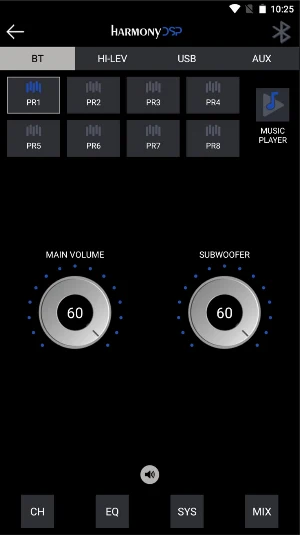
In the main screen you will find the Input Source menu where you can choose BT, HI-LEV, USB and AUX. Here you also find 8 Presets (saved into your device) to choose from, you access the Music Player, you have the Main and Subwoofer Volume, and the Advanced menu with Channels, EQ, System and Mixing.
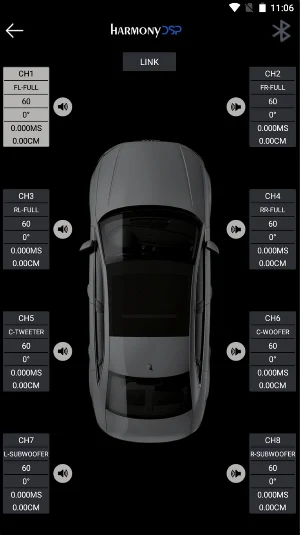
From the Channel Page, you can assign the function of each speaker, check the Phase for polarity, adjust the individual Channel Gains and set Delay in milliseconds or centimeters, for a rock solid and accurate front stage.
The EQ page holds the heart and the brains of the App. You can use either the Graphic or the Paragraphic EQ’s. You can customize the crossovers to fit the needs of your individual system. You have adjustments for Gain, frequency, and Q factor. You can work on channels individually or you can link them.
With the MIX function you can manually determine which inputs (USB-L/R, Digital-L/R, BT-L/R) will be used for each output (processing channel) and how much of each input the output will receive.
The new Music Player function lets you have full control of all your favorite songs, inside the App. Be sure to connect a proper USB device containing audio files in the supported format (MP2/4, WMA, APE, FLAC, AAC, M4A,WAV, AIF, AIFC). From the App it is possible to access the folders and the contained audio files.
In the main screen you will find the Input Source menu where you can choose BT, HI-LEV, USB and AUX. Here you also find 8 Presets (saved into your device) to choose from, you access the Music Player, you have the Main and Subwoofer Volume, and the Advanced menu with Channels, EQ, System and Mixing.
From the Channel Page, you can assign the function of each speaker, check the Phase for polarity, adjust the individual Channel Gains and set Delay in milliseconds or centimeters, for a rock solid and accurate front stage.
The EQ page holds the heart and the brains of the App. You can use either the Graphic or the Paragraphic EQ’s. You can customize the crossovers to fit the needs of your individual system. You have adjustments for Gain, frequency, and Q factor. You can work on channels individually or you can link them.
With the MIX function you can manually determine which inputs (USB-L/R, Digital-L/R, BT-L/R) will be used for each output (processing channel) and how much of each input the output will receive.
The new Music Player function lets you have full control of all your favorite songs, inside the App. Be sure to connect a proper USB device containing audio files in the supported format (MP2/4, WMA, APE, FLAC, AAC, M4A,WAV, AIF, AIFC). From the App it is possible to access the folders and the contained audio files.
User reviews

This app. Is truly incredible. It's almost too good because there is so much you can tweak. You really can get lost in dialing in the music and I've only had it for a day but very impressed with the amount of adjustment I can put in my music. I can hear so much more than without the app. So five stars. Thx.

Love it

Great
Alternatives to Harmony DSP
Looking for apps like Harmony DSP? Here are 3 similar Android apps on Google Play. The highest rated is ZAPCO DSP-Z8IVII (4.5/5), and all 3 are free to download.


| App | Rating | Price | Installs | Last updated | Compare |
|---|---|---|---|---|---|
| Harmony DSP | 3.9 / 5 | Free | 10,000+ | Oct 24, 2025 | |
| HB 410 ADSP | – | Free | 1,000+ | Oct 24, 2025 | Compare |
| ZAPCO ST-4X/6X/68X DSP | – | Free | 1,000+ | Mar 20, 2023 | Compare |
| ZAPCO DSP-Z8IVII | 4.5 / 5 | Free | 5,000+ | Nov 7, 2018 | Compare |
Compare Harmony DSP with the top alternatives: ratings, updates, ASO score and keyword gaps →