

KeyStar: Button Mapper
Enrique Anthony Galea Tools In-app purchases
Reimagine what your buttons can do with KeyStar.
- Rating
- 4.2
- 11 ratings
- Downloads
- 886+
- on Google Play
- Price
- Free
- In-app purchases
- Updated
- Oct 22
- 2026 · v2.01
Screenshots


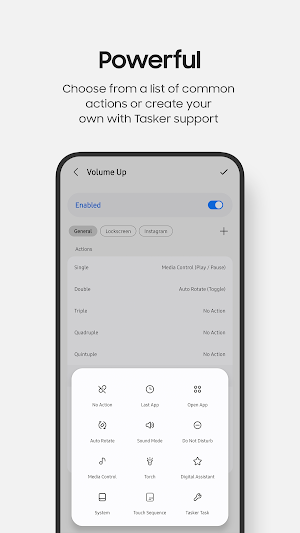
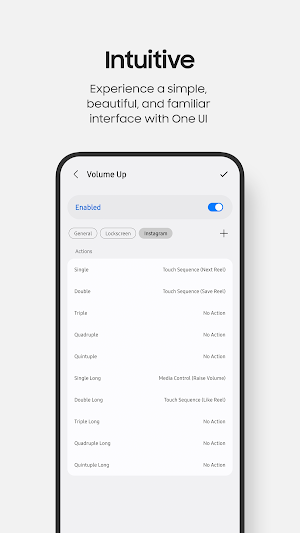


About KeyStar: Button Mapper
With KeyStar, you can take total command of your Samsung device's buttons to perform the exact actions you need.
Add up to 10 actions for each button. Not enough? Add contexts to perform a different set of actions based on the currently open app.
Still not enough? Combine KeyStar with Tasker to create your own actions and hotswap configurations on the fly based on your own rules.
Remapping works always, even with the screen and Always On Display turned off. No root needed.
Soft keys, such as home, back, and recents, are also supported. KeyStar allows you to add your own actions on top of the existing functions provided by these keys.
The engine parameters can be fine tuned to your liking. You can adjust the delays for short presses, long presses, and even customise the volume change speed when holding down the volume buttons.
Supported keys:
• Volume Up
• Volume Down
• Side Key
• Home
• Back
• Recents
Supported triggers:
• Single
• Double
• Triple
• Quadruple
• Quintuple
• Single Long
• Double Long
• Triple Long
• Quadruple Long
• Quintuple Long
Supported actions:
• Last App
• Open App
• Auto Rotate (Enable / Disable / Toggle)
• Sound Mode (Sound / Vibrate / Silent / Cycle)
• Do Not Disturb (Enable / Disable / Toggle)
• Media Control (Play / Pause / Toggle / Next / Previous / Lower Volume / Raise Volume)
• Torch (Enable / Disable / Toggle)
• Digital Assistant
• System (Back / Home / Recents / Notifications / Quick Settings / Power Dialog / Lock Screen / Screenshot)
• Touch Sequence (Tap / Swipe / Combination)
• Tasker Task
For advanced users, KeyStar also has Tasker plugin support. For example, you can hotswap configurations on the fly based on your own logic, and more.
KeyStar uses the following permissions:
• Notifications: Required. This is required to show you when the app is running in the background and to warn you of any issues that prevent actions from working properly.
• Read Logs: Required. This is required to detect when an Air Action gesture has been performed. This permission must be granted with ADB.
• Accessibility: Required. This is required to track which app is currently in the foreground, perform the System action, and perform the Touch Sequence action.
• Appear on Top: Optional. This is required to perform the Open App and Last App actions.
• Write Settings: Optional. This is required to perform the Auto Rotate action.
• Do Not Disturb: Optional. This is required to perform the Sound Mode and Do Not Disturb actions.
• Run Tasker Tasks: Optional. This is required to perform the Tasker Task action.
• Ignore Battery Optimisations: Optional. This is required if you find that your system is killing KeyStar while it runs in the background.
KeyStar does not collect any data.
Add up to 10 actions for each button. Not enough? Add contexts to perform a different set of actions based on the currently open app.
Still not enough? Combine KeyStar with Tasker to create your own actions and hotswap configurations on the fly based on your own rules.
Remapping works always, even with the screen and Always On Display turned off. No root needed.
Soft keys, such as home, back, and recents, are also supported. KeyStar allows you to add your own actions on top of the existing functions provided by these keys.
The engine parameters can be fine tuned to your liking. You can adjust the delays for short presses, long presses, and even customise the volume change speed when holding down the volume buttons.
Supported keys:
• Volume Up
• Volume Down
• Side Key
• Home
• Back
• Recents
Supported triggers:
• Single
• Double
• Triple
• Quadruple
• Quintuple
• Single Long
• Double Long
• Triple Long
• Quadruple Long
• Quintuple Long
Supported actions:
• Last App
• Open App
• Auto Rotate (Enable / Disable / Toggle)
• Sound Mode (Sound / Vibrate / Silent / Cycle)
• Do Not Disturb (Enable / Disable / Toggle)
• Media Control (Play / Pause / Toggle / Next / Previous / Lower Volume / Raise Volume)
• Torch (Enable / Disable / Toggle)
• Digital Assistant
• System (Back / Home / Recents / Notifications / Quick Settings / Power Dialog / Lock Screen / Screenshot)
• Touch Sequence (Tap / Swipe / Combination)
• Tasker Task
For advanced users, KeyStar also has Tasker plugin support. For example, you can hotswap configurations on the fly based on your own logic, and more.
KeyStar uses the following permissions:
• Notifications: Required. This is required to show you when the app is running in the background and to warn you of any issues that prevent actions from working properly.
• Read Logs: Required. This is required to detect when an Air Action gesture has been performed. This permission must be granted with ADB.
• Accessibility: Required. This is required to track which app is currently in the foreground, perform the System action, and perform the Touch Sequence action.
• Appear on Top: Optional. This is required to perform the Open App and Last App actions.
• Write Settings: Optional. This is required to perform the Auto Rotate action.
• Do Not Disturb: Optional. This is required to perform the Sound Mode and Do Not Disturb actions.
• Run Tasker Tasks: Optional. This is required to perform the Tasker Task action.
• Ignore Battery Optimisations: Optional. This is required if you find that your system is killing KeyStar while it runs in the background.
KeyStar does not collect any data.
What’s new
Version 2.01 · Updated October 22, 2026
Version 2.01: - Support hidden Shizuku - Update dependencies - Minor improvements
User reviews

Awesome app. Please keep it going. Don't let it die like sideActions (by jawomo).

Works well, tons of options and features. Setup was simple with some minor hiccups. This is what RegiStar should've been, you've outdone Samsung by a longshot. There should be a trial period before you have to pay for the features, even if it was just a day to make sure everything works. Not a bad price for the feat...

great mew way to make my phone work the way I want it to. developer is very helpful and responsive!

I like it, but I am not a fan of tasker. will there be support for modes and routines itself,
Alternatives to KeyStar: Button Mapper
Looking for apps like KeyStar: Button Mapper? Here are 6 similar Android apps on Google Play. All of them are free to download.





| App | Rating | Price | Installs | Last updated | Compare |
|---|---|---|---|---|---|
| KeyStar: Button Mapper | 4.2 / 5 | Free | 500+ | Oct 22, 2026 | |
| HttpNinja: REST API Client | – | Free | 1,000+ | – | Compare |
| Vector VPN | – | Free | 5,000+ | Aug 12, 2026 | Compare |
| Bukunwo | – | Free | 1,000+ | Oct 29, 2026 | Compare |
| Dearest Friends | – | Free | 50+ | Oct 3, 2026 | Compare |
| WiFiGate | – | Free | 100+ | – | Compare |
| ClaudiOS | – | Free | 50+ | – | Compare |
Similar apps on Google Play
- HttpNinja: REST API Client
- Vector VPN
- Bukunwo
- Dearest Friends
- WiFiGate
- ClaudiOS
- PSW Gen – Password Generator
- Darskee-Sales & Inventory App
- ParkIt Valet
- Encryption Hub Pro
- Media Purge AI – Smart Cleaner
- Lotus Residency 2
- Photo Recovery Master
- CatCat Search
- Smart Printer: Mobile Print
- Camaras IA
- TuMieszkamy
- Online calculator
- Go Next Cleaner
- BannerBuddy
- Smart solar meter
- Apex Dash Wind
- Ligatech Acesso
- Ghost Play: Status & Voice
- TapTag - Easy NFC Card Cloner