

Santa Fe Connect
Therma-Stor House & Home
Monitor and Control your Santa Fe dehumidifier from your phone!
- Rating
- 3.2
- 5 ratings
- Downloads
- 500+
- on Google Play
- Price
- Free
- No in-app purchases
- Updated
- Jan 28
- 2019 · v1.1.0
Screenshots


About Santa Fe Connect
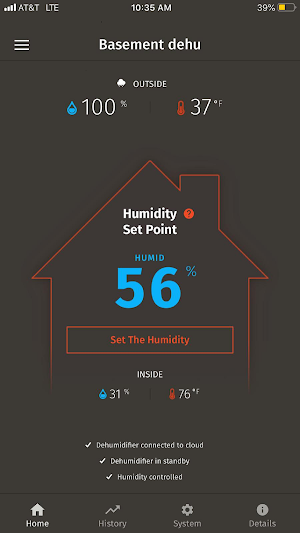
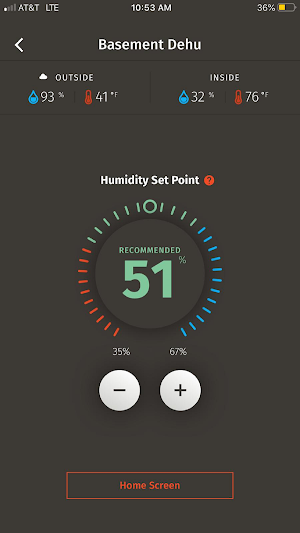
Monitor and control your Santa Fe Dehumidifier through the Santa Fe Connect app! The Santa Fe Connect allows you to control, monitor and live with peace of mind that your home is protected. With the Santa Fe Connect app you can:
Control your dehumidifier remotely:
• Turn your dehumidifier on and off
• Set your Relative Humidity
• Control more than one dehumidifier in your home
• Set to sleep mode for one to four hours
• Control your dehumidifier to high or low mode depending on conditions of space
Monitor your home environment and dehumidifier remotely, including:
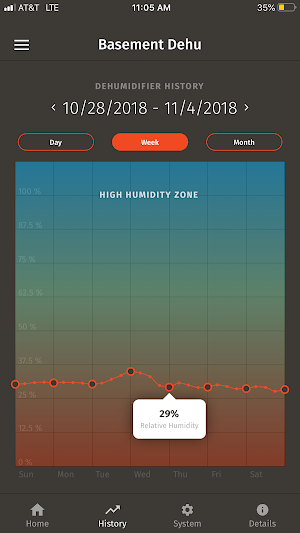
• The current relative humidity and temperature in the space of your dehumidifier
• The current relative humidity and temperature outside
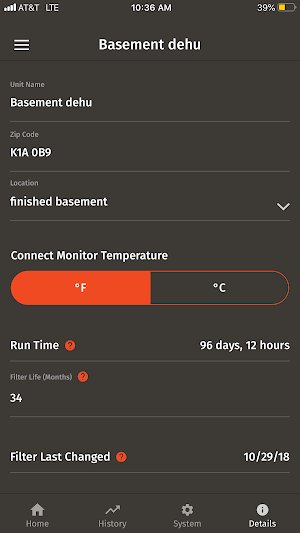
• Actual operating hours
Receive notifications through the app, email or text
• If your Santa Fe Connect is offline
• Water is detected near your dehumidifier
• When there is a possible mold warning – Relative Humidity is over 65% for more than 24 hours
• If there is an overflow from the drain pan
• It is time to change your filter in your dehumidifier
And much more!
The Santa Fe Connect app requires installation of a Santa Fe Connect WiFi module to your Santa Fe Dehumidifier. Working WiFi and an internet connection are also required for installation.
To learn more about our Santa Fe Dehumidifiers and our line of moisture control products go to www.Santa-Fe-Products.com
Control your dehumidifier remotely:
• Turn your dehumidifier on and off
• Set your Relative Humidity
• Control more than one dehumidifier in your home
• Set to sleep mode for one to four hours
• Control your dehumidifier to high or low mode depending on conditions of space
Monitor your home environment and dehumidifier remotely, including:
• The current relative humidity and temperature in the space of your dehumidifier
• The current relative humidity and temperature outside
• Actual operating hours
Receive notifications through the app, email or text
• If your Santa Fe Connect is offline
• Water is detected near your dehumidifier
• When there is a possible mold warning – Relative Humidity is over 65% for more than 24 hours
• If there is an overflow from the drain pan
• It is time to change your filter in your dehumidifier
And much more!
The Santa Fe Connect app requires installation of a Santa Fe Connect WiFi module to your Santa Fe Dehumidifier. Working WiFi and an internet connection are also required for installation.
To learn more about our Santa Fe Dehumidifiers and our line of moisture control products go to www.Santa-Fe-Products.com
What’s new
Version 1.1.0 · Updated January 28, 2019
Welcome to the re-branded Santa Fe Connect mobile app, version 1.1. Monitor and control your Santa Fe Dehumidifier through the Santa Fe Connect app! The Santa Fe Connect allows you to control, monitor and live with peace of mind that your home is protected.
Alternatives to Santa Fe Connect
Looking for apps like Santa Fe Connect? Here are 5 similar Android apps on Google Play. The highest rated is DryLINK (4.8/5), and all 5 are free to download.





| App | Rating | Price | Installs | Last updated | Compare |
|---|---|---|---|---|---|
| Santa Fe Connect | 3.2 / 5 | Free | 500+ | Jan 28, 2019 | |
| Phoenix Psychrometric | 4.3 / 5 | Free | 10,000+ | – | Compare |
| DryLINK | 4.8 / 5 | Free | 5,000+ | – | Compare |
| Quest Cloud Control | – | Free | 10+ | Dec 10, 2021 | Compare |
| Quest Sentry | – | Free | 10+ | Sep 19, 2018 | Compare |
| Santa Fe Sentry | – | Free | 100+ | Oct 10, 2018 | Compare |
Compare Santa Fe Connect with the top alternatives: ratings, updates, ASO score and keyword gaps →