
Print Thermal - Cetak Resi
Tools
Print receipts, receipts & labels to a thermal printer via Bluetooth, USB & WiFi
- Downloads
- 100+
- on Google Play
- Price
- Free
- No in-app purchases
- Updated
- Sep 11
- 2026 · v1.2
Screenshots
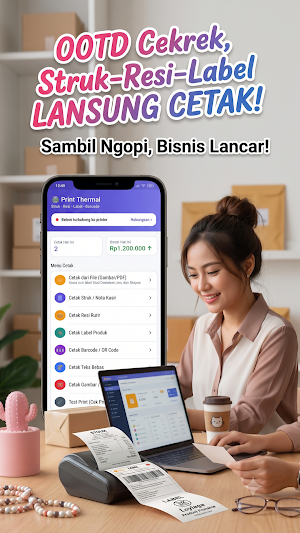
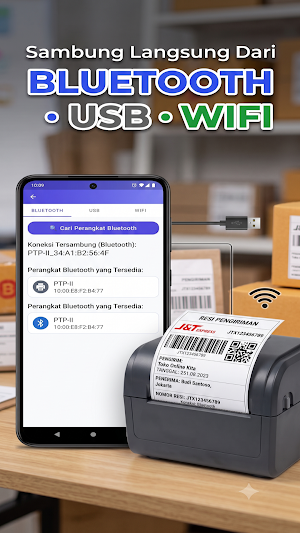
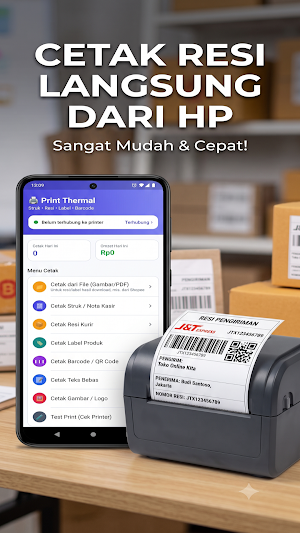
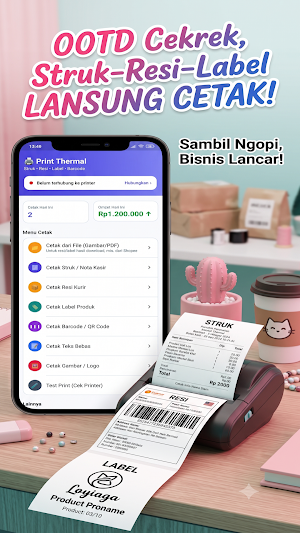
About Print Thermal - Cetak Resi
A thermal printer app for printing receipts, notes, shipping receipts, product labels, barcodes, and QR codes directly from your Android device.
Connect your thermal printer via Bluetooth, USB OTG, or Wi-Fi/LAN using standard ESC/POS protocols.
No need to connect a printer first. Prepare your receipt or select the file you want to print, then select your printer when printing.
✨ KEY FEATURES
📄 Print from File
Print receipts or labels saved on your phone in JPG, PNG, or PDF format. Multi-page PDFs can be printed sequentially.
Suitable for receipt files from marketplaces, courier apps, online stores, and other documents.
🧾 Print Receipts & Cashier Notes
Create receipts with:
Store name
Address
Transaction number
Cashier name
Product list
Qty & price
Subtotal
Discount
Tax
Total
Payment amount
Change
Footer
QR Code
📦 Print Shipping Receipts
Create and print shipping labels with:
Courier name
Service
Receipt number
Barcode
Recipient details
Sender details
Package contents
Weight
COD
Notes
🏷️ Print Product Labels
Create small labels for stores, warehouses, retailers, and products with product name, price, SKU, and barcode.
🔌 Bluetooth, USB & WiFi
Supports various thermal printer connection methods:
Bluetooth SPP
USB OTG / USB Host
WiFi / LAN
Raw socket port 9100
⭐ Save Printer
Previously used Bluetooth and WiFi printers can be saved for easier reuse without having to scan from scratch.
🔄 Auto Reconnect
The app can try to reconnect to the last printer when the app is opened.
🧪 Test Print
Check your printer with one button. The test print can include text, alignment, bold, barcode, and QR Code.
📊 Dashboard
View a summary of today's transaction count and turnover directly from the homepage.
📏 Various Paper Sizes
Supports several paper and label sizes, including:
58mm
80mm
76/72mm
100 × 150mm Receipt
100 × 100mm Receipt
40 × 30mm Label
50 × 30mm Label
🖼️ Print Logos & Images
Select an image from the gallery and print it to a thermal printer. The image is automatically converted to fit the thermal printer.
🔢 Barcode & QR Code
Print CODE128 barcodes and QR codes using the ESC/POS command for sharp prints.
📦 Product Catalog
Save product names, prices, and SKUs. When creating receipts or labels, you can select products without retyping.
🕘 Print History
All previously printed transactions can be viewed and reprinted.
📋 Reprint
Quickly reprint your last transaction.
📑 Multi-Copy
Print multiple copies of receipts, receipts, or labels at once.
💾 Backup & Restore
Export and import data such as:
Receipt templates
Product catalogs
Paper size settings
Use this feature when switching to a new phone or backing up data.
🏪 Multiple Store Templates
Save multiple store profiles with different names, addresses, footers, and paper sizes.
💰 Cash Drawer
Supports ESC/POS commands to open compatible cash drawers.
🔌 HOW TO CONNECT A PRINTER
Bluetooth
Pair the printer via Android's Bluetooth settings first, then select the printer from the app.
USB
Connect the printer using an OTG cable. Android will ask for USB access permission the first time you use it.
WiFi/LAN
Connect your phone and printer to the same network, then enter the printer's IP address. The default RAW port is 9100.
🧾 ESC/POS COMPATIBILITY
Thermal Printer uses ESC/POS commands and is designed to work with a wide range of compatible thermal printers.
It can be used with a wide range of Bluetooth, USB, and network thermal printers that support ESC/POS, including many generic printers and cash register printers.
🔎 Suitable for
Shops
Cashiers
SMEs
Online shops
Warehouses
Retail
Restaurants
Cafes
Marketplace sellers
Couriers
Printing receipts
Printing product labels
Printing barcodes
Bluetooth thermal printers
USB thermal printers
WiFi thermal printers
Thermal Printer - Cashier Printer helps turn your Android device into a practical printing tool for cashier, store, receipt, and label needs.
Connect your thermal printer via Bluetooth, USB OTG, or Wi-Fi/LAN using standard ESC/POS protocols.
No need to connect a printer first. Prepare your receipt or select the file you want to print, then select your printer when printing.
✨ KEY FEATURES
📄 Print from File
Print receipts or labels saved on your phone in JPG, PNG, or PDF format. Multi-page PDFs can be printed sequentially.
Suitable for receipt files from marketplaces, courier apps, online stores, and other documents.
🧾 Print Receipts & Cashier Notes
Create receipts with:
Store name
Address
Transaction number
Cashier name
Product list
Qty & price
Subtotal
Discount
Tax
Total
Payment amount
Change
Footer
QR Code
📦 Print Shipping Receipts
Create and print shipping labels with:
Courier name
Service
Receipt number
Barcode
Recipient details
Sender details
Package contents
Weight
COD
Notes
🏷️ Print Product Labels
Create small labels for stores, warehouses, retailers, and products with product name, price, SKU, and barcode.
🔌 Bluetooth, USB & WiFi
Supports various thermal printer connection methods:
Bluetooth SPP
USB OTG / USB Host
WiFi / LAN
Raw socket port 9100
⭐ Save Printer
Previously used Bluetooth and WiFi printers can be saved for easier reuse without having to scan from scratch.
🔄 Auto Reconnect
The app can try to reconnect to the last printer when the app is opened.
🧪 Test Print
Check your printer with one button. The test print can include text, alignment, bold, barcode, and QR Code.
📊 Dashboard
View a summary of today's transaction count and turnover directly from the homepage.
📏 Various Paper Sizes
Supports several paper and label sizes, including:
58mm
80mm
76/72mm
100 × 150mm Receipt
100 × 100mm Receipt
40 × 30mm Label
50 × 30mm Label
🖼️ Print Logos & Images
Select an image from the gallery and print it to a thermal printer. The image is automatically converted to fit the thermal printer.
🔢 Barcode & QR Code
Print CODE128 barcodes and QR codes using the ESC/POS command for sharp prints.
📦 Product Catalog
Save product names, prices, and SKUs. When creating receipts or labels, you can select products without retyping.
🕘 Print History
All previously printed transactions can be viewed and reprinted.
📋 Reprint
Quickly reprint your last transaction.
📑 Multi-Copy
Print multiple copies of receipts, receipts, or labels at once.
💾 Backup & Restore
Export and import data such as:
Receipt templates
Product catalogs
Paper size settings
Use this feature when switching to a new phone or backing up data.
🏪 Multiple Store Templates
Save multiple store profiles with different names, addresses, footers, and paper sizes.
💰 Cash Drawer
Supports ESC/POS commands to open compatible cash drawers.
🔌 HOW TO CONNECT A PRINTER
Bluetooth
Pair the printer via Android's Bluetooth settings first, then select the printer from the app.
USB
Connect the printer using an OTG cable. Android will ask for USB access permission the first time you use it.
WiFi/LAN
Connect your phone and printer to the same network, then enter the printer's IP address. The default RAW port is 9100.
🧾 ESC/POS COMPATIBILITY
Thermal Printer uses ESC/POS commands and is designed to work with a wide range of compatible thermal printers.
It can be used with a wide range of Bluetooth, USB, and network thermal printers that support ESC/POS, including many generic printers and cash register printers.
🔎 Suitable for
Shops
Cashiers
SMEs
Online shops
Warehouses
Retail
Restaurants
Cafes
Marketplace sellers
Couriers
Printing receipts
Printing product labels
Printing barcodes
Bluetooth thermal printers
USB thermal printers
WiFi thermal printers
Thermal Printer - Cashier Printer helps turn your Android device into a practical printing tool for cashier, store, receipt, and label needs.
What’s new
Version 1.2 · Updated September 11, 2026
Penyambungan otomatis Bluetooth, Wifi, USB
Alternatives to Print Thermal - Cetak Resi
Looking for apps like Print Thermal - Cetak Resi? Here are 4 similar Android apps on Google Play. The highest rated is Invoice Generator - Zoho (4.9/5), and all 4 are free to download.
-
Zoho Invoice - Invoice Maker 4.8
-
RawBT inkless print service 3.9
-
Invoice Maker & Estimate App 4.6
-
Invoice Generator - Zoho 4.9
| App | Rating | Price | Installs | Last updated | Compare |
|---|---|---|---|---|---|
| Print Thermal - Cetak Resi | – | Free | 100+ | Sep 11, 2026 | |
| Zoho Invoice - Invoice Maker | 4.8 / 5 | Free | 1,000,000+ | Sep 23, 2026 | Compare |
| RawBT inkless print service | 3.9 / 5 | Free | 5,000,000+ | Apr 26, 2025 | Compare |
| Invoice Maker & Estimate App | 4.6 / 5 | Free | 1,000,000+ | – | Compare |
| Invoice Generator - Zoho | 4.9 / 5 | Free | 1,000,000+ | Oct 13, 2026 | Compare |