
PriPass - Password Manager
tgbadev Tools
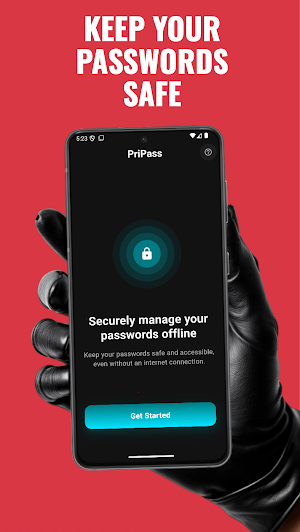
Secure offline password manager with PIN or biometric login.
- Downloads
- 25+
- on Google Play
- Price
- Free
- No in-app purchases
- Updated
- Mar 28
- 2026 · v1.0.3
Screenshots
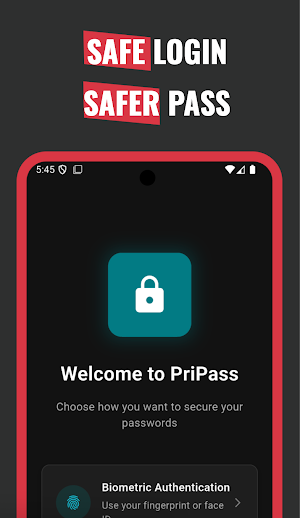
About PriPass - Password Manager
Take control of your digital life with a secure, private, and easy-to-use offline password manager. This app is designed for users who value simplicity, reliability, and maximum security — without relying on the internet.
🔐 Secure Login Options
Choose your preferred way to protect access to the app:
Biometric Authentication (fingerprint or face recognition, depending on your device)
Custom PIN Code that only you know
Every time you open the app, your chosen login method ensures that your sensitive data stays safe from unauthorized access.
📂 Manage Your Passwords with Ease
Organize all your important credentials in one secure vault.
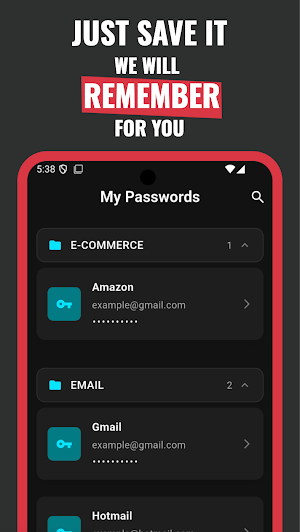
Add entries with service name, username/email, password, and notes
Quickly view, copy, edit, or delete saved information
Search through your passwords for fast access
Keep everything structured and easy to find
🛡 100% Offline & Private
Unlike other password managers, this app works completely offline.
No internet connection required
No cloud sync, no hidden servers, no data tracking
Everything is stored only on your device
Your information never leaves your phone, giving you complete privacy and peace of mind.
🎨 Clean & Modern Design
Enjoy a simple, distraction-free user interface:
Minimal and intuitive navigation
Light and Dark Mode support
Smooth transitions and thumb-friendly actions
Floating action button for quick password creation
⚙️ Customizable Settings
Tailor the app to your needs:
Switch between PIN and Biometric login
Toggle Dark/Light mode
Change your preferred language
Log out securely anytime
Access helpful guidance from the built-in Help section
🧩 Extra Features
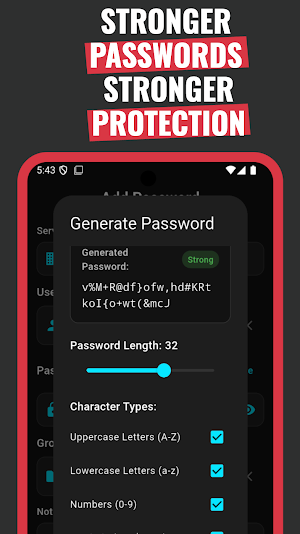
Built-in option to generate strong, secure passwords
Copy to clipboard for quick usage without revealing your credentials
Local encryption for all saved data
Fully functional without ads or unnecessary permissions
✅ Why Choose This App?
Private: Your data never leaves your device
Secure: PIN or biometric protection plus encrypted storage
Simple: Easy to use, clean design, no unnecessary complexity
Reliable: Works anywhere, anytime — no internet needed
🔐 Secure Login Options
Choose your preferred way to protect access to the app:
Biometric Authentication (fingerprint or face recognition, depending on your device)
Custom PIN Code that only you know
Every time you open the app, your chosen login method ensures that your sensitive data stays safe from unauthorized access.
📂 Manage Your Passwords with Ease
Organize all your important credentials in one secure vault.
Add entries with service name, username/email, password, and notes
Quickly view, copy, edit, or delete saved information
Search through your passwords for fast access
Keep everything structured and easy to find
🛡 100% Offline & Private
Unlike other password managers, this app works completely offline.
No internet connection required
No cloud sync, no hidden servers, no data tracking
Everything is stored only on your device
Your information never leaves your phone, giving you complete privacy and peace of mind.
🎨 Clean & Modern Design
Enjoy a simple, distraction-free user interface:
Minimal and intuitive navigation
Light and Dark Mode support
Smooth transitions and thumb-friendly actions
Floating action button for quick password creation
⚙️ Customizable Settings
Tailor the app to your needs:
Switch between PIN and Biometric login
Toggle Dark/Light mode
Change your preferred language
Log out securely anytime
Access helpful guidance from the built-in Help section
🧩 Extra Features
Built-in option to generate strong, secure passwords
Copy to clipboard for quick usage without revealing your credentials
Local encryption for all saved data
Fully functional without ads or unnecessary permissions
✅ Why Choose This App?
Private: Your data never leaves your device
Secure: PIN or biometric protection plus encrypted storage
Simple: Easy to use, clean design, no unnecessary complexity
Reliable: Works anywhere, anytime — no internet needed
What’s new
Version 1.0.3 · Updated March 28, 2026
What’s new in 1.0.3 English & Turkish — Full app localization; choose your language in Settings. Smart default — On first launch, the app uses Turkish if your device language is Turkish; otherwise English. Consistent experience — Welcome, setup, login, passwords, add/edit, settings, help, and system prompts (e.g. biometric) follow your selected language. Improved reliability — Dependency updates for localization support.
Alternatives to PriPass - Password Manager
Looking for apps like PriPass - Password Manager? Here are 6 similar Android apps on Google Play. All of them are free to download.
-
Köfteci Geldi
-
AutoDetailing: Care Manager
-
OtoYorum
-
SnapwordsApp
-
Scannify : Product Content
-
SevapBenim
| App | Rating | Price | Installs | Last updated | Compare |
|---|---|---|---|---|---|
| PriPass - Password Manager | – | Free | 10+ | Mar 28, 2026 | |
| Köfteci Geldi | – | Free | 50+ | Sep 19, 2025 | Compare |
| AutoDetailing: Care Manager | – | Free | 1,000+ | Jul 27, 2025 | Compare |
| OtoYorum | – | Free | 500+ | Jun 30, 2025 | Compare |
| SnapwordsApp | – | Free | 50+ | May 7, 2025 | Compare |
| Scannify : Product Content | – | Free | 1,000+ | – | Compare |
| SevapBenim | – | Free | 100+ | Mar 6, 2025 | Compare |