
Seating Chart: Sekigae Sensei
Teppei Kikuchi Tools Contains ads
Random seating maker & roulette
- Downloads
- 1.7K+
- on Google Play
- Price
- Free
- No in-app purchases
- Updated
- Jun 14
- 2026 · v1.3.5
Screenshots
Save to Pinterest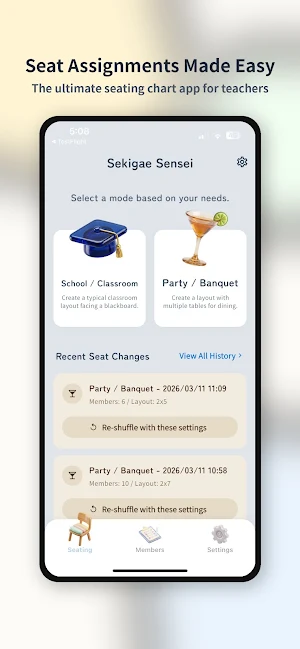


About Seating Chart: Sekigae Sensei
Transform how you organize your classroom!
"Sekigae Sensei" is the ultimate seating chart app developed exclusively for teachers, instructors, seminar hosts, and event organizers. Turn the tedious, time-consuming puzzle of arranging desks into an effortless, highly engaging experience. With advanced rule-settings and a fun animated roulette, your students will actually look forward to seating assignment day!
No more names drawn from a hat, messy paper charts, or complicated spreadsheets. Manage your rosters directly from your smartphone or tablet, design your floor plan with intuitive drag-and-drop tools, and let our smart algorithm sort your students fairly—all while respecting the precise constraints you've set!
■ 5 Reasons to Choose "Sekigae Sensei"
1. [Incredible Time Saver] Ditch the pencil and eraser. Load your class roster, pick a layout, run the roulette, and your seating chart is completely generated in under a minute!
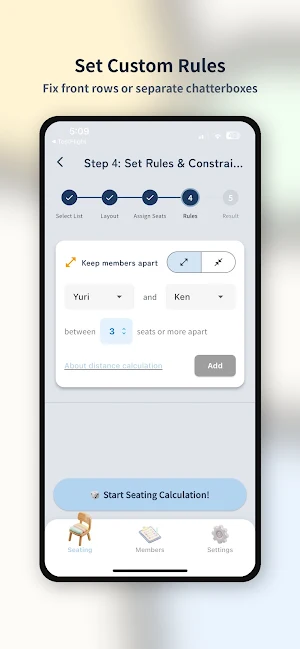
2. [Smarter Rule Management] We understand the realities of classroom management. Need to keep two chatty students apart? Have a student who needs to sit in the front row? Our detailed constraint settings have you covered.
3. [Exciting Roulette Reveal] Don't just assign seats silently. Use the built-in animated interactive roulette to announce seat destinations one by one. Project it onto a smartboard and let the suspense build for a fair and fun classroom environment!
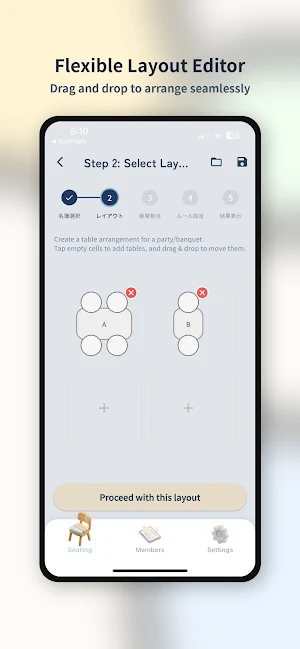
4. [Total Layout Freedom] Whether you teach in a traditional grid, a U-shape, grouping islands, or any unconventional desk arrangement, our flexible drag-and-drop editor map handles it effortlessly.
5. [Private & Secure] Student data never leaves your device uninvited. Generate the chart securely, save it into your history logs, and export a high-quality image directly to your gallery for instant sharing or printing.
■ Core Features
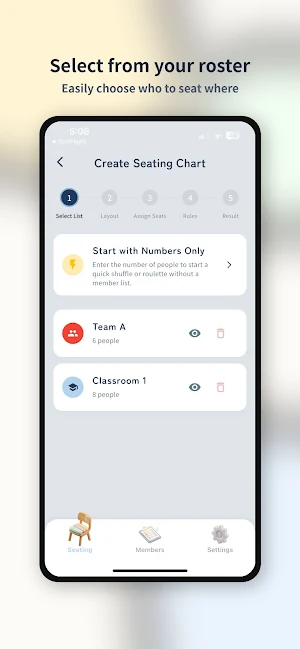
【1】 Comprehensive Roster Management
- Create unlimited combinations of rosters for different classes, grades, or club groups.
- Easily toggle student attendance for the day. If someone is absent, just uncheck them and assign the available seats for those present with one tap.
【2】 Intelligent Visual Layout Editor
- Design physical classroom floor plans that match your real-world environment.
- Intuitively move desks around by swiping. Add spaces for the chalkboard, teacher's podium, or exit doors.
- Save your custom layouts as templates and load them instantly for future classes, easily accommodating different instructional strategies like lecture mode versus group work.
【3】 Deep Seating Constraints & Rules
Teachers need control, and Sekigae Sensei delivers features that no simple randomizer can match.
- "Front Row Lock": Pin specific students to the front rows to accommodate visual or hearing needs seamlessly.
- "Incompatible Pairs (Anti-Grouping)": Prevent behavioral issues by strictly separating certain students so they never end up sitting next to each other.
- "Absolute Lock": Have a student whose seat shouldn't change today? Lock their desk completely while shuffling everyone else around them.
【4】 Interactive Drawing & Presentation Mode
- Bring fairness and entertainment to the classroom! Rather than generating the final layout instantly behind the scenes, present the seating assignments through a fun, animated spinning roulette.
- Perfect for projecting on a screen—build anticipation as students watch to see where they, and their friends, will land!
【5】 Instant Snapshot Sharing & History
- Never lose a seating chart again. The app automatically archives every assigned seating arrangement in the "History" tab, allowing you to quickly look back at who sat where last month.
- Export finished layouts as pristine, high-resolution image files directly to your device. Print them out to stick on your classroom door, or share the image file digitally with substitute teachers and faculty staff.
"Sekigae Sensei" is the ultimate seating chart app developed exclusively for teachers, instructors, seminar hosts, and event organizers. Turn the tedious, time-consuming puzzle of arranging desks into an effortless, highly engaging experience. With advanced rule-settings and a fun animated roulette, your students will actually look forward to seating assignment day!
No more names drawn from a hat, messy paper charts, or complicated spreadsheets. Manage your rosters directly from your smartphone or tablet, design your floor plan with intuitive drag-and-drop tools, and let our smart algorithm sort your students fairly—all while respecting the precise constraints you've set!
■ 5 Reasons to Choose "Sekigae Sensei"
1. [Incredible Time Saver] Ditch the pencil and eraser. Load your class roster, pick a layout, run the roulette, and your seating chart is completely generated in under a minute!
2. [Smarter Rule Management] We understand the realities of classroom management. Need to keep two chatty students apart? Have a student who needs to sit in the front row? Our detailed constraint settings have you covered.
3. [Exciting Roulette Reveal] Don't just assign seats silently. Use the built-in animated interactive roulette to announce seat destinations one by one. Project it onto a smartboard and let the suspense build for a fair and fun classroom environment!
4. [Total Layout Freedom] Whether you teach in a traditional grid, a U-shape, grouping islands, or any unconventional desk arrangement, our flexible drag-and-drop editor map handles it effortlessly.
5. [Private & Secure] Student data never leaves your device uninvited. Generate the chart securely, save it into your history logs, and export a high-quality image directly to your gallery for instant sharing or printing.
■ Core Features
【1】 Comprehensive Roster Management
- Create unlimited combinations of rosters for different classes, grades, or club groups.
- Easily toggle student attendance for the day. If someone is absent, just uncheck them and assign the available seats for those present with one tap.
【2】 Intelligent Visual Layout Editor
- Design physical classroom floor plans that match your real-world environment.
- Intuitively move desks around by swiping. Add spaces for the chalkboard, teacher's podium, or exit doors.
- Save your custom layouts as templates and load them instantly for future classes, easily accommodating different instructional strategies like lecture mode versus group work.
【3】 Deep Seating Constraints & Rules
Teachers need control, and Sekigae Sensei delivers features that no simple randomizer can match.
- "Front Row Lock": Pin specific students to the front rows to accommodate visual or hearing needs seamlessly.
- "Incompatible Pairs (Anti-Grouping)": Prevent behavioral issues by strictly separating certain students so they never end up sitting next to each other.
- "Absolute Lock": Have a student whose seat shouldn't change today? Lock their desk completely while shuffling everyone else around them.
【4】 Interactive Drawing & Presentation Mode
- Bring fairness and entertainment to the classroom! Rather than generating the final layout instantly behind the scenes, present the seating assignments through a fun, animated spinning roulette.
- Perfect for projecting on a screen—build anticipation as students watch to see where they, and their friends, will land!
【5】 Instant Snapshot Sharing & History
- Never lose a seating chart again. The app automatically archives every assigned seating arrangement in the "History" tab, allowing you to quickly look back at who sat where last month.
- Export finished layouts as pristine, high-resolution image files directly to your device. Print them out to stick on your classroom door, or share the image file digitally with substitute teachers and faculty staff.
What’s new
Version 1.3.5 · Updated June 14, 2026
[What's New] - Added "CSV Export" to easily use seating charts in spreadsheets! - Generate a PIN-protected share code directly from the result or history screen to easily transfer data to other devices. - Revamped the sharing menu UI for an intuitive design. - Added "Flip Front/Back" to the history screen for school layouts. - Other minor bug fixes and performance improvements.
Alternatives to Seating Chart: Sekigae Sensei
Looking for apps like Seating Chart: Sekigae Sensei? Here are 6 similar Android apps on Google Play. All of them are free to download.
-
1SecVideo - Daily Memory
-
スマート出席管理&出席簿 - 出欠を簡単集計
-
multicounter / Score Tracker
-
野球スタメン・オーダー作成 少年野球・草野球の打順管理アプリ
-
Learn Japanese myanmapan
-
bahasa jepang BINTANGO JLPT
| App | Rating | Price | Installs | Last updated | Compare |
|---|---|---|---|---|---|
| Seating Chart: Sekigae Sensei | – | Free | 1,000+ | Jun 14, 2026 | |
| 1SecVideo - Daily Memory | – | Free | 10+ | Jun 11, 2026 | Compare |
| スマート出席管理&出席簿 - 出欠を簡単集計 | – | Free | 100+ | May 2, 2026 | Compare |
| multicounter / Score Tracker | – | Free | 10+ | Apr 25, 2026 | Compare |
| 野球スタメン・オーダー作成 少年野球・草野球の打順管理アプリ | – | Free | 500+ | – | Compare |
| Learn Japanese myanmapan | – | Free | 1,000+ | Dec 3, 2022 | Compare |
| bahasa jepang BINTANGO JLPT | – | Free | 10,000+ | Dec 4, 2022 | Compare |