

HanCutE - Photo Collage
Taei Photography Contains ads
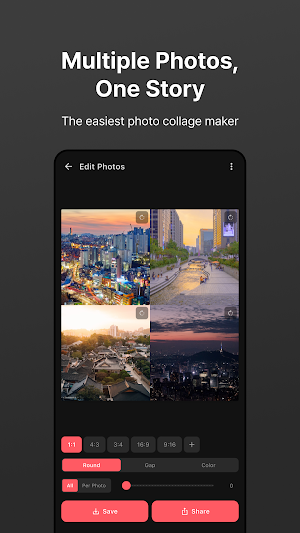
Combine multiple photos into one! Drag-to-crop, various ratios, & high-quality.
- Downloads
- 2.5K+
- on Google Play
- Price
- Free
- No in-app purchases
- Updated
- Sep 27
- 2026 · v1.0.7
Screenshots


About HanCutE - Photo Collage
Combine multiple photos into one clean image with Han-cut-e.
▶ Photo stitching has never been this easy
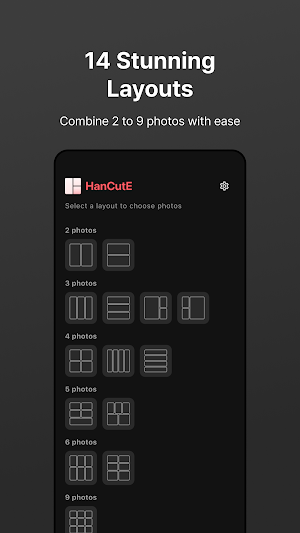
1. Choose a layout (Select from 2 to 9 photos)
2. Pick your photos and see an instant preview
3. Drag to crop and adjust the focus exactly where you want it
4. Save, share, or copy — and you're done!
▶ Key Features
• Diverse Layouts — Vertical, horizontal, and grid arrangements tailored to your photos.
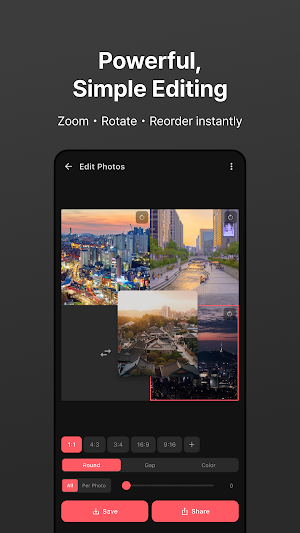
• Intuitive Drag-to-Crop — Simply slide with your finger to show only the best parts.
• Photo Rotation — Rotate images 90 degrees clockwise with a single tap.
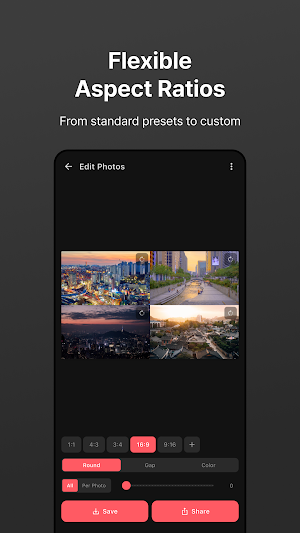
• Aspect Ratio Presets — Supports 1:1 (Square), 4:3, 16:9, and more.
• Custom Ratios — Manually enter your desired ratio for perfect precision.
• Spacing & Colors — Adjust the margins between photos and customize background colors.
• Rounded Corners — Apply sleek, rounded edges to individual photos or the entire frame.
• High-Quality Export — Save your masterpieces in crisp JPEG or PNG formats.
▶ We recommend Han-cut-e for:
• Creating perfect posts for Instagram and blogs.
• Making professional Before & After comparison shots.
• Organizing travel and daily life memories into a single frame.
• Arranging clean product photos for second-hand marketplaces.
• Designing high-quality collages for reviews and testimonials.
▶ Why choose Han-cut-e?
✓ Fast & Intuitive: A streamlined 2-step editing process.
✓ Freedom to Adjust: Effortlessly reposition crops by dragging.
✓ Crystal Clear: High-resolution output for sharp results.
✓ Clean Experience: Minimal ads for a focused workflow.
✓ Multi-language Support: Full support for English and Korean.
Stitch, combine, and collage with ease. Solve all your photo editing needs with Han-cut-e.
▶ Photo stitching has never been this easy
1. Choose a layout (Select from 2 to 9 photos)
2. Pick your photos and see an instant preview
3. Drag to crop and adjust the focus exactly where you want it
4. Save, share, or copy — and you're done!
▶ Key Features
• Diverse Layouts — Vertical, horizontal, and grid arrangements tailored to your photos.
• Intuitive Drag-to-Crop — Simply slide with your finger to show only the best parts.
• Photo Rotation — Rotate images 90 degrees clockwise with a single tap.
• Aspect Ratio Presets — Supports 1:1 (Square), 4:3, 16:9, and more.
• Custom Ratios — Manually enter your desired ratio for perfect precision.
• Spacing & Colors — Adjust the margins between photos and customize background colors.
• Rounded Corners — Apply sleek, rounded edges to individual photos or the entire frame.
• High-Quality Export — Save your masterpieces in crisp JPEG or PNG formats.
▶ We recommend Han-cut-e for:
• Creating perfect posts for Instagram and blogs.
• Making professional Before & After comparison shots.
• Organizing travel and daily life memories into a single frame.
• Arranging clean product photos for second-hand marketplaces.
• Designing high-quality collages for reviews and testimonials.
▶ Why choose Han-cut-e?
✓ Fast & Intuitive: A streamlined 2-step editing process.
✓ Freedom to Adjust: Effortlessly reposition crops by dragging.
✓ Crystal Clear: High-resolution output for sharp results.
✓ Clean Experience: Minimal ads for a focused workflow.
✓ Multi-language Support: Full support for English and Korean.
Stitch, combine, and collage with ease. Solve all your photo editing needs with Han-cut-e.
What’s new
Version 1.0.7 · Updated September 27, 2026
Create a blurred background from one of your photos. Move and resize photos freely with a center alignment guide and haptic feedback. Frame ratio changes stay centered, and saved collages better match the preview. Improved export filenames, photo orientation, and aspect ratios.
Alternatives to HanCutE - Photo Collage
Looking for apps like HanCutE - Photo Collage? Here are 6 similar Android apps on Google Play. The highest rated is Moviq – AI Image Animator (4.3/5), and all 6 are free to download.
-
Offline AI Photo Enhancer: 4x
-
Moviq – AI Image Animator 4.3
-
ProCamera
-
Ready Prompt 3.9
-
Thanksgiving Photo Frames
-
Summer Photo Frames
| App | Rating | Price | Installs | Last updated | Compare |
|---|---|---|---|---|---|
| HanCutE - Photo Collage | – | Free | 1,000+ | Sep 27, 2026 | |
| Offline AI Photo Enhancer: 4x | – | Free | 5,000+ | – | Compare |
| Moviq – AI Image Animator | 4.3 / 5 | Free | 10,000+ | – | Compare |
| ProCamera | – | Free | 5,000+ | Jul 19, 2026 | Compare |
| Ready Prompt | 3.9 / 5 | Free | 10,000+ | Oct 4, 2026 | Compare |
| Thanksgiving Photo Frames | – | Free | 10+ | Jul 3, 2026 | Compare |
| Summer Photo Frames | – | Free | 100+ | May 23, 2026 | Compare |
Similar apps on Google Play
- Offline AI Photo Enhancer: 4x
- Moviq – AI Image Animator
- ProCamera
- Ready Prompt
- Thanksgiving Photo Frames
- Summer Photo Frames
- Picxel - Photo Editor & Filter
- 26 January Photo Editor
- strix!
- Night Camera Mode
- Saree Photo Suit Editor : AI
- AI Collage Maker -Photo Editor
- Occa Cam - camera & editor
- Picta: AI Photo Enhancer
- SmartBody AI Scanner
- GPS Map Camera - GeoFrame
- Nostalgia Camera
- Pose Ideas: Posing Guide
- Muharram Photo Frame 2026
- Microscope 1000x Zoom Camera
- Shotmerce
- Restore Old Photos: ReliveAI
- Kaleidoscope Photo: Mirror
- LogoX - AI Logo Maker
- Glow Studio