
Average Speed Monitor
TechBrew Maps & Navigation In-app purchases
Bulgaria average speed camera alerts — works with Waze & Google Maps
- Downloads
- 1K+
- on Google Play
- Price
- Free
- In-app purchases
- Updated
- Sep 7
- 2026 · v1.22
Screenshots


About Average Speed Monitor
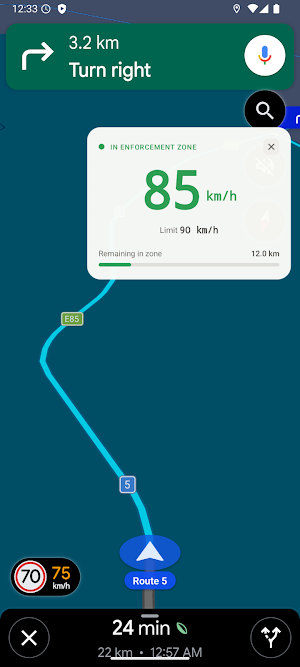
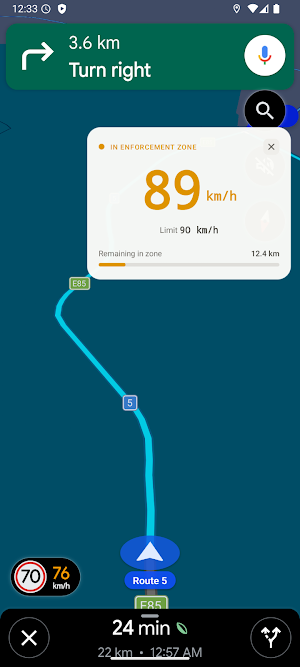
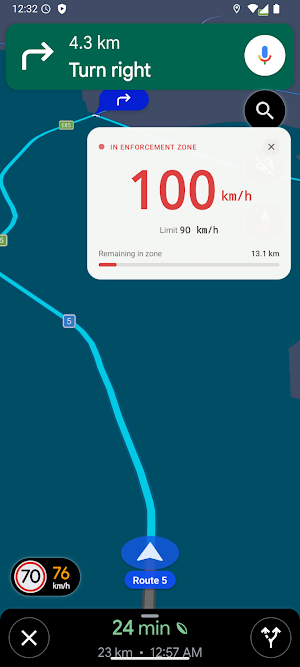
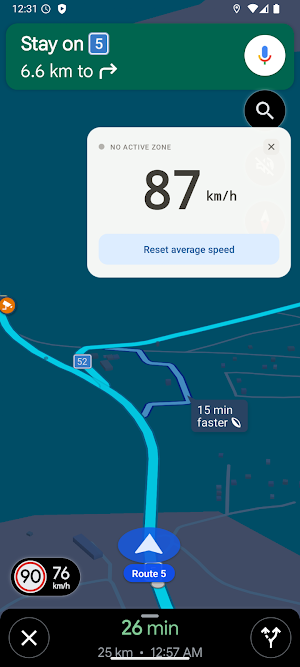
This app monitors your speed in Bulgaria's average-speed camera zones. Whenever you enter such a zone, it calculates your live average speed and shows it in green if you're under the limit, orange if you're close, and red if you've gone over.
The beauty of the app is that it shows you this in an area of the screen and lets you move where you want to place it, so that you can use it with your navigation app you already love — Waze, Google Maps, or anything else. This app doesn't replace it. It floats on top, as a small widget, and shows your average speed while you drive.
WHY AVERAGE SPEED CAMERAS IN BULGARIA ARE DIFFERENT
Speed cameras in average-speed zones don't check your speed at one moment. They check your average speed over the whole zone. A quick burst of speed can put you over the limit even if you slow down right after. This app does the same calculation, live, so you see it before it's a problem.
HOW IT WORKS
1. Open your favorite navigation app like you always do.
2. Start driving.
3. When you enter a monitored zone, a small widget appears on your screen.
4. It shows your live average speed for that zone.
No setup per drive. No switching apps. No changing your habits.
WHAT THE WIDGET SHOWS
- Your average speed, updated live
- The zone's speed limit
- How much distance is left in the zone
- A simple color code: green = safe, amber = getting close, red = over the limit
You can drag it anywhere on your screen, and it stays out of the way of your navigation.
WORKS WITH ANY APP
This is the whole point: no matter what you use to navigate — Waze, Google Maps, Sygic, or anything else — this widget sits on top of it. You don't give anything up.
YOUR PRIVACY
Your location stays on your device. It's never sent anywhere. The app only checks an anonymous ID and your purchase info to confirm your subscription. Full details: avg-speed-monitor.web.app/privacy-policy.html
PERMISSIONS NEEDED
- Location (including background) — to detect zones as you drive
- Display over other apps — to show the widget
The beauty of the app is that it shows you this in an area of the screen and lets you move where you want to place it, so that you can use it with your navigation app you already love — Waze, Google Maps, or anything else. This app doesn't replace it. It floats on top, as a small widget, and shows your average speed while you drive.
WHY AVERAGE SPEED CAMERAS IN BULGARIA ARE DIFFERENT
Speed cameras in average-speed zones don't check your speed at one moment. They check your average speed over the whole zone. A quick burst of speed can put you over the limit even if you slow down right after. This app does the same calculation, live, so you see it before it's a problem.
HOW IT WORKS
1. Open your favorite navigation app like you always do.
2. Start driving.
3. When you enter a monitored zone, a small widget appears on your screen.
4. It shows your live average speed for that zone.
No setup per drive. No switching apps. No changing your habits.
WHAT THE WIDGET SHOWS
- Your average speed, updated live
- The zone's speed limit
- How much distance is left in the zone
- A simple color code: green = safe, amber = getting close, red = over the limit
You can drag it anywhere on your screen, and it stays out of the way of your navigation.
WORKS WITH ANY APP
This is the whole point: no matter what you use to navigate — Waze, Google Maps, Sygic, or anything else — this widget sits on top of it. You don't give anything up.
YOUR PRIVACY
Your location stays on your device. It's never sent anywhere. The app only checks an anonymous ID and your purchase info to confirm your subscription. Full details: avg-speed-monitor.web.app/privacy-policy.html
PERMISSIONS NEEDED
- Location (including background) — to detect zones as you drive
- Display over other apps — to show the widget
What’s new
Version 1.22 · Updated September 7, 2026
Added a newly certified average-speed zone on A-3 (Долна Градешница-Сандански)
Alternatives to Average Speed Monitor
Looking for apps like Average Speed Monitor? Here are 4 similar Android apps on Google Play. The highest rated is Bluebikes (4.7/5), and all 4 are free to download.
-
Bluebikes 4.7
-
Magic Earth Navigation & Maps 1.7
-
Ride with GPS: Bike Navigation 4.6
-
TomTom - Maps & Traffic 4.3
| App | Rating | Price | Installs | Last updated | Compare |
|---|---|---|---|---|---|
| Average Speed Monitor | – | Free | 1,000+ | Sep 7, 2026 | |
| Bluebikes | 4.7 / 5 | Free | 100,000+ | – | Compare |
| Magic Earth Navigation & Maps | 1.7 / 5 | Free | 1,000,000+ | Sep 17, 2026 | Compare |
| Ride with GPS: Bike Navigation | 4.6 / 5 | Free | 1,000,000+ | Oct 19, 2026 | Compare |
| TomTom - Maps & Traffic | 4.3 / 5 | Free | 10,000,000+ | Oct 21, 2026 | Compare |