

Morse-Code-English-Tool
Tatsuo Nakano Productivity In-app purchases Contains ads
Scan, translate, and transmit signals! Learn through fun quizzes
- Downloads
- 2+
- on Google Play
- Price
- Free
- In-app purchases
- Updated
- May 31
- 2026 · v1.0.2
Screenshots


About Morse-Code-English-Tool
\[Overview\]
Welcome to the Signal/Translation App\! From beginners who want to learn the basics of communication to amateur radio operators aiming for certification and outdoor enthusiasts, this app meets all your needs.
We have combined advanced technology, such as text reading via OCR (Optical Character Recognition), with multi-sensory output through light, sound, and vibration, and a learning function that feels like a game. Scan, translate, transmit, and learn signal technology directly from your smartphone screen!
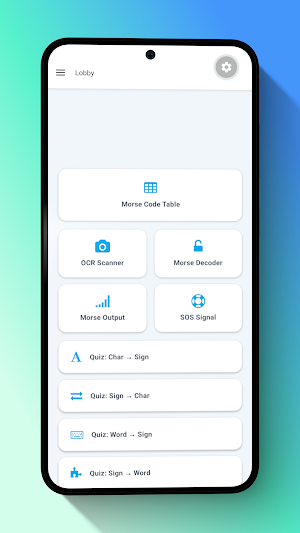
[Main Features]1. Smart OCR Text Scanner
Since you can read it with your camera, there’s no need to go through the trouble of manual input. Using advanced OCR functionality via your device's camera (\*permission required), English text on books, signs, or screens is instantly read and converted directly into signal code.
2. Bidirectional Instant Translation
Seamlessly convert between English text and signal code.Text to Code: Enter English sentences to instantly convert them into dits and dahs (dots and dashes).
Code to Text: Input signals directly through an intuitive interface to instantly decode them into readable English.
Easy Share Function: Once you've created Morse code, share it with friends via SNS or messaging apps with a single tap.3. Signal Output via Light, Sound, and Vibration
Use three different output modes to send messages in any environment.Light (Flashlight): Ideal for visual communication over long distances or in the dark.
Sound (Beep): A classic audio experience, perfect for amateur radio practice.
Vibration: Stealth mode. By feeling the dots and dashes in your hand, completely silent and secret communication is possible.4. SOS Emergency Loop Mode
The app uses both beeps and bright flashing lights to continuously play the international SOS signal in a loop.
5. Gamified Learning & Quiz Features
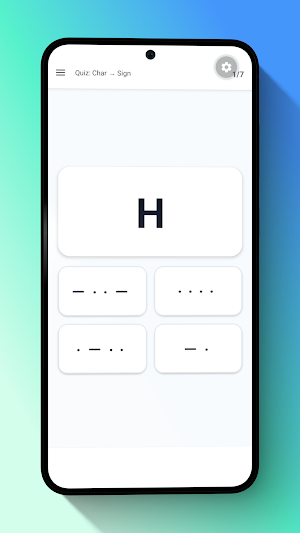
Learning signals has never been more fun\! This app features four different "4-choice quiz modes" for memory retention and instant decoding skills.Mode 1: Character to Signal (e.g., see "A" and choose "・-"). Trains your memory to be able to type it yourself.
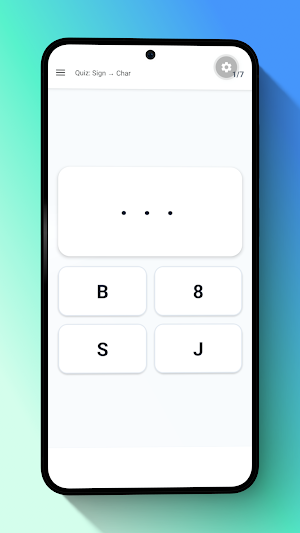
Mode 2: Signal to Character (e.g., see "・-" and choose "A"). Visual training to instantly decode incoming signals.
Mode 3: Word to Signal (e.g., see "SOS" and choose "・・・ --- ・・・"). Advanced practice for more practical typing.
Mode 4: Signal to Word (e.g., see "・・・ --- ・・・" and choose "SOS"). Master receiving actual messages.6. Comprehensive Code Reference Table
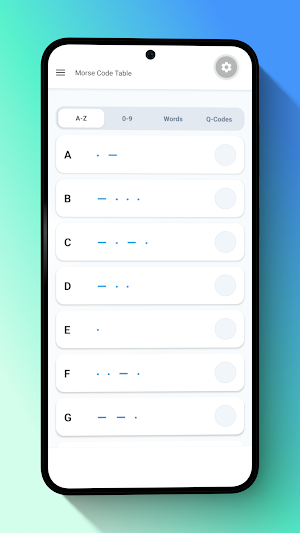
The app includes a built-in, easy-to-read reference table covering:Standard A-Z alphabet
Numbers (0-9)
Symbols
"Q-codes" essential for amateur radio communication
[Recommended for]
Survival/Camping Enthusiasts:
Amateur Radio Operators: The perfect daily practice partner for increasing transmission and reception speeds.
Mystery/Escape Game Fans: Easily decode secret hints or create your own ciphers.
Students/Hobbyist Learners: Anyone who wants to acquire a new and fascinating skill through fun, interactive quizzes.
Welcome to the Signal/Translation App\! From beginners who want to learn the basics of communication to amateur radio operators aiming for certification and outdoor enthusiasts, this app meets all your needs.
We have combined advanced technology, such as text reading via OCR (Optical Character Recognition), with multi-sensory output through light, sound, and vibration, and a learning function that feels like a game. Scan, translate, transmit, and learn signal technology directly from your smartphone screen!
[Main Features]1. Smart OCR Text Scanner
Since you can read it with your camera, there’s no need to go through the trouble of manual input. Using advanced OCR functionality via your device's camera (\*permission required), English text on books, signs, or screens is instantly read and converted directly into signal code.
2. Bidirectional Instant Translation
Seamlessly convert between English text and signal code.Text to Code: Enter English sentences to instantly convert them into dits and dahs (dots and dashes).
Code to Text: Input signals directly through an intuitive interface to instantly decode them into readable English.
Easy Share Function: Once you've created Morse code, share it with friends via SNS or messaging apps with a single tap.3. Signal Output via Light, Sound, and Vibration
Use three different output modes to send messages in any environment.Light (Flashlight): Ideal for visual communication over long distances or in the dark.
Sound (Beep): A classic audio experience, perfect for amateur radio practice.
Vibration: Stealth mode. By feeling the dots and dashes in your hand, completely silent and secret communication is possible.4. SOS Emergency Loop Mode
The app uses both beeps and bright flashing lights to continuously play the international SOS signal in a loop.
5. Gamified Learning & Quiz Features
Learning signals has never been more fun\! This app features four different "4-choice quiz modes" for memory retention and instant decoding skills.Mode 1: Character to Signal (e.g., see "A" and choose "・-"). Trains your memory to be able to type it yourself.
Mode 2: Signal to Character (e.g., see "・-" and choose "A"). Visual training to instantly decode incoming signals.
Mode 3: Word to Signal (e.g., see "SOS" and choose "・・・ --- ・・・"). Advanced practice for more practical typing.
Mode 4: Signal to Word (e.g., see "・・・ --- ・・・" and choose "SOS"). Master receiving actual messages.6. Comprehensive Code Reference Table
The app includes a built-in, easy-to-read reference table covering:Standard A-Z alphabet
Numbers (0-9)
Symbols
"Q-codes" essential for amateur radio communication
[Recommended for]
Survival/Camping Enthusiasts:
Amateur Radio Operators: The perfect daily practice partner for increasing transmission and reception speeds.
Mystery/Escape Game Fans: Easily decode secret hints or create your own ciphers.
Students/Hobbyist Learners: Anyone who wants to acquire a new and fascinating skill through fun, interactive quizzes.
What’s new
Version 1.0.2 · Updated May 31, 2026
Initial Release
Alternatives to Morse-Code-English-Tool
Looking for apps like Morse-Code-English-Tool? Here are 6 similar Android apps on Google Play. All of them are free to download.
-
Habit-Routine-Todo
-
poly-morph-timer
-
Gabor-Patch-Vision-Trainer
-
Wishlist-Quick-Manager
-
Daily-Diary-Planner
-
Book-Lifecycle-Manager
| App | Rating | Price | Installs | Last updated | Compare |
|---|---|---|---|---|---|
| Morse-Code-English-Tool | – | Free | 1+ | May 31, 2026 | |
| Habit-Routine-Todo | – | Free | 5+ | – | Compare |
| poly-morph-timer | – | Free | 10+ | May 9, 2026 | Compare |
| Gabor-Patch-Vision-Trainer | – | Free | 500+ | Apr 27, 2026 | Compare |
| Wishlist-Quick-Manager | – | Free | 10+ | Mar 29, 2026 | Compare |
| Daily-Diary-Planner | – | Free | 10+ | Mar 8, 2026 | Compare |
| Book-Lifecycle-Manager | – | Free | 5+ | – | Compare |