

TI-84 Plus CE Calculator Guide
Graphing Calculator Apps Education
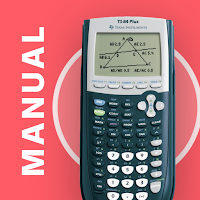
Master your TI-84 Plus CE Graphing Calculator with key presses & screenshots
- Downloads
- 6+
- on Google Play
- Price
- $7.99
- No in-app purchases
- Updated
- Aug 21
- 2026 · v2.0.0
Screenshots


About TI-84 Plus CE Calculator Guide
• This manual shows all the important functions of the TI-84 Plus CE graphing calculator you need to know for high school or college. It comes with step-by-step key press sequences and some insider tips about your calculator. In total it covers 65 topics that will transform you into a TI-84 master.
• The following chapters are available: First Steps, Graphing Basics, Differential Calculus, Solve Equations, Integral Calculus, Matrices, Statistics & Probability and The Apps Menu.
• You can swipe through screenshots of the original graphing calculator that show every step you need to take (over 300 screenshots in total), watch animated key press sequences, or open video tutorials to see how it works on the TI-84 Plus CE!
• 60 math problems with solutions and a quiz to practice your skills!
• Ideal for exam preparation since you often won't remember all the calculator's commands after several months. It covers all you need to know for the SAT, ACT, and AP exams.
• The app contains the following topics:
FIRST STEPS
• The Basics of the Basics
• Mode Settings
• Basic Arithmetic
• Storing Variables
• Working with Fractions
• Testing Numbers
• Converting Angles & DMS
• Your Calculator on the SAT, ACT & AP Exams
• Common Error Messages
• Complex Numbers
GRAPHING BASICS
• Enter Functions
• Enter Families of Functions
• Formatting the Graph
• Setting the Graph Window
• Zooming the Graph Window
• Using the Table
• Parametric, Polar & Sequence Graphing
DIFFERENTIAL CALCULUS
• Tracing a Graph
• Find Y-Value
• Find X-Value
• Y-Intercept
• Zeros of a Function
• Minimum
• Maximum
• Intersection of two Functions
• Draw Derivative
• Inflection Points
• Calculate Tangent
SOLVE EQUATIONS
• Polynomial
• Solve any Equation
• Equation Solver
INTEGRAL CALCULUS
• Calculate Integral
• Integral in GRAPH Menu
• Find Area with Absolute Value
• Area between two Functions
• Integral Function
MATRICES
• Save Matrix
• Delete Matrix
• Put into Row-Echelon Form
• Solve Matrix
• Transpose of a Matrix
• Identity Matrix
• Inversion of a Matrix
• Determinant of a Matrix
• Matrix Arithmetic Operations
STATISTICS & PROBABILITY
• Permutations, Combinations & Factorials
• Random Numbers
• Lists & Statistical Data
• Histogram, Box Plot & Scatter Plot
• Statistical Data Analysis
• Regression
• Probability Distributions
• TESTS Menu: Hypothesis Tests & Confidence Intervals
THE APPS MENU
• Finance (TVM Solver)
• CabriJr (Interactive Geometry)
• Conics (Conic Graphing)
• Inequalz (Inequality Graphing)
• Periodic (Periodic Table)
• PlySmlt2 (Root Finder & Simultaneous Equation Solver)
• Prob Sim (Probability Simulation)
• Python (CE Python Models)
• SciTools (Science Tools)
• Transfrm (Transformation Graphing)
• The Rest of the Menu
• Sharing Files: the LINK Menu
MATH PROBLEMS & QUIZ
• Practice with 60 math problems with solutions and test yourself with the built-in quiz.
We also have manual apps for the TI-84 Plus, TI-Nspire CX (and CAS), and CASIO fx-9860GII. And if you are looking for the calculator itself, check out our graphing calculator app Taculator 84.
NO ACTUAL GRAPHING CALCULATOR INCLUDED. THE APP IS A MANUAL!
TI-84 Plus and TI-84 Plus CE are trademarks of Texas Instruments Incorporated. This app is an independently developed manual and is not affiliated with, sponsored by, or endorsed by Texas Instruments.
What’s new
Version 2.0.0 · Updated August 21, 2026
Your TI-84 Plus CE graphing calculator manual, completely rebuilt from the ground up: • All-new content based on the 2027 edition of our printed guidebook — now 65 topics in 8 sections • Fresh, modern design with dark mode • Step-by-step key press animations you can play, pause and replay • Video tutorials right inside the chapters • Course filter: see only the chapters for Algebra, Pre-Calc, Calculus, Statistics or ACT/SAT • Track your reading progress and bookmark chapters
Alternatives to TI-84 Plus CE Calculator Guide
Looking for apps like TI-84 Plus CE Calculator Guide? Here are 3 similar Android apps on Google Play. The highest rated is Taculator 84 Graphing Calc (3.7/5), and 2 of the 3 are free to download.


| App | Rating | Price | Installs | Last updated | Compare |
|---|---|---|---|---|---|
| TI-84 Plus CE Calculator Guide | – | $7.99 | 5+ | Aug 21, 2026 | |
| TI84 Plus Graphing Calc Manual | – | 7.99 USD | 5+ | Aug 24, 2026 | Compare |
| Geometry Solver Pro | 2.0 / 5 | Free | 5,000+ | Aug 29, 2021 | Compare |
| Taculator 84 Graphing Calc | 3.7 / 5 | Free | 50,000+ | Oct 15, 2026 | Compare |