
MediaForge: Video & Audio Tool
chandusurisetty Tools
Fast offline video to MP3, audio converter, MP3 cutter, compressor, & tools.
- Downloads
- 159+
- on Google Play
- Price
- Free
- No in-app purchases
- Updated
- Jul 17
- 2026 · v0.2.0
Screenshots


About MediaForge: Video & Audio Tool
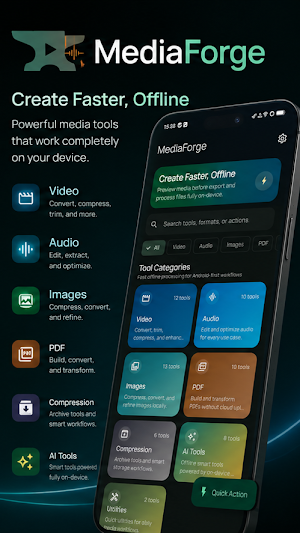
MediaForge is a fast, 100% offline video to MP3 converter, audio editor, and media utility app for Android. Convert formats, compress files, trim tracks, merge clips, and manage documents instantly on your device—with total privacy and zero cloud uploads.
Whether you need a quick MP3 cutter, a reliable audio joiner, a video compressor, or a fast MP4 to MP3 extractor, MediaForge gives you clean, powerful media tools in one light app.
🎬 VIDEO TOOLS
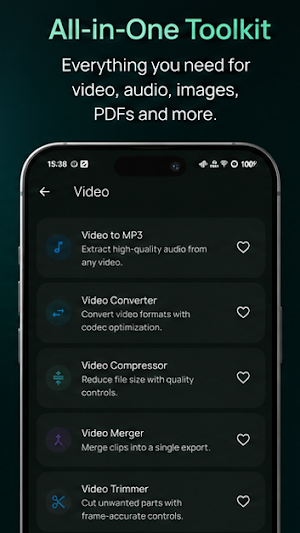
• Video to MP3 Converter: Extract high-quality audio from video files. Fast conversion from MP4, MOV, or MKV to MP3, WAV, AAC, and M4A.
• Video Editor Utilities: Trim video, crop, rotate, change playback speed, mute tracks, merge clips, add audio backings, convert video to GIF, and extract frames.
• Video Compressor: Reduce video file size without sacrificing noticeable visual quality.
🎵 AUDIO & MUSIC TOOLS
• Audio Format Converter: Convert seamlessly between MP3, WAV, AAC, FLAC, OGG, and M4A with custom bitrates.
• MP3 Cutter & Ringtone Maker: Trim audio clips precisely, set start/end points, adjust fade-in/fade-out, and create custom alarm tones.
• Audio Joiner & Track Merger: Combine multiple audio files or recordings into one continuous track.
• Audio Compressor: Shrink audio file size easily for sharing via email or messaging platforms.
🖼️ IMAGE, PDF & FILE UTILITIES
• Image Converter & Compressor: Compress photo size, resize images, convert PNG/JPG/WEBP, apply blur, add watermarks, and clear EXIF data.
• PDF Tools: Convert images to PDF, merge or split PDF documents, and extract text with offline OCR.
• File Management: Create and extract ZIP archives locally on your device.
🔒 PRIVACY-FIRST & 100% OFFLINE
All conversions, trimming, and compression happen entirely on your phone. MediaForge requires no account login, collects no personal file data, and never uploads your media to external servers.
Download MediaForge today for fast, private, and complete offline video, audio, and file management!
Whether you need a quick MP3 cutter, a reliable audio joiner, a video compressor, or a fast MP4 to MP3 extractor, MediaForge gives you clean, powerful media tools in one light app.
🎬 VIDEO TOOLS
• Video to MP3 Converter: Extract high-quality audio from video files. Fast conversion from MP4, MOV, or MKV to MP3, WAV, AAC, and M4A.
• Video Editor Utilities: Trim video, crop, rotate, change playback speed, mute tracks, merge clips, add audio backings, convert video to GIF, and extract frames.
• Video Compressor: Reduce video file size without sacrificing noticeable visual quality.
🎵 AUDIO & MUSIC TOOLS
• Audio Format Converter: Convert seamlessly between MP3, WAV, AAC, FLAC, OGG, and M4A with custom bitrates.
• MP3 Cutter & Ringtone Maker: Trim audio clips precisely, set start/end points, adjust fade-in/fade-out, and create custom alarm tones.
• Audio Joiner & Track Merger: Combine multiple audio files or recordings into one continuous track.
• Audio Compressor: Shrink audio file size easily for sharing via email or messaging platforms.
🖼️ IMAGE, PDF & FILE UTILITIES
• Image Converter & Compressor: Compress photo size, resize images, convert PNG/JPG/WEBP, apply blur, add watermarks, and clear EXIF data.
• PDF Tools: Convert images to PDF, merge or split PDF documents, and extract text with offline OCR.
• File Management: Create and extract ZIP archives locally on your device.
🔒 PRIVACY-FIRST & 100% OFFLINE
All conversions, trimming, and compression happen entirely on your phone. MediaForge requires no account login, collects no personal file data, and never uploads your media to external servers.
Download MediaForge today for fast, private, and complete offline video, audio, and file management!
What’s new
Version 0.2.0 · Updated July 17, 2026
Fixed App Launch Crashes: The app now starts up reliably without crashing or throwing errors on launch. Fixed App Freezes: Removed startup delays so the app opens instantly instead of freezing (ANR). Fixed File Sharing: You can now successfully share your converted or edited files using the Share button without permissions issues. Release Build Success: The app is compiled and ready to upload to the Google Play Store.
Alternatives to MediaForge: Video & Audio Tool
Looking for apps like MediaForge: Video & Audio Tool? Here are 6 similar Android apps on Google Play. All of them are free to download.
-
Netlyzer
-
Flash Bridge
-
NanoBot
-
Pocket AI (Offline AI)
-
PocketHost: Local Web Server
-
OmniControl PC Remote
| App | Rating | Price | Installs | Last updated | Compare |
|---|---|---|---|---|---|
| MediaForge: Video & Audio Tool | – | Free | 100+ | Jul 17, 2026 | |
| Netlyzer | – | Free | 10+ | Sep 9, 2026 | Compare |
| Flash Bridge | – | Free | 50+ | – | Compare |
| NanoBot | – | Free | 50+ | Jun 18, 2026 | Compare |
| Pocket AI (Offline AI) | – | Free | 1,000+ | Aug 21, 2026 | Compare |
| PocketHost: Local Web Server | – | Free | 1,000+ | Oct 20, 2026 | Compare |
| OmniControl PC Remote | – | Free | 100+ | Aug 21, 2026 | Compare |