
QR Code Scanner & Read Barcode
Syntaxa Smart Studio Productivity In-app purchases Contains ads
Scan QR code and barcode, check product details, and generate QR codes instantly
- Downloads
- 10.8K+
- on Google Play
- Price
- Free
- In-app purchases
- Updated
- Jul 22
- 2026 · v1.0.0
Screenshots
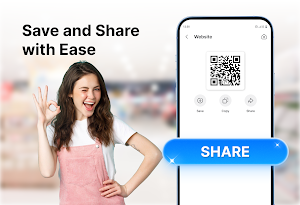
About QR Code Scanner & Read Barcode
Scan QR codes and barcodes quickly with this app. While shopping, use the barcode reader to identify products and view available information. Download this app to create QR codes for websites, text, contacts, phone numbers, email addresses, Wi-Fi details, and more.
🌀 KEY FEATURES
✔ Fast QR code scanning
✔ Product barcode reader
✔ Access available product details
✔ Create QR codes easily
✔ Revisit previous scans in history
✔ Share results through supported apps
🔹 SCAN QR CODES
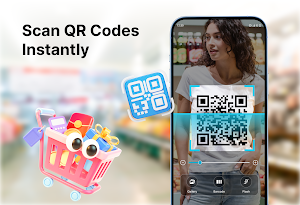
Use your camera to scan a QR code and let the app detect it automatically. You can quickly open websites, read text, or view other supported content.
🔹 BARCODE READER
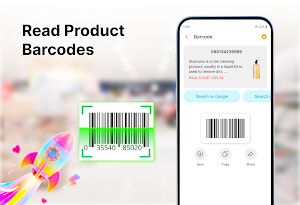
Use the barcode scanner while shopping to recognize codes on products, books, packages, and everyday items. When information is available, the app displays useful product details so you can review them before making a decision.
🔹 CREATE YOUR QR CODES
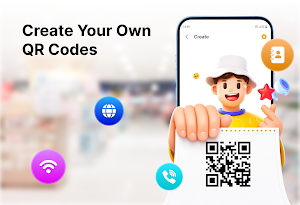
You can generate QR codes for:
• Website links
• Text
• Contact information
• Email addresses
• Phone numbers
• SMS messages
• Wi-Fi networks
• Locations
🧿 SCAN FROM PHOTOS
Choose an image from your gallery when the QR code or barcode is already saved on your phone. The app can read supported codes from photos without requiring you to scan them again with the camera.
🧿 SCAN HISTORY
Previous results are stored in one place, allowing you to return to useful links, product codes, contact details, or other scanned information whenever needed.
🧿 SAVE AND SHARE RESULTS
Copy scanned content, open supported links, or share results through messaging, email, social media, and other compatible apps. Generated QR codes can also be saved for future use.
❓Who uses this app regularly?
• Shoppers: Scan product barcodes and view available item details while shopping.
• Students: Open links, save useful information, and share study content through QR codes.
• Office Workers: Access websites, Wi-Fi details, and work information quickly.
• Business Owners: Create QR codes for menus, promotions, websites, and contact details.
• Other Users: Scan, create QR codes for daily tasks.
✅ Enjoy QR Code Scanner & Read Barcode to keep useful scanning and QR creation tools close at hand. Download the app today and manage codes more conveniently in daily life. Thank you for using our app!
🌀 KEY FEATURES
✔ Fast QR code scanning
✔ Product barcode reader
✔ Access available product details
✔ Create QR codes easily
✔ Revisit previous scans in history
✔ Share results through supported apps
🔹 SCAN QR CODES
Use your camera to scan a QR code and let the app detect it automatically. You can quickly open websites, read text, or view other supported content.
🔹 BARCODE READER
Use the barcode scanner while shopping to recognize codes on products, books, packages, and everyday items. When information is available, the app displays useful product details so you can review them before making a decision.
🔹 CREATE YOUR QR CODES
You can generate QR codes for:
• Website links
• Text
• Contact information
• Email addresses
• Phone numbers
• SMS messages
• Wi-Fi networks
• Locations
🧿 SCAN FROM PHOTOS
Choose an image from your gallery when the QR code or barcode is already saved on your phone. The app can read supported codes from photos without requiring you to scan them again with the camera.
🧿 SCAN HISTORY
Previous results are stored in one place, allowing you to return to useful links, product codes, contact details, or other scanned information whenever needed.
🧿 SAVE AND SHARE RESULTS
Copy scanned content, open supported links, or share results through messaging, email, social media, and other compatible apps. Generated QR codes can also be saved for future use.
❓Who uses this app regularly?
• Shoppers: Scan product barcodes and view available item details while shopping.
• Students: Open links, save useful information, and share study content through QR codes.
• Office Workers: Access websites, Wi-Fi details, and work information quickly.
• Business Owners: Create QR codes for menus, promotions, websites, and contact details.
• Other Users: Scan, create QR codes for daily tasks.
✅ Enjoy QR Code Scanner & Read Barcode to keep useful scanning and QR creation tools close at hand. Download the app today and manage codes more conveniently in daily life. Thank you for using our app!
Alternatives to QR Code Scanner & Read Barcode
Looking for apps like QR Code Scanner & Read Barcode? Here are 3 similar Android apps on Google Play. The highest rated is PDF Reader - Edit PDF File (3.7/5), and all 3 are free to download.

| App | Rating | Price | Installs | Last updated | Compare |
|---|---|---|---|---|---|
| QR Code Scanner & Read Barcode | – | Free | 10,000+ | Jul 22, 2026 | |
| PDF Reader - Edit PDF File | 3.7 / 5 | Free | 500,000+ | – | Compare |
| Document Reader - All Scan PDF | – | Free | 50,000+ | Oct 28, 2026 | Compare |
| ChefMate: AI Recipe Assistant | – | Free | 100+ | Apr 6, 2026 | Compare |