

Text On Photo
SyedApps Art & Design Contains ads
Easily Create, Write Text Arts In Photos With Our Text Art Photo Editor App.
- Downloads
- 10+
- on Google Play
- Price
- Free
- No in-app purchases
- Updated
- Mar 29
- 2024 · v1.0
Screenshots
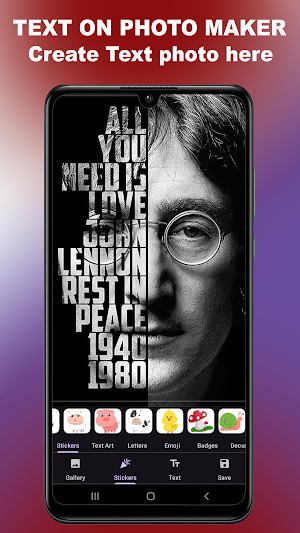
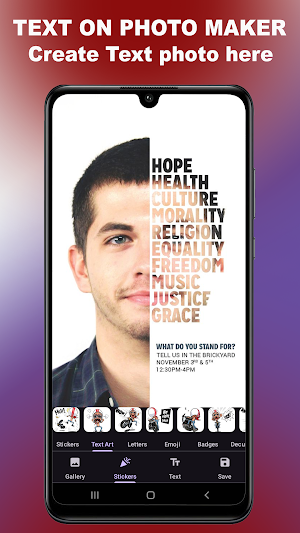
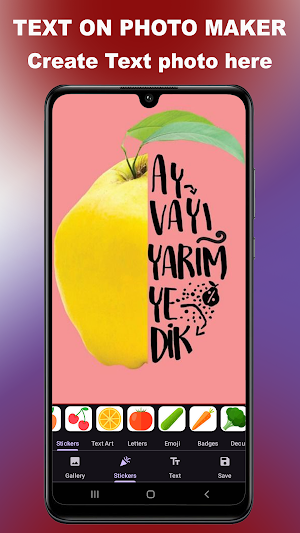
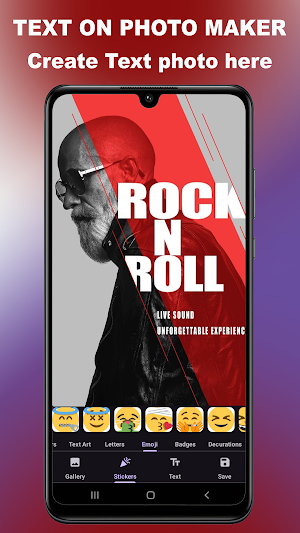


About Text On Photo
Text Art Editor is a easy app to create text art design and photo editing with fonts. Easily add captions and text on image and photos. Create awesome cool creations in just minutes. Just Add Text on Photo & Its Ready.
Key Features :-
1000+ Fonts & Textures
500+ backgrounds & Templates
3D Text & Name Art Editing Tools
Easy And SimpleTo Use
Add Image With Text & Words
Put Texts In Photo Or Image
Make Motivational Quotes
Daily Suvichar Writings
Image And Photo Merging
Write Text In Any Photo Poster
Make Beautiful Poster
Create Name Art Maker
Share Your Creations In Social Media
Text Art - Text On Photo Editor 2023 is used to create cool fancy text styles and text art along with any photos and images. Just add image, photos and put your text to express your art emotions.
All-in-one editor for text creation with 1000+ fonts
Hello & Welcome!
Add Text app is the all-in-one tool for text creation. Texts can be added to a photo, gradient, solid color or a transparent background.
HIGHLIGHTS
• 1000+ fonts, + ability to add unlimited number of your custom fonts (including emoji fonts)
• Add layers: texts, photos, shapes, stickers and saved text styles
• Design parts of the text separately: supported in Font, Format, Color, Stroke, Highlight tools
• 3D text tools: 3D Rotate, 3D Depth, Perspective
• Change text size, wrapping and scale to get any type of text layout
• Layers view: reorder layers (overlays), change visibility, lock/unlock for each layer
• Tools for background: Effects, Crop, Resize, Flip/Rotate, Square Fit
• Save your text creation in Style tool to reuse later for watermarks, signatures, branding etc
• Save project to edit & reuse later, create templates
• Save image as JPEG, PNG or WebP file
• Dark mode to reduce eye strain and save battery life
FEATURES
• Add multiple texts (and overlays) on photo, edit each one without losing final preview
• Move, scale, rotate, edit, copy, delete (for overlays) and wrap the text by text-box handles
• Font and Format tools: change font, alignment, text size, with bold, italic, underlined & strikethrough options
• Change text color & opacity: can be applied on each word/letter separately
• Add Stroke (Outline) to text with colors and stroke width
• Highlight the whole text or separate parts with different colors & opacity
• Letter & Line spacing
• Positioning grid with snapping option, flip overlay horizontally and/or vertically
• Bend the text: text along a curve
• Shadow with colors, opacity, blur and positioning
• Predefined Gradients: edit start/end colors and gradient angle
• Texture by adding any photo and make any type of transformation with it
• Opacity and Blend with background
• Erase tool: Clear parts of text with brush to achieve Text Behind effect (see screenshot)
• Color tools have eyedropper, color picker and predefined colors
• Add Stickers/Emojis, hundreds of them arranged in 8 categories
• Add any photo from your phone as an overlay
• Add 100+ shapes: with both filled and outlined versions
• Tools for other overlays: Opacity, Position, Perspective, Crop, Shape color, stroke & width
• Change the background without starting your work from scratch
• Pan mode: move canvas with one finger & pinch to zoom without worrying to accidentally touch overlays
• Pin mode: pins the background so that you won't accidentally change its position
• Fit: bring canvas to its original position (fit to screen)
• Undo & Redo history
• Fast sharing: showing recent apps you shared your work to
• All these and more in a small sized APK
If you come across any problem or have a suggestion please contact us
Spread the word to make this free tool available for everyone. Inspire us for the next releases. And rate us in Play Store.
So go ahead and create a meme, quote, Instagram story, Youtube thumbnail, banner, cover photo with captions, word art, poster, flyer, invitation, logo etc.
Key Features :-
1000+ Fonts & Textures
500+ backgrounds & Templates
3D Text & Name Art Editing Tools
Easy And SimpleTo Use
Add Image With Text & Words
Put Texts In Photo Or Image
Make Motivational Quotes
Daily Suvichar Writings
Image And Photo Merging
Write Text In Any Photo Poster
Make Beautiful Poster
Create Name Art Maker
Share Your Creations In Social Media
Text Art - Text On Photo Editor 2023 is used to create cool fancy text styles and text art along with any photos and images. Just add image, photos and put your text to express your art emotions.
All-in-one editor for text creation with 1000+ fonts
Hello & Welcome!
Add Text app is the all-in-one tool for text creation. Texts can be added to a photo, gradient, solid color or a transparent background.
HIGHLIGHTS
• 1000+ fonts, + ability to add unlimited number of your custom fonts (including emoji fonts)
• Add layers: texts, photos, shapes, stickers and saved text styles
• Design parts of the text separately: supported in Font, Format, Color, Stroke, Highlight tools
• 3D text tools: 3D Rotate, 3D Depth, Perspective
• Change text size, wrapping and scale to get any type of text layout
• Layers view: reorder layers (overlays), change visibility, lock/unlock for each layer
• Tools for background: Effects, Crop, Resize, Flip/Rotate, Square Fit
• Save your text creation in Style tool to reuse later for watermarks, signatures, branding etc
• Save project to edit & reuse later, create templates
• Save image as JPEG, PNG or WebP file
• Dark mode to reduce eye strain and save battery life
FEATURES
• Add multiple texts (and overlays) on photo, edit each one without losing final preview
• Move, scale, rotate, edit, copy, delete (for overlays) and wrap the text by text-box handles
• Font and Format tools: change font, alignment, text size, with bold, italic, underlined & strikethrough options
• Change text color & opacity: can be applied on each word/letter separately
• Add Stroke (Outline) to text with colors and stroke width
• Highlight the whole text or separate parts with different colors & opacity
• Letter & Line spacing
• Positioning grid with snapping option, flip overlay horizontally and/or vertically
• Bend the text: text along a curve
• Shadow with colors, opacity, blur and positioning
• Predefined Gradients: edit start/end colors and gradient angle
• Texture by adding any photo and make any type of transformation with it
• Opacity and Blend with background
• Erase tool: Clear parts of text with brush to achieve Text Behind effect (see screenshot)
• Color tools have eyedropper, color picker and predefined colors
• Add Stickers/Emojis, hundreds of them arranged in 8 categories
• Add any photo from your phone as an overlay
• Add 100+ shapes: with both filled and outlined versions
• Tools for other overlays: Opacity, Position, Perspective, Crop, Shape color, stroke & width
• Change the background without starting your work from scratch
• Pan mode: move canvas with one finger & pinch to zoom without worrying to accidentally touch overlays
• Pin mode: pins the background so that you won't accidentally change its position
• Fit: bring canvas to its original position (fit to screen)
• Undo & Redo history
• Fast sharing: showing recent apps you shared your work to
• All these and more in a small sized APK
If you come across any problem or have a suggestion please contact us
Spread the word to make this free tool available for everyone. Inspire us for the next releases. And rate us in Play Store.
So go ahead and create a meme, quote, Instagram story, Youtube thumbnail, banner, cover photo with captions, word art, poster, flyer, invitation, logo etc.
User reviews
Nice text on photo 2024 Hd app
Hd text on photo app 2024 Simple text on photo maker Unique text art maker 2024

Unique text on photo app I like it honestly

Best Text on photo editor Unique Poetry text on Photo Heavy Writings on Photo 2024 Top Text On photo Maker 2024
Alternatives to Text On Photo
Looking for apps like Text On Photo? Here are 6 similar Android apps on Google Play. The highest rated is Esports Gaming Logo Maker (5.0/5), and all 6 are free to download.
-
Highlights Cover Maker For IG 4.9
-
Esports Gaming Logo Maker 5.0
-
Logo Maker & Logo Creator 4.6
-
Birthday Invitation Card Maker
-
Baby Shower Invitation Card
-
3d Logo Maker 5.0
| App | Rating | Price | Installs | Last updated | Compare |
|---|---|---|---|---|---|
| Text On Photo | – | Free | 10+ | Mar 29, 2024 | |
| Highlights Cover Maker For IG | 4.9 / 5 | Free | 500+ | Apr 3, 2024 | Compare |
| Esports Gaming Logo Maker | 5.0 / 5 | Free | 50+ | Apr 3, 2024 | Compare |
| Logo Maker & Logo Creator | 4.6 / 5 | Free | 100+ | Apr 4, 2024 | Compare |
| Birthday Invitation Card Maker | – | Free | 1+ | Apr 24, 2024 | Compare |
| Baby Shower Invitation Card | – | Free | 10+ | Apr 21, 2024 | Compare |
| 3d Logo Maker | 5.0 / 5 | Free | 50+ | Apr 1, 2024 | Compare |
Compare Text On Photo with the top alternatives: ratings, updates, ASO score and keyword gaps →
Similar apps on Google Play
- Highlights Cover Maker For IG
- Esports Gaming Logo Maker
- Logo Maker & Logo Creator
- Birthday Invitation Card Maker
- Baby Shower Invitation Card
- 3d Logo Maker
- Cartoon Maker
- Calligraphy Name art Maker
- Luxury Logo Maker, Logo Design
- Royal Logo Maker & Logo Design
- Business Logo Maker & Designer
- FF Logo Maker Gaming Esports
- 3D Logo Maker
- FF Logo Maker - Gaming Logo