

Volume Master
Tools
Swipe to adjust volume with a stylish, customizable floating button.
- Downloads
- 4.2K+
- on Google Play
- Price
- Free
- No in-app purchases
- Updated
- Jan 6
- 2026 · v5.0
Screenshots
About Volume Master
Volume Master offers a smart and modern way to manage your device’s audio levels without relying on physical buttons. Designed for convenience and accessibility, this app allows you to control volume through intuitive swipe gestures on a floating handle that stays accessible over any app.
Ideal for users with broken volume buttons, those using large devices with one hand, or anyone looking for a more seamless and stylish way to manage sound.
Key Features:
Swipe to Control: Effortlessly adjust volume levels by sliding your finger up or down on the floating handle.
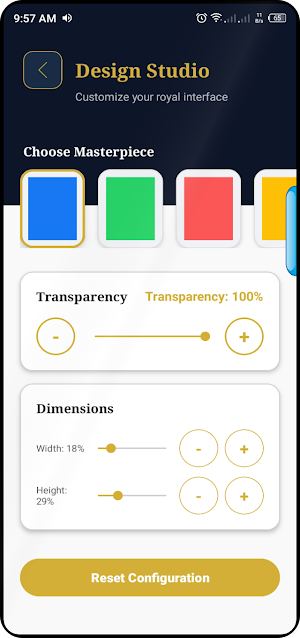
Fully Customizable Styles: Choose from premium colors like Blue, Green, Red, and Yellow to match your device’s theme.
Adjustable Dimensions: Fully customize the width and height of the touch handle to fit your screen perfectly.
Transparency Control: Adjust the handle’s visibility so it remains accessible without obstructing your content.
Flexible Positioning: Simply long-press and drag the handle to any position on the screen edge for easy access.
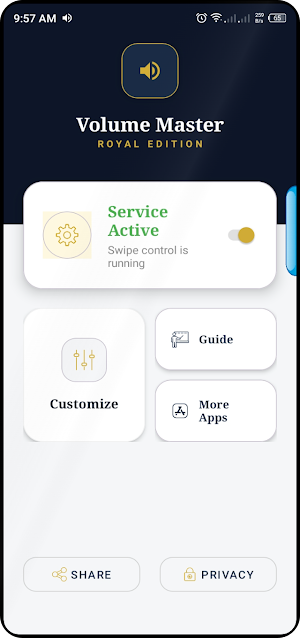
User-Friendly Dashboard: A clean and elegant interface to manage your settings and enable the service instantly.
How to Use:
Open Volume Master and enable the service from the main dashboard.
A stylish floating handle will appear on the edge of your screen.
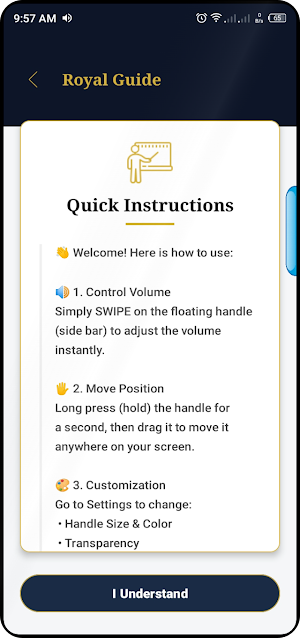
Swipe up or down on the handle to increase or decrease volume.
Long-press and drag to move the handle to your preferred location.
Visit the Customize section to change the color, size, and transparency.
IMPORTANT DISCLOSURE (Required by Google Policy): Permission Declaration: Volume Master requires the "Display over other apps" (SYSTEM_ALERT_WINDOW) permission to function. This permission allows the app to display the floating volume control handle on top of other applications, enabling you to adjust volume without leaving your current task.
Privacy Commitment: We value your privacy. Volume Master does not collect, store, or share any personal data, device information, or user interactions. The overlay is used solely for providing the volume control interface.
Ideal for users with broken volume buttons, those using large devices with one hand, or anyone looking for a more seamless and stylish way to manage sound.
Key Features:
Swipe to Control: Effortlessly adjust volume levels by sliding your finger up or down on the floating handle.
Fully Customizable Styles: Choose from premium colors like Blue, Green, Red, and Yellow to match your device’s theme.
Adjustable Dimensions: Fully customize the width and height of the touch handle to fit your screen perfectly.
Transparency Control: Adjust the handle’s visibility so it remains accessible without obstructing your content.
Flexible Positioning: Simply long-press and drag the handle to any position on the screen edge for easy access.
User-Friendly Dashboard: A clean and elegant interface to manage your settings and enable the service instantly.
How to Use:
Open Volume Master and enable the service from the main dashboard.
A stylish floating handle will appear on the edge of your screen.
Swipe up or down on the handle to increase or decrease volume.
Long-press and drag to move the handle to your preferred location.
Visit the Customize section to change the color, size, and transparency.
IMPORTANT DISCLOSURE (Required by Google Policy): Permission Declaration: Volume Master requires the "Display over other apps" (SYSTEM_ALERT_WINDOW) permission to function. This permission allows the app to display the floating volume control handle on top of other applications, enabling you to adjust volume without leaving your current task.
Privacy Commitment: We value your privacy. Volume Master does not collect, store, or share any personal data, device information, or user interactions. The overlay is used solely for providing the volume control interface.
What’s new
Version 5.0 · Updated January 6, 2026
Release Production
Alternatives to Volume Master
Looking for apps like Volume Master? Here are 3 similar Android apps on Google Play. The highest rated is Chargeway (4.2/5), and all 3 are free to download.



| App | Rating | Price | Installs | Last updated | Compare |
|---|---|---|---|---|---|
| Volume Master | – | Free | 1,000+ | Jan 6, 2026 | |
| Battery Transfer / Receiver | 3.7 / 5 | Free | 1,000,000+ | Dec 31, 2021 | Compare |
| Chargeway | 4.2 / 5 | Free | 10,000+ | Sep 24, 2026 | Compare |
| EcoNet | 4.1 / 5 | Free | 100,000+ | Aug 13, 2026 | Compare |
Compare Volume Master with the top alternatives: ratings, updates, ASO score and keyword gaps →