
GPS Photo With Location
Swift Utilities Hub Tools In-app purchases Contains ads
Geo-tag photos and videos, view them on a map, and organize media by location.
- Rating
- 3.6
- 6K ratings
- Downloads
- 4.9M+
- on Google Play
- Price
- Free
- In-app purchases
- Updated
- Sep 15
- 2026 · v1.4.8
Screenshots


About GPS Photo With Location
This app helps you capture, view, and organize photos and videos that include device-based location and timestamp data. It’s designed for travel, field work, and anyone who needs location-based media organization.
🌟 Key Features
👉 Automatic GPS Tagging
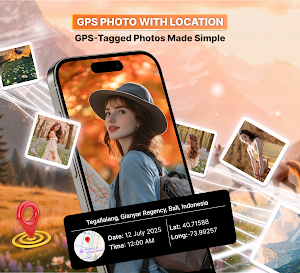
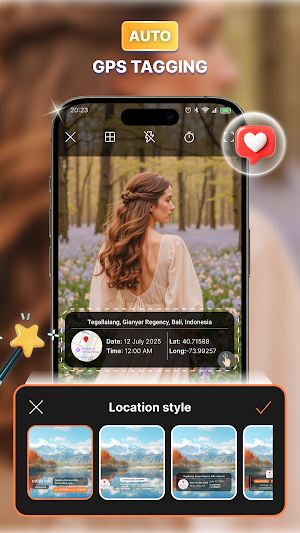
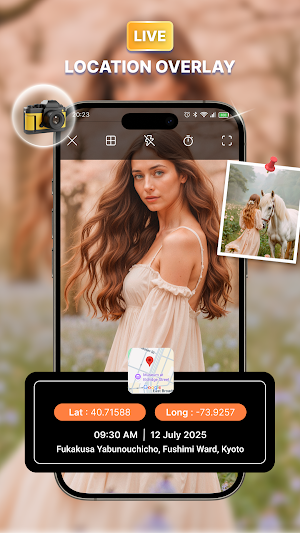
Automatically attach location and time information to new photos and videos using your device’s location services.
👉 Map-Based Viewing
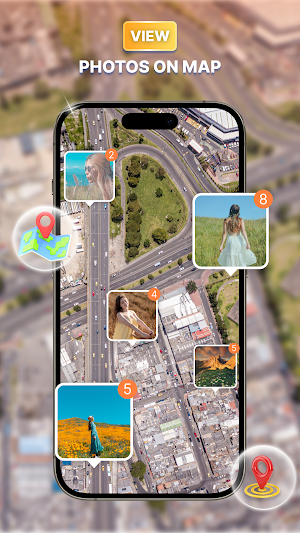
Geo-tagged media appears as pins on an interactive map, making it easy to review where your photos and videos were taken.
👉 Smart Import for Existing Photos
Add or correct GPS EXIF data when your existing photos lack accurate location information. Only metadata is updated; the image content itself is not changed.
👉 Simple Collage Creation
Create one-page layouts using built-in templates for trip overviews, field documentation, or quick visual summaries.
👉 Integrated Gallery
Browse and manage your media directly inside the app without switching to the system gallery.
🔐 Permissions & Privacy
This app uses the following permissions to provide its core features:
• Camera – to capture photos and videos
• Location – to attach device-reported location data and show map information
• Microphone – to record audio while capturing videos
• Photos/Media – to save new content and import existing files
You can manage these permissions at any time in your device settings. If location access is turned off, geo-tagging and some map-based features may be limited.
🎯 Ideal For
• Travelers
• Field inspectors and survey work
• Users organizing media by location
• Quick reports requiring GPS details
🧭 Overview
This app provides a straightforward way to:
• Capture media with device-based GPS location data
• Review photos and videos on an interactive map
• Update or add location data to existing images
• Create simple collage-style pages
• Keep everything organized in a dedicated in-app gallery
All features are described to reflect the actual capabilities of the tool, without promising functionality beyond what it offers.
🌟 Key Features
👉 Automatic GPS Tagging
Automatically attach location and time information to new photos and videos using your device’s location services.
👉 Map-Based Viewing
Geo-tagged media appears as pins on an interactive map, making it easy to review where your photos and videos were taken.
👉 Smart Import for Existing Photos
Add or correct GPS EXIF data when your existing photos lack accurate location information. Only metadata is updated; the image content itself is not changed.
👉 Simple Collage Creation
Create one-page layouts using built-in templates for trip overviews, field documentation, or quick visual summaries.
👉 Integrated Gallery
Browse and manage your media directly inside the app without switching to the system gallery.
🔐 Permissions & Privacy
This app uses the following permissions to provide its core features:
• Camera – to capture photos and videos
• Location – to attach device-reported location data and show map information
• Microphone – to record audio while capturing videos
• Photos/Media – to save new content and import existing files
You can manage these permissions at any time in your device settings. If location access is turned off, geo-tagging and some map-based features may be limited.
🎯 Ideal For
• Travelers
• Field inspectors and survey work
• Users organizing media by location
• Quick reports requiring GPS details
🧭 Overview
This app provides a straightforward way to:
• Capture media with device-based GPS location data
• Review photos and videos on an interactive map
• Update or add location data to existing images
• Create simple collage-style pages
• Keep everything organized in a dedicated in-app gallery
All features are described to reflect the actual capabilities of the tool, without promising functionality beyond what it offers.
User reviews

nice to monitor my family place
Alternatives to GPS Photo With Location
Looking for apps like GPS Photo With Location? Here are 5 similar Android apps on Google Play. The highest rated is GPS Tracker and Finder (4.6/5), and all 5 are free to download.
-
File Recovery: Photo & Video 4.4
-
GPS Tracker and Finder 4.6
-
All PDF Reader & PDF Viewer
-
QR Code Scanner: Smart Scan
-
Document Reader & PDF Editor
| App | Rating | Price | Installs | Last updated | Compare |
|---|---|---|---|---|---|
| GPS Photo With Location | 3.6 / 5 | Free | 1,000,000+ | Sep 15, 2026 | |
| File Recovery: Photo & Video | 4.4 / 5 | Free | 1,000,000+ | Sep 29, 2026 | Compare |
| GPS Tracker and Finder | 4.6 / 5 | Free | 1,000,000+ | Sep 8, 2026 | Compare |
| All PDF Reader & PDF Viewer | – | Free | 100,000+ | Oct 8, 2026 | Compare |
| QR Code Scanner: Smart Scan | – | Free | 1,000,000+ | Sep 8, 2026 | Compare |
| Document Reader & PDF Editor | – | Free | 5,000+ | Aug 21, 2026 | Compare |