
Portuguese keyboard
Waqar Baba Productivity Contains ads
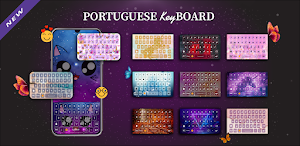
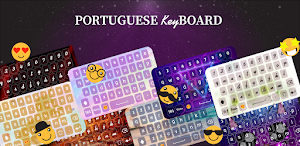
Portuguese keyboard offers a huge collection of free keyboard themes.
- Downloads
- 10+
- on Google Play
- Price
- Free
- No in-app purchases
- Updated
- May 25
- 2022 · v1.01
Screenshots
About Portuguese keyboard
Stylish Themes of Portuguese keyboard 2022
Portuguese keyboard offers a huge collection of free keyboard themes. English to Portuguese keyboard contains the stylish and most popular themes. Customized your mobile keyboards with Portuguese custom keyboard. Portuguese keyboard is cool themes Keyboard for Portuguese language keyboard App.
Portuguese Keyboard provides you to facility of chat with eye catching background themes and smart cute face and all others emojis. Portuguese language keyboard is the easiest keypad to write in the Portuguese and English with soft English Portuguese typing. Portuguese keyboard for all of us who love their native Portuguese language. You can also avail the facility of change the background themes of Portuguese keyboard.
Portuguese Keyboard is a Portuguese font style keyboard apply in your phone keyboard with any kind of message to used Portuguese characters.
❤️ 2 languages supported. Portuguese and English. ❤️
Portuguese keyboard Available Features:
- Stunning Themes is there to decorate your Portuguese keyboard.
- Emotion, emojis numeric and special characters that make your Portuguese chat tremendous.
- Alter the keyboard From Portuguese to English and from English to Portuguese language using this.
- Portuguese Keyboard with emojis will allow you to Text in Portuguese language.
- A lot of themes are created.
- 100+ Emojis, smiles, emotion to make your Portuguese Text effective.
Privacy Policy of Portuguese Keyboard 2022: Easy Typing Keyboard
Portuguese Keyboard 2020 is best for Portuguese and English Typing with stylish themes and Emoji’s are 100% safe because we do not save any key stroke and any kind of your personal data like photos, videos, contacts, microphone, camera etc. Otherwise check the privacy police link in the play store of this app.
How to Use Portuguese Keyboard 2020: Easy Typing Keyboard
1. Download and Install!
2. Open (“Portuguese Keyboard”).
3. Enable Keyboard (“Choose the Portuguese Keyboard”).
4. Select Keyboard (“Choose Portuguese Keyboard”).
5. Themes (“Select Favorite of your Choice”).
Portuguese keyboard offers a huge collection of free keyboard themes. English to Portuguese keyboard contains the stylish and most popular themes. Customized your mobile keyboards with Portuguese custom keyboard. Portuguese keyboard is cool themes Keyboard for Portuguese language keyboard App.
Portuguese Keyboard provides you to facility of chat with eye catching background themes and smart cute face and all others emojis. Portuguese language keyboard is the easiest keypad to write in the Portuguese and English with soft English Portuguese typing. Portuguese keyboard for all of us who love their native Portuguese language. You can also avail the facility of change the background themes of Portuguese keyboard.
Portuguese Keyboard is a Portuguese font style keyboard apply in your phone keyboard with any kind of message to used Portuguese characters.
❤️ 2 languages supported. Portuguese and English. ❤️
Portuguese keyboard Available Features:
- Stunning Themes is there to decorate your Portuguese keyboard.
- Emotion, emojis numeric and special characters that make your Portuguese chat tremendous.
- Alter the keyboard From Portuguese to English and from English to Portuguese language using this.
- Portuguese Keyboard with emojis will allow you to Text in Portuguese language.
- A lot of themes are created.
- 100+ Emojis, smiles, emotion to make your Portuguese Text effective.
Privacy Policy of Portuguese Keyboard 2022: Easy Typing Keyboard
Portuguese Keyboard 2020 is best for Portuguese and English Typing with stylish themes and Emoji’s are 100% safe because we do not save any key stroke and any kind of your personal data like photos, videos, contacts, microphone, camera etc. Otherwise check the privacy police link in the play store of this app.
How to Use Portuguese Keyboard 2020: Easy Typing Keyboard
1. Download and Install!
2. Open (“Portuguese Keyboard”).
3. Enable Keyboard (“Choose the Portuguese Keyboard”).
4. Select Keyboard (“Choose Portuguese Keyboard”).
5. Themes (“Select Favorite of your Choice”).
Alternatives to Portuguese keyboard
Looking for apps like Portuguese keyboard? Here are 6 similar Android apps on Google Play. All of them are free to download.
-
Girls Tattoo Photo Editor 2023
-
Makeup Tips in 2023
-
Finger Mehndi Designs in 2023
-
Pakistan Defense Day Photo Edi
-
Traffic Signs Guide
-
Clinical Skills
| App | Rating | Price | Installs | Last updated | Compare |
|---|---|---|---|---|---|
| Portuguese keyboard | – | Free | 10+ | May 25, 2022 | |
| Girls Tattoo Photo Editor 2023 | – | Free | 50+ | Mar 21, 2023 | Compare |
| Makeup Tips in 2023 | – | Free | 10+ | Mar 21, 2023 | Compare |
| Finger Mehndi Designs in 2023 | – | Free | 500+ | Mar 21, 2023 | Compare |
| Pakistan Defense Day Photo Edi | – | Free | 1+ | Mar 7, 2023 | Compare |
| Traffic Signs Guide | – | Free | 100+ | Nov 1, 2022 | Compare |
| Clinical Skills | – | Free | 10+ | Nov 1, 2022 | Compare |
Similar apps on Google Play
- Girls Tattoo Photo Editor 2023
- Makeup Tips in 2023
- Finger Mehndi Designs in 2023
- Pakistan Defense Day Photo Edi
- Traffic Signs Guide
- Clinical Skills
- Edge Lighting Border Light
- How to earn money online
- Gold Finder & Metal Detector
- General Knowledge Urdu GK
- English Conversation Practice
- Akan Ghana Keyboard
- Body Temperature Fever Diary
- Blood pressure Tracker Bp Info