
Supply Sync Mobile
Supply-Sync Business
Companion app for Supply Sync drivers - receive loads, capture tickets, sync.
- Downloads
- 8+
- on Google Play
- Price
- Free
- No in-app purchases
- Updated
- Oct 16
- 2026 · v1.0.3
Screenshots
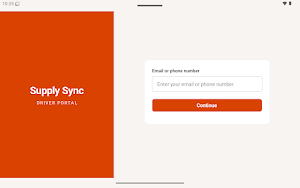


About Supply Sync Mobile
Supply Sync is the companion mobile app for commercial truck drivers
working with carriers that use the Supply Sync dispatch platform. If
your dispatcher has issued you a Supply Sync account, this is how you
receive load assignments, confirm deliveries, and stay in sync with
your team throughout the day.
This is a business app intended for active drivers at participating
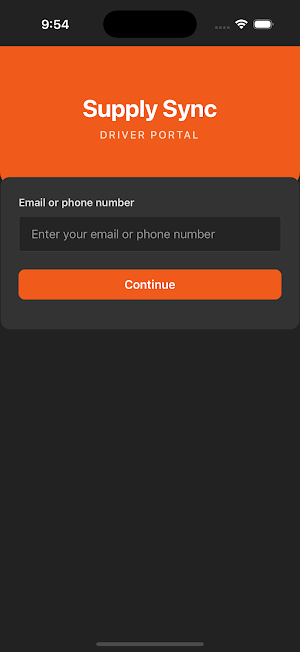
carriers. You will need a driver account from your carrier company to
sign in.
What you can do with Supply Sync
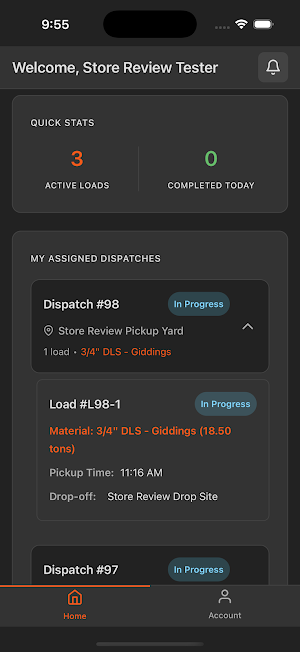
• See your day's assigned loads at a glance, grouped by dispatch, with
pickup and dropoff details, materials, and quantities
• Accept or reject load assignments as they come in
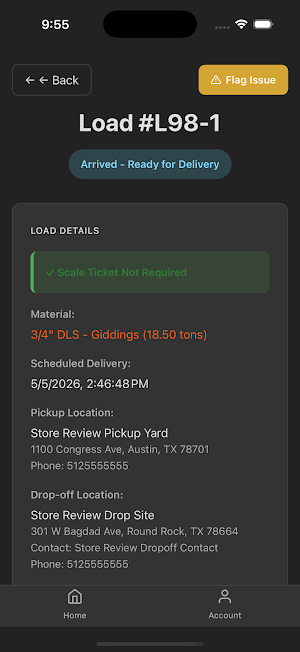
• Mark loads as Loaded at the pickup site and Delivered at the drop
site, with built-in geofence validation so on-site activity is
verified automatically
• Capture scale ticket photos directly in the app — automatic OCR
reads weights, ticket numbers, and dates so you don't have to
transcribe anything
• Message dispatchers about a specific load when you need clarification
or want to flag a delay
• Flag loads for review with a reason (breakdown, detention, weather,
customer issue, etc.) when something doesn't go to plan
• Receive push notifications the moment a new load is assigned or a
dispatcher sends you a message
• View and manage your assignment history, including completed and
rejected loads
• Switch between English and Spanish anywhere in the app
Built for the way drivers actually work
• Offline-aware: status changes and scale ticket photos are queued
locally if you lose service, then sync automatically when you're
back online — so you never lose work mid-route
• Light and dark mode that follows your system theme
• Tablet support for in-cab mounted devices
• Driver-instruction notes for each pickup and drop site, viewable in
your preferred language
Privacy and data
Supply Sync only collects what's needed to do the job:
• Account information (name, email, phone) provided by your carrier
• Precise location, captured at status updates to verify pickup and
dropoff
• Scale ticket photos and any notes you add to a load
• Driver-dispatcher messages tied to a load
Your data stays in your carrier's Supply Sync workspace and is not
sold or shared with advertisers. Full details are in our privacy
policy linked on this listing.
Who should download this
This app is intended for drivers working with a carrier that has
provisioned them a Supply Sync account. If you don't have an account
from your carrier yet, the sign-in flow won't work for you. Contact
your dispatcher or fleet manager to be added.
Need help?
If you're a driver and run into trouble, contact your carrier's
dispatch desk first — they can fix most account and assignment issues
directly. For app issues that aren't account-related, reach our
support team at [email protected].
working with carriers that use the Supply Sync dispatch platform. If
your dispatcher has issued you a Supply Sync account, this is how you
receive load assignments, confirm deliveries, and stay in sync with
your team throughout the day.
This is a business app intended for active drivers at participating
carriers. You will need a driver account from your carrier company to
sign in.
What you can do with Supply Sync
• See your day's assigned loads at a glance, grouped by dispatch, with
pickup and dropoff details, materials, and quantities
• Accept or reject load assignments as they come in
• Mark loads as Loaded at the pickup site and Delivered at the drop
site, with built-in geofence validation so on-site activity is
verified automatically
• Capture scale ticket photos directly in the app — automatic OCR
reads weights, ticket numbers, and dates so you don't have to
transcribe anything
• Message dispatchers about a specific load when you need clarification
or want to flag a delay
• Flag loads for review with a reason (breakdown, detention, weather,
customer issue, etc.) when something doesn't go to plan
• Receive push notifications the moment a new load is assigned or a
dispatcher sends you a message
• View and manage your assignment history, including completed and
rejected loads
• Switch between English and Spanish anywhere in the app
Built for the way drivers actually work
• Offline-aware: status changes and scale ticket photos are queued
locally if you lose service, then sync automatically when you're
back online — so you never lose work mid-route
• Light and dark mode that follows your system theme
• Tablet support for in-cab mounted devices
• Driver-instruction notes for each pickup and drop site, viewable in
your preferred language
Privacy and data
Supply Sync only collects what's needed to do the job:
• Account information (name, email, phone) provided by your carrier
• Precise location, captured at status updates to verify pickup and
dropoff
• Scale ticket photos and any notes you add to a load
• Driver-dispatcher messages tied to a load
Your data stays in your carrier's Supply Sync workspace and is not
sold or shared with advertisers. Full details are in our privacy
policy linked on this listing.
Who should download this
This app is intended for drivers working with a carrier that has
provisioned them a Supply Sync account. If you don't have an account
from your carrier yet, the sign-in flow won't work for you. Contact
your dispatcher or fleet manager to be added.
Need help?
If you're a driver and run into trouble, contact your carrier's
dispatch desk first — they can fix most account and assignment issues
directly. For app issues that aren't account-related, reach our
support team at [email protected].
What’s new
Version 1.0.3 · Updated October 16, 2026
A refreshed driver experience with clearer load guidance, light and dark themes, and improved tablet layouts. New pickup, hold, and delivery instructions for preloaded loads. Improved location checks and offline syncing. App version information and notices when an update is available. Updated Android compatibility.
Alternatives to Supply Sync Mobile
Looking for apps like Supply Sync Mobile? Here are 6 similar Android apps on Google Play. All of them are free to download.





| App | Rating | Price | Installs | Last updated | Compare |
|---|---|---|---|---|---|
| Supply Sync Mobile | – | Free | 5+ | Oct 16, 2026 | |
| GoTOM | – | Free | 100+ | Dec 29, 2025 | Compare |
| M-Flow Go | – | Free | 10+ | Sep 23, 2026 | Compare |
| rekkeh | – | Free | 10+ | Sep 5, 2026 | Compare |
| Celtucom | – | Free | 10+ | Jul 28, 2026 | Compare |
| SIHL Global Investments | – | Free | 100+ | – | Compare |
| Sonam Connect | – | Free | 100+ | Sep 13, 2026 | Compare |
Compare Supply Sync Mobile with the top alternatives: ratings, updates, ASO score and keyword gaps →
Similar apps on Google Play
- GoTOM
- M-Flow Go
- rekkeh
- Celtucom
- SIHL Global Investments
- Sonam Connect
- BillMithra: AI POS for Cafés
- Be Staff
- Dynafios Mobile
- sky's da limit
- simonsen app®
- KAS & CINC HOA Portal
- Pcsoft Enterprises
- FundR NXT
- Swarn Shilp
- Texxano Door
- IRISS SiteWalk
- MyCWGS Enrollment & Resources
- Digital Info/Business Card
- ClickFlare
- La Central
- Canvas by Livspace
- SupportCore
- CF Brown Bottle
- Платформа ЭДО