
Comment Artist
ADHD_PEACE! Entertainment
Make your comments stand out with eye-catching text art
- Downloads
- 100+
- on Google Play
- Price
- Free
- No in-app purchases
- Updated
- May 10
- 2026 · v0.1.4
Screenshots
About Comment Artist
Comment Artist turns photos, text, and drawings into text art that makes your comments stand out.
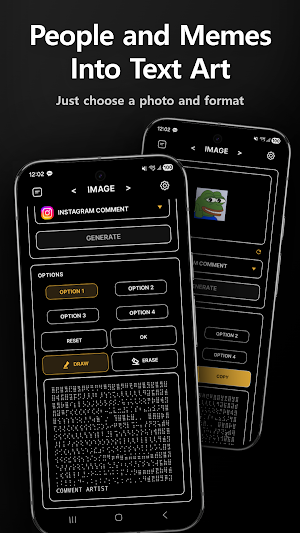
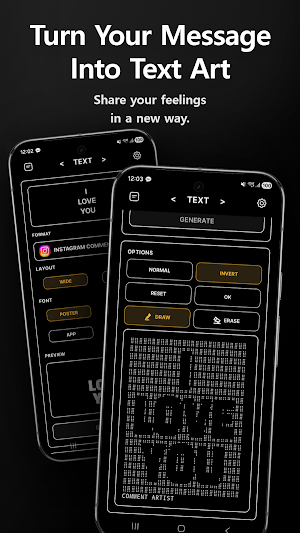
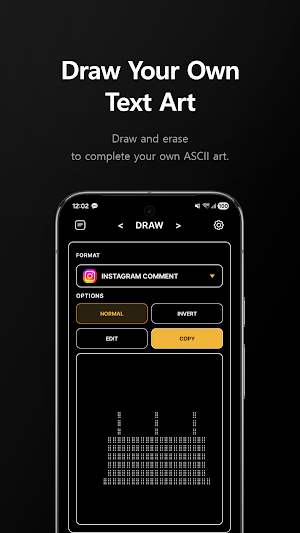
Use it when you want to write comments that get more attention than plain text. Turn selected images into text art, or create unique character art from your own words and drawings.
✨ Key Features
• Turn photos and images into braille-style text art
• Convert your words into comment-ready text art
• Create character art from your own drawings
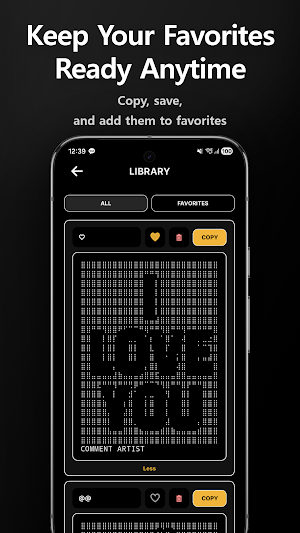
• Copy your result and paste it into comments, chats, and posts
• Save your favorite results in your library
• Choose from multiple output formats and style options
• Supports light mode and dark mode
• Available in Korean, English, Spanish, and Portuguese
💬 Perfect For
• Making your comments stand out
• Posting text art that feels more fun and creative than plain text
• Turning photos or drawings into unique character art
• Creating copy-and-paste text art for social media, communities, and chats
• Saying something with a little more impact than regular words or emojis
📸 Photos, Text, and Drawings Into Text Art
Comment Artist is designed to keep things simple. Pick an image, type your text, or draw something by hand, then generate a text art result in just a few taps. Once it is ready, copy it and paste it wherever you want.
🔒 Simple and Clean
The current version is free to use, has no ads, and does not require an account. Your selected images, typed text, and drawings are processed on your device.
If you want your comments to feel less ordinary, create your own text art with Comment Artist.
Use it when you want to write comments that get more attention than plain text. Turn selected images into text art, or create unique character art from your own words and drawings.
✨ Key Features
• Turn photos and images into braille-style text art
• Convert your words into comment-ready text art
• Create character art from your own drawings
• Copy your result and paste it into comments, chats, and posts
• Save your favorite results in your library
• Choose from multiple output formats and style options
• Supports light mode and dark mode
• Available in Korean, English, Spanish, and Portuguese
💬 Perfect For
• Making your comments stand out
• Posting text art that feels more fun and creative than plain text
• Turning photos or drawings into unique character art
• Creating copy-and-paste text art for social media, communities, and chats
• Saying something with a little more impact than regular words or emojis
📸 Photos, Text, and Drawings Into Text Art
Comment Artist is designed to keep things simple. Pick an image, type your text, or draw something by hand, then generate a text art result in just a few taps. Once it is ready, copy it and paste it wherever you want.
🔒 Simple and Clean
The current version is free to use, has no ads, and does not require an account. Your selected images, typed text, and drawings are processed on your device.
If you want your comments to feel less ordinary, create your own text art with Comment Artist.
What’s new
Version 0.1.4 · Updated May 10, 2026
The first version of Comment Artist is now available. We hope it helps make comment communities more fun and creative.
Alternatives to Comment Artist
Looking for apps like Comment Artist? Here are 4 similar Android apps on Google Play. All of them are free to download.
-
Lucky Sic Bo Analyzer
-
thumBlock: Short-Form Blocker
-
Lucky Baccarat Analyzer
-
Infinite Liquid: Space Out
| App | Rating | Price | Installs | Last updated | Compare |
|---|---|---|---|---|---|
| Comment Artist | – | Free | 100+ | May 10, 2026 | |
| Lucky Sic Bo Analyzer | – | Free | 100+ | Oct 30, 2026 | Compare |
| thumBlock: Short-Form Blocker | – | Free | 10+ | – | Compare |
| Lucky Baccarat Analyzer | – | Free | 1,000+ | – | Compare |
| Infinite Liquid: Space Out | – | Free | 100+ | – | Compare |
Compare Comment Artist with the top alternatives: ratings, updates, ASO score and keyword gaps →