
PDF Reader and Editor
Yassine noufair Tools Contains ads
Read, annotate and organize PDF documents on your device.
- Downloads
- 267+
- on Google Play
- Price
- Free
- No in-app purchases
- Updated
- Dec 10
- 2025 · v1.4.1
Screenshots


About PDF Reader and Editor
Read and manage PDF documents with an intuitive interface designed for students, professionals, and everyday users.
CORE FEATURES
Viewing and Navigation
Read PDF documents with smooth scrolling and zoom controls. Navigate through pages quickly with bookmarks and page thumbnails. Jump to any page instantly.
Annotation Tools
Highlight text with custom colors. Underline and strikethrough text for emphasis. Add notes and comments directly to pages. Draw and sketch on documents. Mark up pages with multiple tools.
Organization
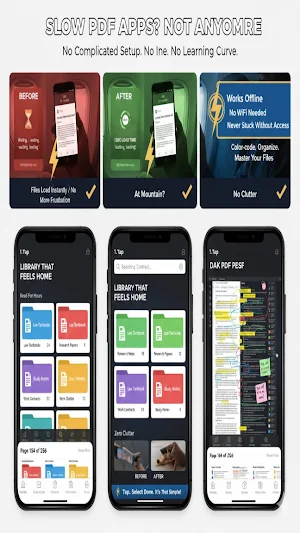
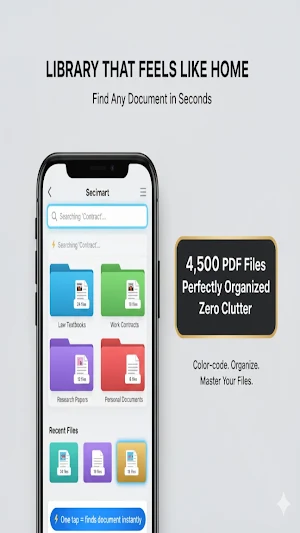
Create folders to organize your library. Rename and manage multiple PDFs. Search across all your documents. Sort by date, name, or size. Mark favorite documents for quick access.
Reading Options
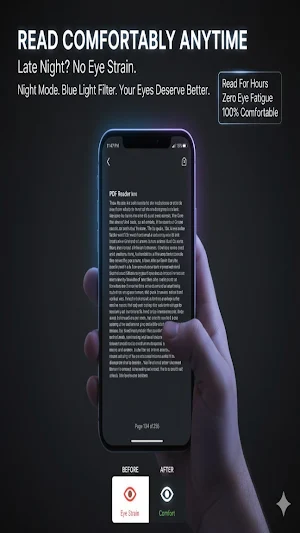
Adjust text size for comfortable reading. Enable dark mode to reduce eye strain. Reflow text-heavy PDFs for better readability. Full-screen viewing mode. Night reading filter available.
LOCAL STORAGE
All documents are stored on your device. Process documents without internet connection. Your files remain private and secure.
FOR STUDENTS
Study mode with focused interface. Note-taking tools optimized for learning. Works with textbook PDFs. Organize study materials by subject.
FOR PROFESSIONALS
Fill forms in PDF documents. Extract and copy text from pages. Annotate contracts and documents. Print documents directly from the app. Works with business file formats.
TECHNICAL DETAILS
Lightweight application with minimal storage footprint. Optimized for all Android devices. Responsive performance on older and newer devices. Regular updates with improvements.
ABOUT ANNOTATIONS
Highlight important sections with color options. Create study notes within documents. Mark up documents for review. Export annotated PDFs with notes included.
HOW USERS DESCRIBE THIS APP
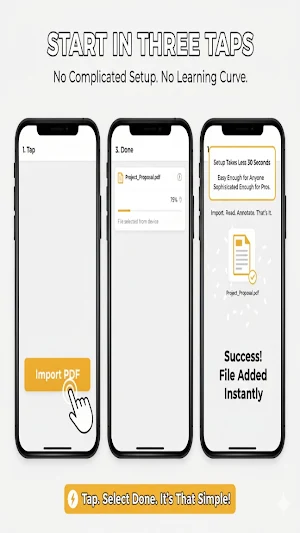
Users appreciate the simple interface that requires no learning curve. The annotation features help with document review and studying. Offline access means reading PDFs anywhere without internet. The organization tools help manage growing document libraries.
PERMISSIONS
Storage access: To read and manage your PDF files. No other permissions required or requested.
UPDATES
Regular updates improve app stability and add requested features. Updates are released based on user feedback.
PRIVACY
We collect no personal data. No tracking. No analytics collection. No ads. All processing happens on your device.
This app is suitable for anyone who regularly works with PDF documents. Whether for education, work, or personal use, the app provides essential tools for reading and managing PDFs.
CORE FEATURES
Viewing and Navigation
Read PDF documents with smooth scrolling and zoom controls. Navigate through pages quickly with bookmarks and page thumbnails. Jump to any page instantly.
Annotation Tools
Highlight text with custom colors. Underline and strikethrough text for emphasis. Add notes and comments directly to pages. Draw and sketch on documents. Mark up pages with multiple tools.
Organization
Create folders to organize your library. Rename and manage multiple PDFs. Search across all your documents. Sort by date, name, or size. Mark favorite documents for quick access.
Reading Options
Adjust text size for comfortable reading. Enable dark mode to reduce eye strain. Reflow text-heavy PDFs for better readability. Full-screen viewing mode. Night reading filter available.
LOCAL STORAGE
All documents are stored on your device. Process documents without internet connection. Your files remain private and secure.
FOR STUDENTS
Study mode with focused interface. Note-taking tools optimized for learning. Works with textbook PDFs. Organize study materials by subject.
FOR PROFESSIONALS
Fill forms in PDF documents. Extract and copy text from pages. Annotate contracts and documents. Print documents directly from the app. Works with business file formats.
TECHNICAL DETAILS
Lightweight application with minimal storage footprint. Optimized for all Android devices. Responsive performance on older and newer devices. Regular updates with improvements.
ABOUT ANNOTATIONS
Highlight important sections with color options. Create study notes within documents. Mark up documents for review. Export annotated PDFs with notes included.
HOW USERS DESCRIBE THIS APP
Users appreciate the simple interface that requires no learning curve. The annotation features help with document review and studying. Offline access means reading PDFs anywhere without internet. The organization tools help manage growing document libraries.
PERMISSIONS
Storage access: To read and manage your PDF files. No other permissions required or requested.
UPDATES
Regular updates improve app stability and add requested features. Updates are released based on user feedback.
PRIVACY
We collect no personal data. No tracking. No analytics collection. No ads. All processing happens on your device.
This app is suitable for anyone who regularly works with PDF documents. Whether for education, work, or personal use, the app provides essential tools for reading and managing PDFs.
Alternatives to PDF Reader and Editor
Looking for apps like PDF Reader and Editor? Here are 6 similar Android apps on Google Play. The highest rated is عالم النوستالجيا (3.3/5), and all 6 are free to download.
-
عالم النوستالجيا 3.3
-
Word Race: Huroof
-
Hospital Manager Tycoon
-
Idol Livestream: Doll Dress Up
-
Mahjong Solitaire: Tile Match
-
Fidget Games: Stress Relief
| App | Rating | Price | Installs | Last updated | Compare |
|---|---|---|---|---|---|
| PDF Reader and Editor | – | Free | 100+ | Dec 10, 2025 | |
| عالم النوستالجيا | 3.3 / 5 | Free | 10,000+ | – | Compare |
| Word Race: Huroof | – | Free | 50+ | Apr 7, 2026 | Compare |
| Hospital Manager Tycoon | – | Free | 100+ | – | Compare |
| Idol Livestream: Doll Dress Up | – | Free | 1,000+ | – | Compare |
| Mahjong Solitaire: Tile Match | – | Free | 1,000+ | – | Compare |
| Fidget Games: Stress Relief | – | Free | 500+ | Dec 17, 2025 | Compare |