

Solitaire Classic: Pro
Card In-app purchases Contains ads
A solitaire experience packed with tons of features, content and customization!
- Rating
- 4.6
- 196 ratings
- Downloads
- 14.1K+
- on Google Play
- Price
- Free
- In-app purchases
- Updated
- Oct 26
- 2024 · v3.1.8
Screenshots


About Solitaire Classic: Pro
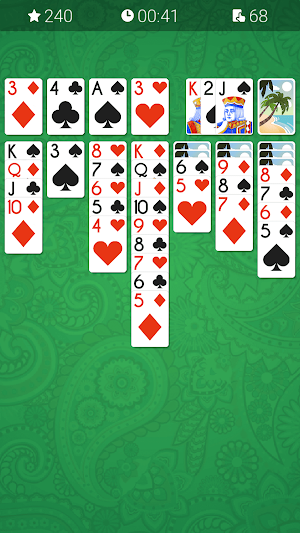
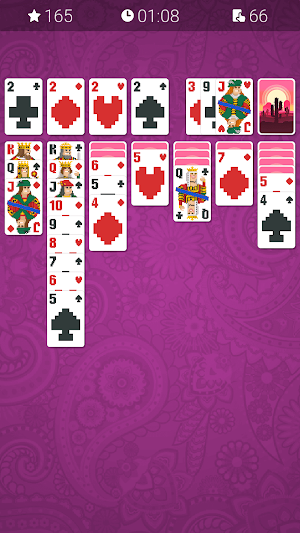
Play the definitive Solitaire experience with unmatched gameplay, content, and features. Customize your game with gorgeous themes and make it your own. Explore features such as landscape mode, swipe left to undo, tap to move a card, shortcut button customization, left-hand play and much more in Solitaire Classic: Pro. Sit back, relax and experience the beautiful game of Solitaire like you have never before!
Key Features:
• 3 Game Modes: Normal, Vegas & Vegas Cumulative (Vegas +)
• Portrait and Landscape mode
• Auto Complete for quick finishing
• Unlimited Hints, Undos and Redos
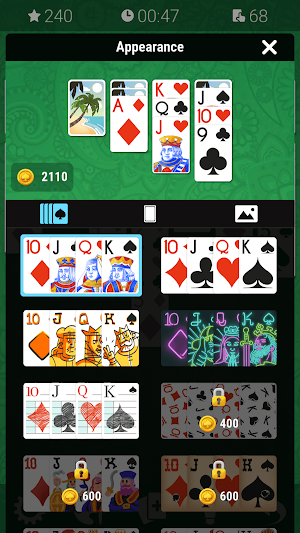
• Unlockables: Earn coins to unlock Decks, Card Backs and Backgrounds
• Tons of Settings: Customize your game with different settings such as Tap to Move, Auto Hints, and Left-Hand play
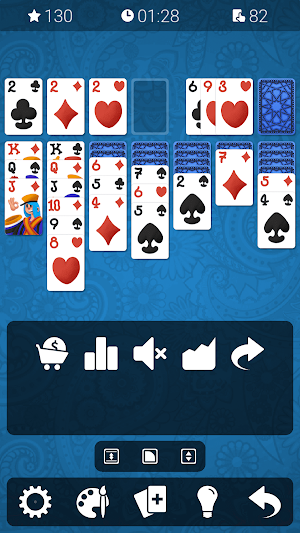
• Shortcut Buttons: Press & hold on the bottom bar to open the customization tray
• Swipe Gestures: Swipe left to undo, right to redo, down to show a hint, and up to open the new game window
• A Quicker way to Undo: Press & hold Undo to perform a series of undos. Same goes for redos!
• Save & Load: Your games are always automatically saved
• Stats: Track your stats for each individual game mode
• Leaderboards: Compete with players from around the world with global leaderboards
Customization:
• Game Modes: Choose your game mode directly from the new game window
• Shortcut Buttons: Press & hold anywhere (except for Undo and Redo) on the bottom bar to open the customization tray. You can then drag and drop buttons on and off the tray. The 3 transform options also allow you to rescale, reshape and reposition the bar. Tap anywhere outside the tray when you are done. If you have removed the New Game or Settings button from the bar, you can swipe right or left on the bar to access them
• Game Information: Press and hold anywhere on the top bar to open the customization tray. You can use the same customization options as the bottom bar
• Appearance: You can unlock Decks, Card Backs and Backgrounds with coins. Earn coins each time you play. You can earn coins by winning or losing a game. The payout for winning is much higher than that of losing. Before starting a new game you can see how many coins you will earn from the current game in the New Game window
Save & Restore your themes with Google Play Services:
• Save your themes by logging into Google Play Services so you can restore them if you happen to switch to a different device
• Make sure your themes are saved by checking your achievements. If an achievement is unlocked for a particular theme then that theme is saved
Make sure you are logged into Google Play Services (if you are not automatically logged in):
• Click on the leaderboards button located in the Settings window
• If the game doesn't log you in or prompt a login window after a few seconds close the app
• Go to your device's settings and login to Google Play Services from there
• Open Solitaire Classic: Pro and click on the leaderboards button again and it should log you in
Enjoy!
Key Features:
• 3 Game Modes: Normal, Vegas & Vegas Cumulative (Vegas +)
• Portrait and Landscape mode
• Auto Complete for quick finishing
• Unlimited Hints, Undos and Redos
• Unlockables: Earn coins to unlock Decks, Card Backs and Backgrounds
• Tons of Settings: Customize your game with different settings such as Tap to Move, Auto Hints, and Left-Hand play
• Shortcut Buttons: Press & hold on the bottom bar to open the customization tray
• Swipe Gestures: Swipe left to undo, right to redo, down to show a hint, and up to open the new game window
• A Quicker way to Undo: Press & hold Undo to perform a series of undos. Same goes for redos!
• Save & Load: Your games are always automatically saved
• Stats: Track your stats for each individual game mode
• Leaderboards: Compete with players from around the world with global leaderboards
Customization:
• Game Modes: Choose your game mode directly from the new game window
• Shortcut Buttons: Press & hold anywhere (except for Undo and Redo) on the bottom bar to open the customization tray. You can then drag and drop buttons on and off the tray. The 3 transform options also allow you to rescale, reshape and reposition the bar. Tap anywhere outside the tray when you are done. If you have removed the New Game or Settings button from the bar, you can swipe right or left on the bar to access them
• Game Information: Press and hold anywhere on the top bar to open the customization tray. You can use the same customization options as the bottom bar
• Appearance: You can unlock Decks, Card Backs and Backgrounds with coins. Earn coins each time you play. You can earn coins by winning or losing a game. The payout for winning is much higher than that of losing. Before starting a new game you can see how many coins you will earn from the current game in the New Game window
Save & Restore your themes with Google Play Services:
• Save your themes by logging into Google Play Services so you can restore them if you happen to switch to a different device
• Make sure your themes are saved by checking your achievements. If an achievement is unlocked for a particular theme then that theme is saved
Make sure you are logged into Google Play Services (if you are not automatically logged in):
• Click on the leaderboards button located in the Settings window
• If the game doesn't log you in or prompt a login window after a few seconds close the app
• Go to your device's settings and login to Google Play Services from there
• Open Solitaire Classic: Pro and click on the leaderboards button again and it should log you in
Enjoy!
What’s new
Version 3.1.8 · Updated October 26, 2024
• 4 New Themes! • Bug fixes & performance improvements
Play today's Threadline puzzle
Draw one line through every cell, visiting the numbers in order. A free daily puzzle from Fiplay, same board for everyone. It plays right here, no download.
User reviews

I love the game on. Here What I want is to find a way to be go up to harder levels !!? Can u help me with this !! Please LUCILLE

Perfect game, may god give health to your hands

Lovely

So fun!! I recommend it to everyone.
Alternatives to Solitaire Classic: Pro
Looking for apps like Solitaire Classic: Pro? Here are 4 similar Android apps on Google Play. The highest rated is Solitaire Arcana-card games (4.8/5), and all 4 are free to download.
-
Solitaire 4.5
-
Classic Solitaire - Card Games 4.6
-
Solitaire Arcana-card games 4.8
-
Solitaire: Daily Challenges 4.6
| App | Rating | Price | Installs | Last updated | Compare |
|---|---|---|---|---|---|
| Solitaire Classic: Pro | 4.6 / 5 | Free | 10,000+ | Oct 26, 2024 | |
| Solitaire | 4.5 / 5 | Free | 1,000,000+ | Jun 29, 2020 | Compare |
| Classic Solitaire - Card Games | 4.6 / 5 | Free | 5,000,000+ | Oct 31, 2025 | Compare |
| Solitaire Arcana-card games | 4.8 / 5 | Free | 100,000+ | – | Compare |
| Solitaire: Daily Challenges | 4.6 / 5 | Free | 500,000+ | Oct 23, 2026 | Compare |