

SnapPass - Visa&Passport photo
Starii Tech Pty Ltd Photography In-app purchases
Create Professional ID Photos in One Minute
- Downloads
- 100+
- on Google Play
- Price
- Free
- In-app purchases
- Updated
- Oct 29
- 2024 · v1.2.2
Screenshots


About SnapPass - Visa&Passport photo
Still looking for the best ID Photo solution?
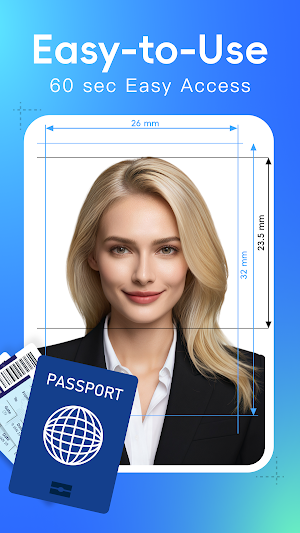
SnapPass is an online tool for creating professional ID photos. Easily capture and produce photos for resumes, licenses, passports, and more. No ads, no registration, and you can create a standard ID photo in 60 seconds, all from home.
Simple and Convenient Process – Create a Professional ID Photo in 60 Seconds
No need to worry about complicated steps: Select the size → Take or upload a photo → Save. Just 3 steps to get your ID photo! No skills required, unlimited uploads, and easily download your digital photo anytime.
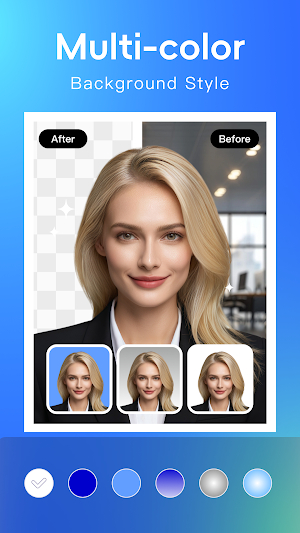
One-tap Background Removal, Multiple Background Colors Available
Need a specific background? SnapPass lets you upload or take a front-facing photo, automatically removing the background with precision. Choose from multiple background colors to fit your needs.
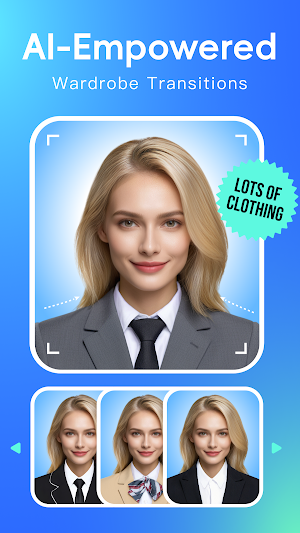
Dozens of Outfit Options, AI Auto-Detection for One-Tap Wardrobe
Not having the right clothes? SnapPass offers dozens of suits! With AI auto-detection, just tap on the outfit and instantly switch to the new look. It’s super easy!
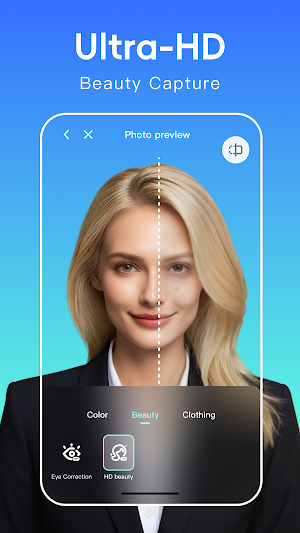
Free Ultra HD Beauty Mode, Create a Natural Look
Not feeling great or too lazy to do makeup? SnapPass ID photo offers ultra HD enhancement. Get smooth, natural, or whitening makeup look with one tap.
Generate Layout Photos for Easy Printing
Need to print a physical ID photo? SnapPass generates layout photos automatically. Just select the correct photo size, save the layout, and print it at a convenience store or from your home printer. It’s quick and easy!
Multiple Sizes to Choose From
SnapPass offers passport and Visa photos for various countries, as well as a wide range of other standard ID photo sizes, such as:
U.S. Passport (51x51mm)
U.S. Visa (51x51mm)
Resume (51x51mm)
Photo 1.5*1.5 Inches (38x38mm)
Photo 1.5*2 Inches (50x38mm)
Photo 1* 1 Inches (25x25mm)
Photo 2* 2 Inches (50x50mm)
Chinese Visa (in-person) (48x33mm)
Japanese Visa(45x35mm)
Korean Visa(45x35mm)
Vietnamese Visa(60x40mm)
EU Visa(45x35mm)
Hong Kong Visa(135x102mm)
……
Printing Methods:
① Print at Convenience Store:
1. Use the convenience store’s printing service app.
2. Follow the app’s instructions to upload and register your photo.
3. Send the layout photo to the printer.
4. Select the photo print option at the store’s printer.
② Print at home:
1. Save the layout photo to your phone or computer.
2. Connect your smartphone or computer to the printer.
3. Use special ID photo paper for best results.
4. Photo storage location: Internal Storage/Pictures.
【SnapPass PRO】
Upgrade to SnapPass PRO for unlimited access
SnapPass will continue providing an enhanced user experience. Stay tuned for
more!
For business collaborations, feel free to reach out to us at [email protected]。
SnapPass is an online tool for creating professional ID photos. Easily capture and produce photos for resumes, licenses, passports, and more. No ads, no registration, and you can create a standard ID photo in 60 seconds, all from home.
Simple and Convenient Process – Create a Professional ID Photo in 60 Seconds
No need to worry about complicated steps: Select the size → Take or upload a photo → Save. Just 3 steps to get your ID photo! No skills required, unlimited uploads, and easily download your digital photo anytime.
One-tap Background Removal, Multiple Background Colors Available
Need a specific background? SnapPass lets you upload or take a front-facing photo, automatically removing the background with precision. Choose from multiple background colors to fit your needs.
Dozens of Outfit Options, AI Auto-Detection for One-Tap Wardrobe
Not having the right clothes? SnapPass offers dozens of suits! With AI auto-detection, just tap on the outfit and instantly switch to the new look. It’s super easy!
Free Ultra HD Beauty Mode, Create a Natural Look
Not feeling great or too lazy to do makeup? SnapPass ID photo offers ultra HD enhancement. Get smooth, natural, or whitening makeup look with one tap.
Generate Layout Photos for Easy Printing
Need to print a physical ID photo? SnapPass generates layout photos automatically. Just select the correct photo size, save the layout, and print it at a convenience store or from your home printer. It’s quick and easy!
Multiple Sizes to Choose From
SnapPass offers passport and Visa photos for various countries, as well as a wide range of other standard ID photo sizes, such as:
U.S. Passport (51x51mm)
U.S. Visa (51x51mm)
Resume (51x51mm)
Photo 1.5*1.5 Inches (38x38mm)
Photo 1.5*2 Inches (50x38mm)
Photo 1* 1 Inches (25x25mm)
Photo 2* 2 Inches (50x50mm)
Chinese Visa (in-person) (48x33mm)
Japanese Visa(45x35mm)
Korean Visa(45x35mm)
Vietnamese Visa(60x40mm)
EU Visa(45x35mm)
Hong Kong Visa(135x102mm)
……
Printing Methods:
① Print at Convenience Store:
1. Use the convenience store’s printing service app.
2. Follow the app’s instructions to upload and register your photo.
3. Send the layout photo to the printer.
4. Select the photo print option at the store’s printer.
② Print at home:
1. Save the layout photo to your phone or computer.
2. Connect your smartphone or computer to the printer.
3. Use special ID photo paper for best results.
4. Photo storage location: Internal Storage/Pictures.
【SnapPass PRO】
Upgrade to SnapPass PRO for unlimited access
SnapPass will continue providing an enhanced user experience. Stay tuned for
more!
For business collaborations, feel free to reach out to us at [email protected]。
What’s new
Version 1.2.2 · Updated October 29, 2024
【Feature update】Photo creation for passport, visa, and ID is now more in line with official requirements!
Alternatives to SnapPass - Visa&Passport photo
Looking for apps like SnapPass - Visa&Passport photo? Here are 5 similar Android apps on Google Play. The highest rated is Winkit - AI Video Enhancer (4.4/5), and all 5 are free to download.
-
X-Design-AI Photo Editor
-
Winkit - AI Video Enhancer 4.4
-
KapKap-AI Captions 4.1
-
Gemix-AI Photo Generator 4.2
-
Starii-AI Beauty Editor 4.4
| App | Rating | Price | Installs | Last updated | Compare |
|---|---|---|---|---|---|
| SnapPass - Visa&Passport photo | – | Free | 100+ | Oct 29, 2024 | |
| X-Design-AI Photo Editor | – | Free | 100,000+ | – | Compare |
| Winkit - AI Video Enhancer | 4.4 / 5 | Free | 5,000,000+ | Jan 9, 2025 | Compare |
| KapKap-AI Captions | 4.1 / 5 | Free | 5,000,000+ | Sep 24, 2026 | Compare |
| Gemix-AI Photo Generator | 4.2 / 5 | Free | 100+ | Jan 4, 2024 | Compare |
| Starii-AI Beauty Editor | 4.4 / 5 | Free | 1,000,000+ | Jul 23, 2025 | Compare |