

Click With Safin
Sy Spark Studio Tools Contains ads
Automate screen taps and swipes with custom intervals and patterns.
- Downloads
- 625+
- on Google Play
- Price
- Free
- No in-app purchases
- Updated
- Sep 16
- 2026 · v1.0.6
Screenshots

About Click With Safin
Automate your screen interactions with precision and ease.
Click With Safin is a powerful and secure local automation tool designed to help you simulate clicks, taps, and swipes on your Android device. Whether you need to automate repetitive tasks in games, test UI interactions, or perform routine actions, Click With Safin offers a flexible solution with fully customizable settings.
Key Features:
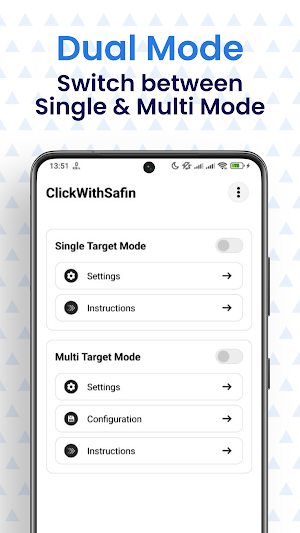
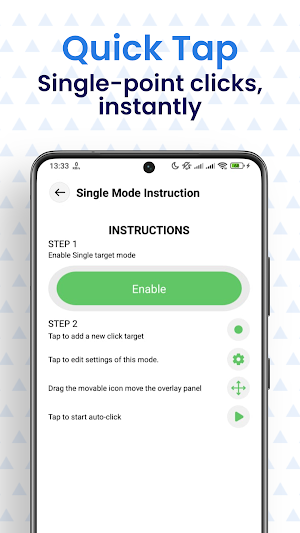
👆 Automated Clicking & Tapping Set up single or multiple target points on your screen. Configure the app to tap automatically at specific intervals, saving you time and effort on repetitive tasks.
↔️ Auto Swipe Generator Need to scroll through content or simulate swipe gestures? Click With Safin allows you to define start and end points for automated swipes, perfect for apps that require sliding actions.
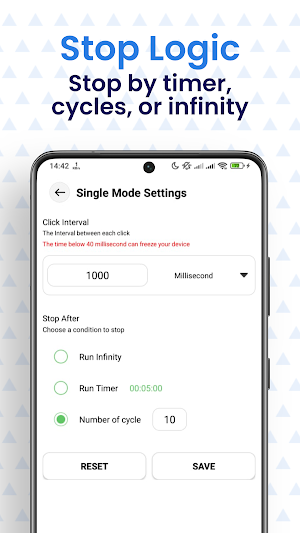
⏱️ Custom Intervals & Timers Take full control over the speed and timing. Set precise delays between clicks, click durations, and cycle intervals to match your specific needs.
💾 Save & Load Configurations Don't waste time setting up the same patterns every day. Save your custom click scripts and settings locally as JSON files and reload them instantly whenever you need them.
🎨 User-Friendly Overlay Manage your automation with a convenient floating control panel. Start, stop, and pause scripts directly from the overlay without exiting your current app.
🔒 Privacy-First Design We value your privacy. Click With Safin operates entirely offline.
No Account Required: Start using the app immediately.
Local Storage: All your settings and patterns are stored locally on your device.
No Data Collection: We do not upload your usage data or personal information to external servers.
Technical Specifications:
Supports multi-touch patterns.
Low battery consumption optimization.
Uses Gson for reliable local data handling.
Smooth integration with Glide for interface elements.
⚠️ Important Accessibility Permission Declaration:
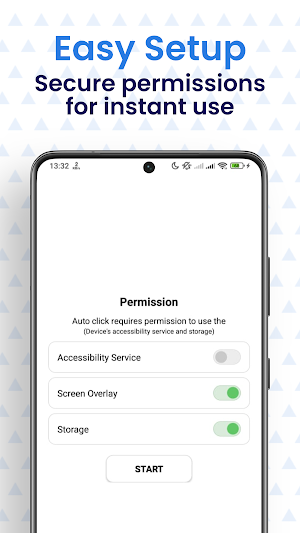
Click With Safin requires the Accessibility Service API to function properly.
Why do we use this service? This application uses the Accessibility Service API solely to perform the core functions of simulating user interactions, such as clicks, swipes, and touches on your screen, as configured by you.
Is your data safe? Yes. We do not use this service to access, collect, read, or transmit any personal or sensitive user data (such as screen content, passwords, or messages).
User Consent: This permission must be manually enabled in your device settings. You can revoke this permission at any time.
Download Click With Safin today and simplify your mobile experience!
Click With Safin is a powerful and secure local automation tool designed to help you simulate clicks, taps, and swipes on your Android device. Whether you need to automate repetitive tasks in games, test UI interactions, or perform routine actions, Click With Safin offers a flexible solution with fully customizable settings.
Key Features:
👆 Automated Clicking & Tapping Set up single or multiple target points on your screen. Configure the app to tap automatically at specific intervals, saving you time and effort on repetitive tasks.
↔️ Auto Swipe Generator Need to scroll through content or simulate swipe gestures? Click With Safin allows you to define start and end points for automated swipes, perfect for apps that require sliding actions.
⏱️ Custom Intervals & Timers Take full control over the speed and timing. Set precise delays between clicks, click durations, and cycle intervals to match your specific needs.
💾 Save & Load Configurations Don't waste time setting up the same patterns every day. Save your custom click scripts and settings locally as JSON files and reload them instantly whenever you need them.
🎨 User-Friendly Overlay Manage your automation with a convenient floating control panel. Start, stop, and pause scripts directly from the overlay without exiting your current app.
🔒 Privacy-First Design We value your privacy. Click With Safin operates entirely offline.
No Account Required: Start using the app immediately.
Local Storage: All your settings and patterns are stored locally on your device.
No Data Collection: We do not upload your usage data or personal information to external servers.
Technical Specifications:
Supports multi-touch patterns.
Low battery consumption optimization.
Uses Gson for reliable local data handling.
Smooth integration with Glide for interface elements.
⚠️ Important Accessibility Permission Declaration:
Click With Safin requires the Accessibility Service API to function properly.
Why do we use this service? This application uses the Accessibility Service API solely to perform the core functions of simulating user interactions, such as clicks, swipes, and touches on your screen, as configured by you.
Is your data safe? Yes. We do not use this service to access, collect, read, or transmit any personal or sensitive user data (such as screen content, passwords, or messages).
User Consent: This permission must be manually enabled in your device settings. You can revoke this permission at any time.
Download Click With Safin today and simplify your mobile experience!
What’s new
Version 1.0.6 · Updated September 16, 2026
Bug Fixes
Alternatives to Click With Safin
Looking for apps like Click With Safin? Here are 4 similar Android apps on Google Play. The highest rated is Blue Sky Vitamin (4.8/5), and all 4 are free to download.




| App | Rating | Price | Installs | Last updated | Compare |
|---|---|---|---|---|---|
| Click With Safin | – | Free | 500+ | Sep 16, 2026 | |
| Reveri: Relief in Minutes | 4.1 / 5 | Free | 100,000+ | Oct 25, 2026 | Compare |
| Blue Sky Vitamin | 4.8 / 5 | Free | 1,000+ | Oct 8, 2026 | Compare |
| The Lyss Method V2 | – | Free | 1,000+ | Oct 1, 2026 | Compare |
| Solink | 4.0 / 5 | Free | 10,000+ | Oct 1, 2026 | Compare |
Compare Click With Safin with the top alternatives: ratings, updates, ASO score and keyword gaps →