
Quick Sign -PDF Sign and Edit
Madlab Studios Tools Contains ads
Sign PDFs, Fill Forms, and Scan Signatures instantly. Offline & Secure.
- Downloads
- 138+
- on Google Play
- Price
- Free
- No in-app purchases
- Updated
- Dec 30
- 2025 · v1.0.0
Screenshots


About Quick Sign -PDF Sign and Edit
Quick Sign is the fastest, most professional way to handle contracts, agreements, and forms on your Android device.
Forget printing, signing, and scanning. With Quick Sign, you can fill and sign any PDF document in seconds—completely offline and securely on your phone.
✨ Key Features
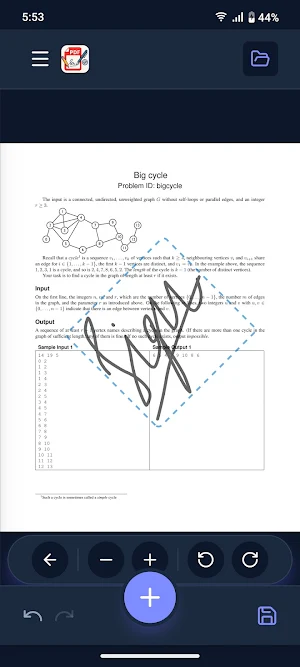
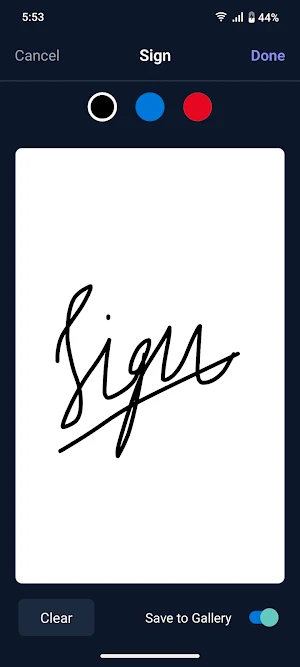
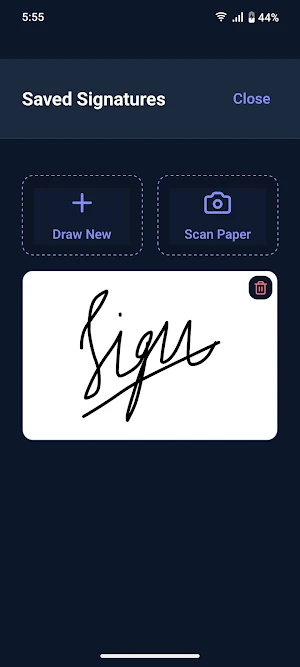
🖋️ Smooth Digital Ink Create your signature once and use it forever. Our advanced ink engine mimics the feel of a real gel pen with velocity-sensitive curves. Choose between Standard Black or Legal Blue ink.
📷 Magic Signature Scanner Have a paper signature you love? Snap a photo of it! Quick Sign instantly removes the background paper, turning it into a sharp, transparent digital signature you can place on any document.
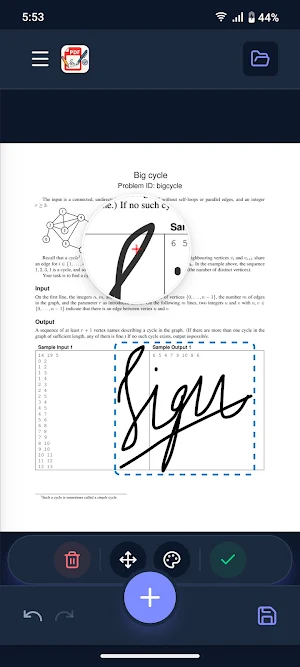
🔍 Precision Magnifier Need to sign on a tiny dotted line? Our built-in Magnifying Glass appears when you touch the screen, letting you place text, dates, and signatures with pixel-perfect accuracy.
📝 Fill Forms & Dates
Add Text: Type names, addresses, and notes directly onto forms.
Smart Date: One-tap insertion of today's date in any format.
Checkmarks: Easily tick boxes and fill questionnaires.
🌙 Professional Dark Mode Work comfortably at night or in low light with a fully optimized, battery-saving Dark Theme.
🛡️ Privacy First
Quick Sign works 100% offline. Your documents, signatures, and personal data NEVER leave your device. We do not store or upload your sensitive contracts to any cloud server.
Why Quick Sign?
No Accounts: Just open and sign.
No Subscriptions: Essential features are free forever.
No Bloat: Lightweight and fast.
Perfect for:
Freelancers signing contracts.
Real Estate agents managing agreements.
Students filling out permission slips.
Anyone tired of printers!
Download Quick Sign today and make paperwork painless.
Forget printing, signing, and scanning. With Quick Sign, you can fill and sign any PDF document in seconds—completely offline and securely on your phone.
✨ Key Features
🖋️ Smooth Digital Ink Create your signature once and use it forever. Our advanced ink engine mimics the feel of a real gel pen with velocity-sensitive curves. Choose between Standard Black or Legal Blue ink.
📷 Magic Signature Scanner Have a paper signature you love? Snap a photo of it! Quick Sign instantly removes the background paper, turning it into a sharp, transparent digital signature you can place on any document.
🔍 Precision Magnifier Need to sign on a tiny dotted line? Our built-in Magnifying Glass appears when you touch the screen, letting you place text, dates, and signatures with pixel-perfect accuracy.
📝 Fill Forms & Dates
Add Text: Type names, addresses, and notes directly onto forms.
Smart Date: One-tap insertion of today's date in any format.
Checkmarks: Easily tick boxes and fill questionnaires.
🌙 Professional Dark Mode Work comfortably at night or in low light with a fully optimized, battery-saving Dark Theme.
🛡️ Privacy First
Quick Sign works 100% offline. Your documents, signatures, and personal data NEVER leave your device. We do not store or upload your sensitive contracts to any cloud server.
Why Quick Sign?
No Accounts: Just open and sign.
No Subscriptions: Essential features are free forever.
No Bloat: Lightweight and fast.
Perfect for:
Freelancers signing contracts.
Real Estate agents managing agreements.
Students filling out permission slips.
Anyone tired of printers!
Download Quick Sign today and make paperwork painless.
Alternatives to Quick Sign -PDF Sign and Edit
Looking for apps like Quick Sign -PDF Sign and Edit? Here are 6 similar Android apps on Google Play. The highest rated is ProBooks: Invoice Maker (4.7/5), and all 6 are free to download.
-
SignNow: Sign & Fill PDF Docs 4.3
-
UPDF - AI-Powered PDF Editor 3.5
-
pdfFiller Edit, fill, sign PDF 3.9
-
KnowHow 4.0
-
ProBooks: Invoice Maker 4.7
-
PDFelement-PDF Editor & Reader 4.2
| App | Rating | Price | Installs | Last updated | Compare |
|---|---|---|---|---|---|
| Quick Sign -PDF Sign and Edit | – | Free | 100+ | Dec 30, 2025 | |
| SignNow: Sign & Fill PDF Docs | 4.3 / 5 | Free | 5,000,000+ | Oct 20, 2026 | Compare |
| UPDF - AI-Powered PDF Editor | 3.5 / 5 | Free | 1,000,000+ | Feb 6, 2026 | Compare |
| pdfFiller Edit, fill, sign PDF | 3.9 / 5 | Free | 5,000,000+ | Oct 22, 2026 | Compare |
| KnowHow | 4.0 / 5 | Free | 1,000+ | Sep 10, 2026 | Compare |
| ProBooks: Invoice Maker | 4.7 / 5 | Free | 100,000+ | Aug 28, 2026 | Compare |
| PDFelement-PDF Editor & Reader | 4.2 / 5 | Free | 5,000,000+ | Oct 16, 2026 | Compare |