
DocNest - free PDF Tools (25+)
Simhadri Somasekhar Tools Contains ads
Merge, split, convert & compress PDF files easily. Fast offline PDF tools app.
- Downloads
- 867+
- on Google Play
- Price
- Free
- No in-app purchases
- Updated
- Jul 6
- 2026 · v1.1.7
Screenshots


About DocNest - free PDF Tools (25+)
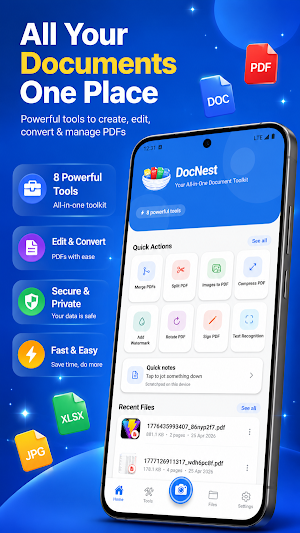
DocNest is your pocket workspace for PDFs: merge, split, edit, convert, protect, and read documents — with processing done on your device so your files stay with you.
Why DocNest
• Works offline — Use core PDF tools without relying on a connection.
• Privacy-minded — Document edits run on-device; no sign-up required to get started.
• All-in-one toolkit — From quick merges to signatures and OCR, one app covers everyday PDF tasks.
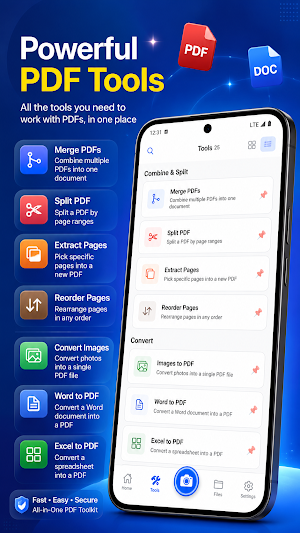
Combine & split
• Merge PDFs — Join multiple PDFs into a single file.
• Split PDF — Separate a document by page ranges.
• Extract pages — Pull only the pages you need into a new PDF.
• Reorder pages — Put pages in the order you want.
Convert
• Images to PDF — Turn photos from your gallery into one PDF.
• PDF to images — Export pages as PNG images when you need pictures instead of a PDF.
Edit & polish
• Compress PDF — Shrink file size for easier sharing.
• Rotate PDF — Fix orientation in steps (90° / 180° / 270°).
• Watermark — Add a text stamp across pages.
• Page numbers — Add clear “page N of total” style numbering.
Security & signatures
• Sign PDF — Draw your signature or use an image and place it on the page.
• Lock PDF — Protect a PDF with a password.
• Unlock PDF — Remove password protection when you have the correct password.
Smart tools
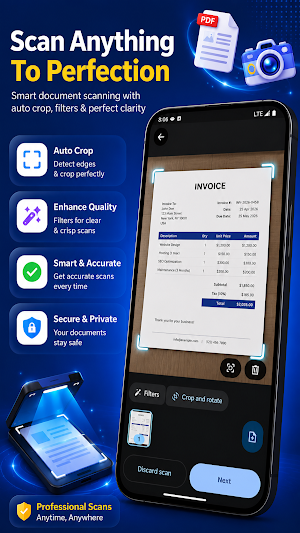
• OCR / text recognition — Pull text from images on-device for searchable, reusable content.
• PDF viewer — Open and read PDFs, with sharing when you need to send a file.
Files & experience
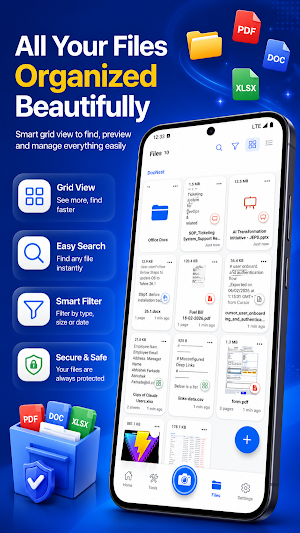
• Built-in file area — Browse and organize documents saved in DocNest, with quick access to recent work.
• Looks great day or night — Light and dark appearance options.
• Speaks your language — Interface available in multiple languages.
DocNest is built for students, freelancers, and anyone who lives in PDFs — forms, scans, contracts, notes, and reports — and wants tools that are fast, simple, and ready when you are.
Note: DocNest is free to use and may show ads. Optional notifications can keep you informed about app updates where enabled.
What’s new
Version 1.1.7 · Updated July 6, 2026
What's new in 1.1.7 • App Lock — PIN or biometrics to protect DocNest • Private Vault — hide sensitive files on your device • Recently deleted — restore files for up to 30 days • Search — find text inside PDFs, Word, Excel & more • Redact PDF — permanently black out sensitive content • Listen — read documents aloud hands-free • Clear cache — free space without deleting your files • UI refresh & first-run onboarding
User reviews

brilliant UI

Great apk . very usefull app...all in one 👍

Nice application with clean UI for daily use

nice app

perfect app all in one 👌

nice app for pdf tools
Alternatives to DocNest - free PDF Tools (25+)
Looking for apps like DocNest - free PDF Tools (25+)? Here are 6 similar Android apps on Google Play. The highest rated is Easy Diary (4.3/5), and all 6 are free to download.
-
touchnotes 3.5
-
PDF Reader(KDAN PDF): Edit PDF 3.8
-
PDF Merge: Scan, Sign & Edit 3.8
-
PDFelement-PDF Editor & Reader 4.1
-
Easy Diary 4.3
-
Dolphin EasyReader 3.5
| App | Rating | Price | Installs | Last updated | Compare |
|---|---|---|---|---|---|
| DocNest - free PDF Tools (25+) | – | Free | 500+ | Jul 6, 2026 | |
| touchnotes | 3.5 / 5 | Free | 1,000,000+ | Oct 24, 2026 | Compare |
| PDF Reader(KDAN PDF): Edit PDF | 3.8 / 5 | Free | 10,000,000+ | – | Compare |
| PDF Merge: Scan, Sign & Edit | 3.8 / 5 | Free | 5,000,000+ | Feb 2, 2026 | Compare |
| PDFelement-PDF Editor & Reader | 4.1 / 5 | Free | 5,000,000+ | Oct 16, 2026 | Compare |
| Easy Diary | 4.3 / 5 | Free | 50,000+ | Oct 2, 2026 | Compare |
| Dolphin EasyReader | 3.5 / 5 | Free | 100,000+ | Aug 28, 2026 | Compare |