
TuneCast DLNA Music Player
Sparkling Apps Music & Audio Contains ads
TuneCast - Play any music on your device and send it straight to your Smart TV
- Rating
- 3.7
- 244 ratings
- Downloads
- 41.5K+
- on Google Play
- Price
- Free
- No in-app purchases
- Updated
- May 31
- 2022 · v1.1.4
Screenshots


About TuneCast DLNA Music Player
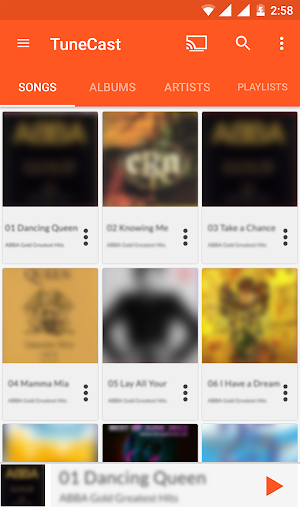
Play any music straight to your TV with TuneCast. TuneCast gives you full control over all your music files and gives you the option to stream them to any Smart TV. No need for any additional hardware, just play the songs to your tv and enjoy them on your home music system instead of your mobile speakers.
TuneCast supports just about any type of mp3, midi, wav, flac, raw, aac files and other audio formats. Easily browse songs by genre, album, artist, song name and folder and play on your phone or to your TV.
TuneCast uses DLNA/UPnP to discover and initiate/control playback on devices in your home network.
FEATURES:
Listen to music and songs with this practical lightweight music player for your android device.
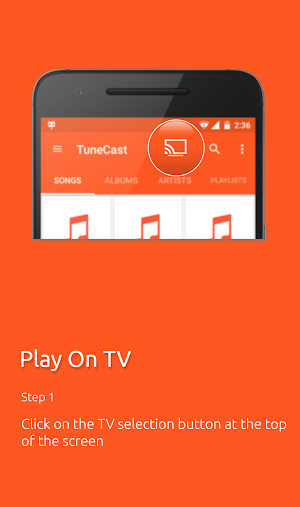
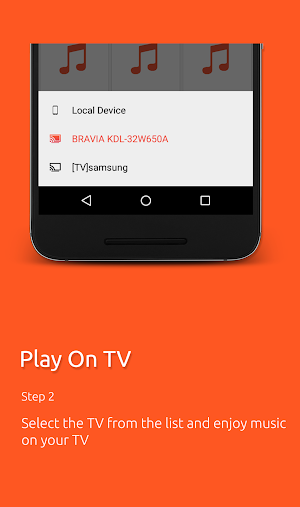
Play to TV - Instantly stream your music to any Smart TV
Search Music - Search for your songs quickly
Play music by song, artist, album or playlist
Easy navigation - One touch to navigate in your audio player between music playlist, artist, songs, and settings
Music Playlist - Build and edit your songs into playlists
Music shuffle - Shuffle your music
Notification control - Control playback from notifications and lock screen
Create and save playlists
5 band graphical equalizer with presets
Supports mp3, midi, wav, flac, aac and other audio formats
TuneCast supports the following devices for TV streaming:
- Western Digital Media Players (WD TV Live, WD TV Live Plus, WD TV Live Hub)
- Samsung SmartTVs
- Sony Bravia SmartTVs
- Panasonic Viera TVs
- Philips SmartTVs
- Toshiba SmartTVs
- Sharp TVs
- LG Connected TVs
- Xbox 360
- Xbox One
- XBMC
- Chromecast, Chromecast Audio, Nexus Player, Nvidia Shield, and other Google Cast devices
- DLNA TVs and music receivers from popular TV and HiFi brands
- BubbleUPNP Media Renderer and similar UPnP / DLNA renderers
- Roku | Streaming TV & Media Player
- Xiaomi Box and Huawei MediaQ box
- Amazon Fire TV and Fire TV Stick
- Windows Media Player
Enjoy TuneCast! For any comments, please write to us at [email protected]
TuneCast supports just about any type of mp3, midi, wav, flac, raw, aac files and other audio formats. Easily browse songs by genre, album, artist, song name and folder and play on your phone or to your TV.
TuneCast uses DLNA/UPnP to discover and initiate/control playback on devices in your home network.
FEATURES:
Listen to music and songs with this practical lightweight music player for your android device.
Play to TV - Instantly stream your music to any Smart TV
Search Music - Search for your songs quickly
Play music by song, artist, album or playlist
Easy navigation - One touch to navigate in your audio player between music playlist, artist, songs, and settings
Music Playlist - Build and edit your songs into playlists
Music shuffle - Shuffle your music
Notification control - Control playback from notifications and lock screen
Create and save playlists
5 band graphical equalizer with presets
Supports mp3, midi, wav, flac, aac and other audio formats
TuneCast supports the following devices for TV streaming:
- Western Digital Media Players (WD TV Live, WD TV Live Plus, WD TV Live Hub)
- Samsung SmartTVs
- Sony Bravia SmartTVs
- Panasonic Viera TVs
- Philips SmartTVs
- Toshiba SmartTVs
- Sharp TVs
- LG Connected TVs
- Xbox 360
- Xbox One
- XBMC
- Chromecast, Chromecast Audio, Nexus Player, Nvidia Shield, and other Google Cast devices
- DLNA TVs and music receivers from popular TV and HiFi brands
- BubbleUPNP Media Renderer and similar UPnP / DLNA renderers
- Roku | Streaming TV & Media Player
- Xiaomi Box and Huawei MediaQ box
- Amazon Fire TV and Fire TV Stick
- Windows Media Player
Enjoy TuneCast! For any comments, please write to us at [email protected]
What’s new
Version 1.1.4 · Updated May 31, 2022
- Adjusted ad placement to be less intrusive - Bug fixes and performance improvements
User reviews

Works really well with my Sony Bravia! Full marks to the developers .

SunGlasses

easy connect n use,find song fast

No complaint so far
it is that I have been searching i am really grateful with us , developers :')

best of DLNA app, thanks
Alternatives to TuneCast DLNA Music Player
Looking for apps like TuneCast DLNA Music Player? Here are 6 similar Android apps on Google Play. The highest rated is Voice Answer Lite (3.3/5), and all 6 are free to download.
-
Redmi Call Recorder
-
Realme Call Recorder
-
Voice Answer Lite 3.3
-
Vivo Call Recorder
-
Oppo Call Recorder
-
Poco Call Recorder
| App | Rating | Price | Installs | Last updated | Compare |
|---|---|---|---|---|---|
| TuneCast DLNA Music Player | 3.7 / 5 | Free | 10,000+ | May 31, 2022 | |
| Redmi Call Recorder | – | Free | 500,000+ | Oct 10, 2025 | Compare |
| Realme Call Recorder | – | Free | 50,000+ | Aug 31, 2021 | Compare |
| Voice Answer Lite | 3.3 / 5 | Free | 500,000+ | Nov 1, 2019 | Compare |
| Vivo Call Recorder | – | Free | 100,000+ | Oct 6, 2026 | Compare |
| Oppo Call Recorder | – | Free | 500,000+ | Oct 13, 2026 | Compare |
| Poco Call Recorder | – | Free | 50,000+ | Sep 22, 2025 | Compare |
Similar apps on Google Play
- Redmi Call Recorder
- Realme Call Recorder
- Voice Answer Lite
- Vivo Call Recorder
- Oppo Call Recorder
- Poco Call Recorder
- Translator keyboard
- Infinix Call Recorder
- NOTAMs
- CrypTop
- PilotWeather Lite
- Traffic Racing
- WeatherRadar Pro
- WeatherRadar
- ImageCast DLNA Gallery Viewer
- TuneCast DNLA Music Player Pro
- Voice to Voice
- Talking Goggles Lite
- Talking Goggles
- Translator with Speech Pro
- Voice Answer
- Talk to Eve
- PilotWeather
- Translator With Speech
- Screen Project