
SpaceLens
Intellignt Phool Productivity
Privacy focused- storage analyzer. Find duplicates, clear junk, space safely.
- Downloads
- 36+
- on Google Play
- Price
- Free
- No in-app purchases
- Updated
- Sep 12
- 2026 · v0.1.6
Screenshots
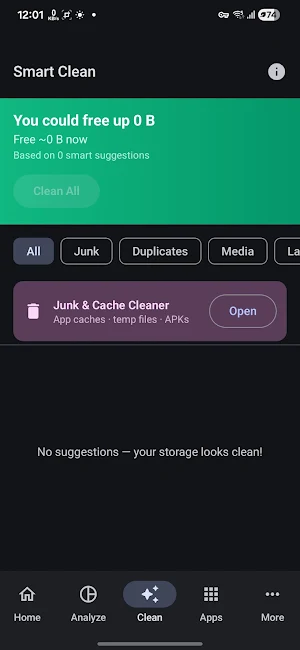


About SpaceLens
Running low on storage? SpaceLens shows you exactly what's taking up space — and
helps you clean it up safely, with a full undo safety net.
🔍 DEEP ANALYSIS
• Scans photos, videos, audio, documents, downloads, and app data in seconds
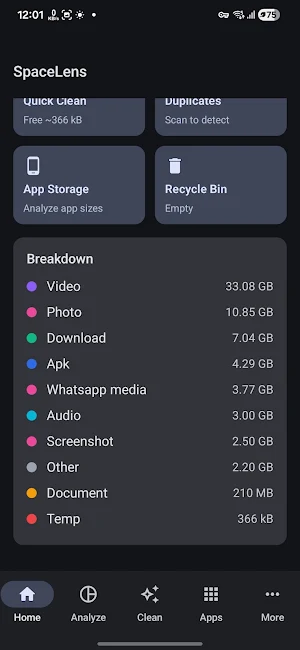
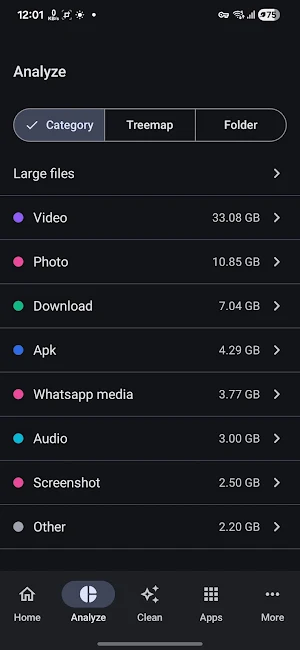
• Category breakdown — see at a glance which type is eating your storage
• Large-file finder — spot space hogs by size across every category
• Duplicate detector — finds exact copies and keeps the oldest original for you
• Similar Photos — detects near-duplicate and blurry shots using on-device image analysis
• App Storage Analyzer — see cache, data, and install size per app with last-used date
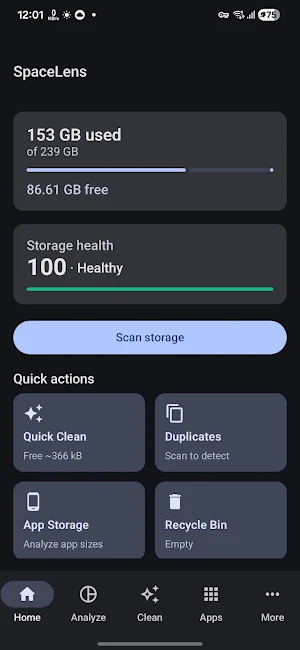
• Storage Health Score — clear 0–100 signal with Healthy / Fair / Warning / Critical labels
• Storage Timeline — track how your usage has grown over the past week, month, or year
🧹 SMART, SAFE CLEANUP
• Smart Recommendations — every suggestion includes a plain-English reason ("WhatsApp
media, downloaded 60 days ago, never opened") so you always know what you're deleting
• Safety ratings (Safe / Review / Caution) for every file recommendation
• One-tap or reviewed batch deletion — you choose what goes
• Recycle Bin with configurable retention (7 / 14 / 30 days / Off)
• 8-second undo snackbar on every delete — change your mind instantly
• Scheduled auto-clean — set it and forget it (optional, off by default)
• Watch List — monitor specific folders and get alerted when they grow too large
🔒 PRIVACY-FIRST, FULLY OFFLINE
• No INTERNET permission — SpaceLens makes no network calls and transmits no user data
• No account, no sign-in, no ads, no trackers, no analytics
• All analysis runs entirely on-device; your files never leave your phone
• Open permissions audit screen shows exactly which permissions are granted and why
• Optional App Lock — protect SpaceLens with a PIN or biometric
🎨 POLISHED & ACCESSIBLE
• Material You design with system, light, and dark theme support
• Clean, modern UI built for Android 8.0 (API 26) and above
• TalkBack-compatible with meaningful content descriptions throughout
• 48 dp minimum touch targets, reduced-motion support
• Folder treemap visualisation — see your storage landscape at a glance
---
SpaceLens is completely free. No subscription, no "Pro" tier, no upsells.
helps you clean it up safely, with a full undo safety net.
🔍 DEEP ANALYSIS
• Scans photos, videos, audio, documents, downloads, and app data in seconds
• Category breakdown — see at a glance which type is eating your storage
• Large-file finder — spot space hogs by size across every category
• Duplicate detector — finds exact copies and keeps the oldest original for you
• Similar Photos — detects near-duplicate and blurry shots using on-device image analysis
• App Storage Analyzer — see cache, data, and install size per app with last-used date
• Storage Health Score — clear 0–100 signal with Healthy / Fair / Warning / Critical labels
• Storage Timeline — track how your usage has grown over the past week, month, or year
🧹 SMART, SAFE CLEANUP
• Smart Recommendations — every suggestion includes a plain-English reason ("WhatsApp
media, downloaded 60 days ago, never opened") so you always know what you're deleting
• Safety ratings (Safe / Review / Caution) for every file recommendation
• One-tap or reviewed batch deletion — you choose what goes
• Recycle Bin with configurable retention (7 / 14 / 30 days / Off)
• 8-second undo snackbar on every delete — change your mind instantly
• Scheduled auto-clean — set it and forget it (optional, off by default)
• Watch List — monitor specific folders and get alerted when they grow too large
🔒 PRIVACY-FIRST, FULLY OFFLINE
• No INTERNET permission — SpaceLens makes no network calls and transmits no user data
• No account, no sign-in, no ads, no trackers, no analytics
• All analysis runs entirely on-device; your files never leave your phone
• Open permissions audit screen shows exactly which permissions are granted and why
• Optional App Lock — protect SpaceLens with a PIN or biometric
🎨 POLISHED & ACCESSIBLE
• Material You design with system, light, and dark theme support
• Clean, modern UI built for Android 8.0 (API 26) and above
• TalkBack-compatible with meaningful content descriptions throughout
• 48 dp minimum touch targets, reduced-motion support
• Folder treemap visualisation — see your storage landscape at a glance
---
SpaceLens is completely free. No subscription, no "Pro" tier, no upsells.
Alternatives to SpaceLens
Looking for apps like SpaceLens? Here are 4 similar Android apps on Google Play. All of them are free to download.

| App | Rating | Price | Installs | Last updated | Compare |
|---|---|---|---|---|---|
| SpaceLens | – | Free | 10+ | Sep 12, 2026 | |
| Battery Current Monitor | – | Free | 100+ | Oct 18, 2026 | Compare |
| Travel Explorer | – | Free | 10+ | Aug 29, 2026 | Compare |
| Screenshots Organizer | – | Free | 10+ | Oct 15, 2026 | Compare |
| Status Saver - Offline Backup | – | Free | 50+ | – | Compare |
Compare SpaceLens with the top alternatives: ratings, updates, ASO score and keyword gaps →