

Win Shelves
Portofein Arcade
Win Shelves - Sort glowing gems across glass shelves in 20 colorful puzzles.
- Price
- Free
- No in-app purchases
- Updated
- Aug 31
- 2026
Screenshots


About Win Shelves
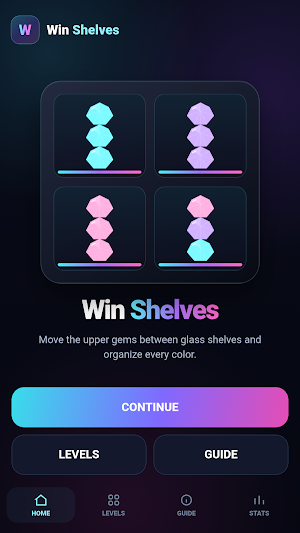
💎 Win Shelves brings a clean color-sorting puzzle into a glowing cabinet filled with glass shelves and bright faceted gems. Each level starts with mixed colors arranged across several shelves. Move the upper gem from one shelf to another and organize the cabinet until every occupied shelf contains gems of only one color.
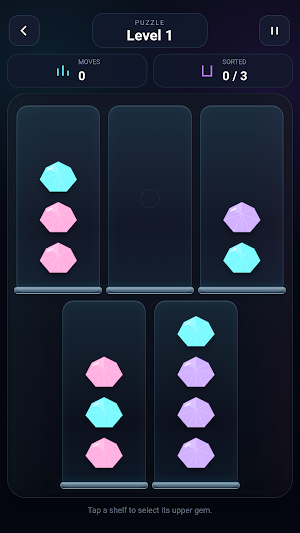
✨ In Win Shelves, tap a shelf to select the gem resting at the upper position, then choose where to place it. A gem can move to an empty shelf or onto a matching color when space is available. When all occupied shelves contain a single color, the level is complete.
🗄️ The puzzle screen in Win Shelves is built around a dark illuminated cabinet. Transparent glass shelves sit inside a deep background with cyan, violet, and pink lighting. The gems use faceted shapes, bright reflections, layered gradients, and glowing edges, helping each color remain easy to recognize. The layout stays centered and symmetrical as the number of shelves changes.
🧩 Win Shelves includes 20 puzzle levels with a gradual increase in colors and shelf count. Early stages introduce the sorting rule with compact arrangements, while later stages create larger cabinets that require more careful sequencing. Empty shelves provide temporary space for rearranging colors, and deciding when to use that space becomes an important part of solving each board.
🎯 You can only move the upper gem, so pieces below it remain blocked until the gems above are relocated. This makes Win Shelves a game of order, observation, and planning rather than quick reactions. A useful move can open several options, while a careless move can make the next steps more complicated.
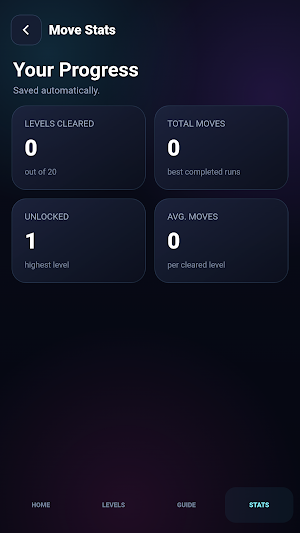
📊 Win Shelves includes Move Stats for tracking progress. You can see how many levels have been cleared, review move totals, view the highest unlocked level, and check the average move count across completed stages. Progress is stored automatically on the device, so you can return later and continue from the levels you have already unlocked.
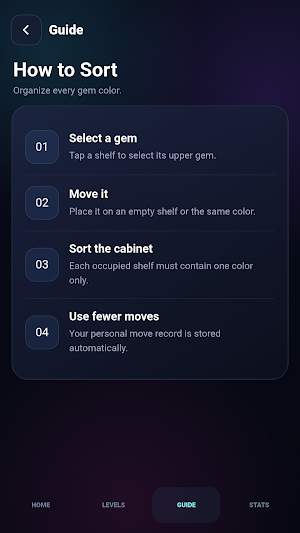
📚 The Guide screen explains the core rules directly inside Win Shelves. It shows how to select the upper gem, where a selected gem can be placed, and what a completed shelf should look like. The interface stays focused on the puzzle and keeps navigation straightforward through Main Menu, Levels, Guide, and Move Stats.
⏸️ During a puzzle, Win Shelves provides a Pause screen. From there, you can resume the current board, restart the level from its initial arrangement, or return to level selection. Restart also gives you a simple way to approach the same cabinet again with a different sequence of moves.
🌈 The visual identity of Win Shelves stays consistent across menus and puzzle screens. Cyan highlights, violet accents, pink illumination, transparent panels, and luminous gems create a polished neon atmosphere. The cabinet gives each stage a clear structure, while the gem artwork keeps individual colors visually distinct.
📱 Win Shelves is designed for mobile interaction. Large touch areas make shelves easy to select, the portrait layout keeps important information visible, and the puzzle board adapts to different cabinet sizes. Move information and sorting progress remain easy to read while you work through the arrangement.
🔹 Completed stages can be replayed so you can try another route through the same arrangement and compare move counts. Use empty space carefully, combine matching colors, uncover blocked gems, and gradually turn a mixed cabinet into an organized display.
💠 Win Shelves focuses on one clear sorting mechanic across twenty different arrangements. From the first selection to the final organized shelf, the experience stays centered on examining colors, planning the order, moving upper gems, and completing the cabinet with clean single-color groups.
✨ In Win Shelves, tap a shelf to select the gem resting at the upper position, then choose where to place it. A gem can move to an empty shelf or onto a matching color when space is available. When all occupied shelves contain a single color, the level is complete.
🗄️ The puzzle screen in Win Shelves is built around a dark illuminated cabinet. Transparent glass shelves sit inside a deep background with cyan, violet, and pink lighting. The gems use faceted shapes, bright reflections, layered gradients, and glowing edges, helping each color remain easy to recognize. The layout stays centered and symmetrical as the number of shelves changes.
🧩 Win Shelves includes 20 puzzle levels with a gradual increase in colors and shelf count. Early stages introduce the sorting rule with compact arrangements, while later stages create larger cabinets that require more careful sequencing. Empty shelves provide temporary space for rearranging colors, and deciding when to use that space becomes an important part of solving each board.
🎯 You can only move the upper gem, so pieces below it remain blocked until the gems above are relocated. This makes Win Shelves a game of order, observation, and planning rather than quick reactions. A useful move can open several options, while a careless move can make the next steps more complicated.
📊 Win Shelves includes Move Stats for tracking progress. You can see how many levels have been cleared, review move totals, view the highest unlocked level, and check the average move count across completed stages. Progress is stored automatically on the device, so you can return later and continue from the levels you have already unlocked.
📚 The Guide screen explains the core rules directly inside Win Shelves. It shows how to select the upper gem, where a selected gem can be placed, and what a completed shelf should look like. The interface stays focused on the puzzle and keeps navigation straightforward through Main Menu, Levels, Guide, and Move Stats.
⏸️ During a puzzle, Win Shelves provides a Pause screen. From there, you can resume the current board, restart the level from its initial arrangement, or return to level selection. Restart also gives you a simple way to approach the same cabinet again with a different sequence of moves.
🌈 The visual identity of Win Shelves stays consistent across menus and puzzle screens. Cyan highlights, violet accents, pink illumination, transparent panels, and luminous gems create a polished neon atmosphere. The cabinet gives each stage a clear structure, while the gem artwork keeps individual colors visually distinct.
📱 Win Shelves is designed for mobile interaction. Large touch areas make shelves easy to select, the portrait layout keeps important information visible, and the puzzle board adapts to different cabinet sizes. Move information and sorting progress remain easy to read while you work through the arrangement.
🔹 Completed stages can be replayed so you can try another route through the same arrangement and compare move counts. Use empty space carefully, combine matching colors, uncover blocked gems, and gradually turn a mixed cabinet into an organized display.
💠 Win Shelves focuses on one clear sorting mechanic across twenty different arrangements. From the first selection to the final organized shelf, the experience stays centered on examining colors, planning the order, moving upper gems, and completing the cabinet with clean single-color groups.
Play today's Inkspill puzzle
Spread your ink until the whole board is one color, within the move limit. A free daily puzzle from Fiplay, same board for everyone. It plays right here, no download.
Alternatives to Win Shelves
Looking for apps like Win Shelves? Here are 6 similar Android apps on Google Play. All of them are free to download.






| App | Rating | Price | Installs | Last updated | Compare |
|---|---|---|---|---|---|
| Win Shelves | – | Free | 0+ | Aug 31, 2026 | |
| Sum Trail | – | Free | 1+ | Aug 10, 2026 | Compare |
| Win Flick | – | Free | 0+ | Aug 31, 2026 | Compare |
| Win Glyphs | – | Free | 100+ | Aug 31, 2026 | Compare |
| Win Rotate | – | Free | 0+ | Aug 31, 2026 | Compare |
| Win Crates | – | Free | 5+ | Aug 31, 2026 | Compare |
| Win Loop | – | Free | 0+ | Aug 31, 2026 | Compare |
Compare Win Shelves with the top alternatives: ratings, updates, ASO score and keyword gaps →