
HDD Audio Remote
Sony Home Entertainment & Sound Products Inc. Music & Audio
You can operate your Sony HDD Audio Player using this app.
- Rating
- 3.4
- 933 ratings
- Downloads
- 241K+
- on Google Play
- Price
- Free
- No in-app purchases
- Updated
- Dec 12
- 2022 · v4.3.1
Screenshots


About HDD Audio Remote
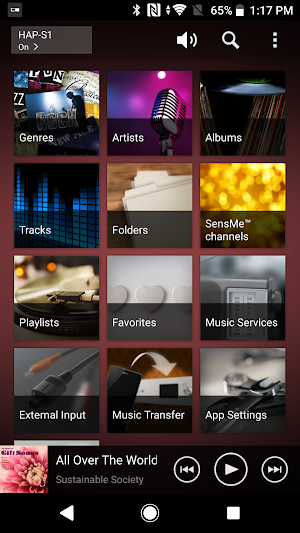
HDD Audio Remote is a mobile application that allows you to operate compatible HDD AUDIO PLAYER models using your smartphone or tablet.
The application allows you to operate HDD AUDIO PLAYER easily using specialized functions that are only possible in a mobile application, such as the “Full Browser” function (tablets only).
This application has the following features:
- Easy operation of HDD AUDIO PLAYER using your mobile device
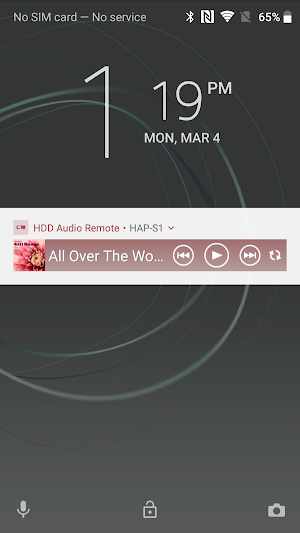
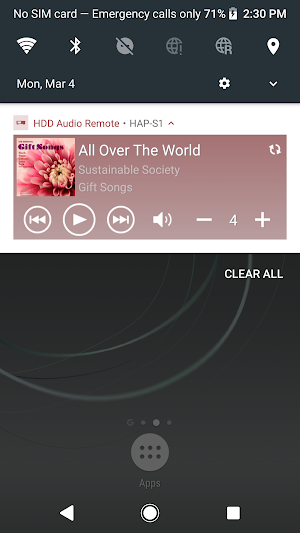
By installing HDD Audio Remote on your smartphone or tablet, you can remotely select and play tracks, change playback volume, stop playback and more, instead of operating the HDD AUDIO PLAYER directly. You can also select music services.
- Creating and editing playlists
You can create and edit playlists with your favorite tracks.
- Editing the music information of a track
You can edit the details of tracks.
Compatible models:
HDD Audio Remote supports the following HDD AUDIO PLAYER models. (as of Sept., 2013)
- HAP-Z1ES
- HAP-S1
Note:
The functions of HDD Audio Remote may vary depending on the HDD AUDIO PLAYER model.
Version 4.2.0
- Added support for specification changes in Spotify service.
"Favorites" for Spotify is changed to "Presets".
- Operability improved.
Version 4.1.0
- Search from the search history is now available.
- Track list sorting by playback count (max./min.) is now available.
- The "Play same SensMe™ channels" option is now included in the track/file context menu and the option menu on the playback screen. (You can immediately play tracks in the SensMe™ channels to which the selected track/file belongs.)
- Operability improved.
Version 4.0.0
- Spotify Connect is now supported. Start the Spotify application and log in with the Premium account. (Only available in the service coverage areas.)
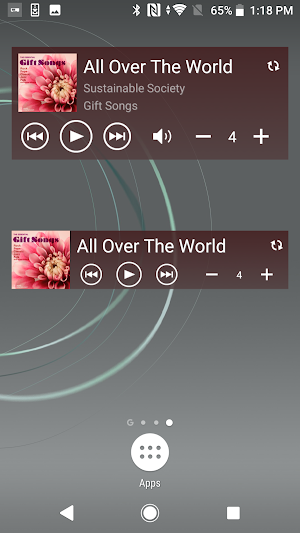
- Widgets are now supported.
- Playlists can now be created easier. You can add content to a playlist while browsing or add the entire play queue to a playlist.
- Playlists can now be sorted (by Name, by Creation Date, or by No. of Tracks).
- Detailed track information can now be displayed on the playback screen. You can tap an album name or an artist name to go to the relevant list.
- During playback of one of the SensMe™ channels, its channel name can now be displayed on the playback screen.
- Operability improved.
Version 3.3.0
- "DSEE HX" was added to the Options menu. (HAP-S1 only)
- "Recently played" was added to automatically generated playlists.
- Music info can now be re-acquired for DSD format content also.
- Descending order was added to sorting (by name, by album track, by year).
- Operability improved.
Version 3.2.0
- "Divide Album" is now supported.
- Format display was added to the Album list of the tablet (when all tracks on the album are the same format).
- "Go to album" (go directly from the track or file to the album to which the track or file belongs) is now supported.
- The track list can now be sorted in the screen used to add tracks to the playlist.
- Operability improved.
Version 3.1.0
- "TuneIn" Internet radio is now supported.
- "Help" was added to the Home menu.
- "Re-acquire database from the player" was added to the App Settings.
- Images saved on the mobile device can now be selected when editing album art. (OS 4.0.3 or later)
- Operability improved.
Version 3.0.1
- Operability improved.
Version 3.0.0
- The app now supports the "Music Transfer" function (transferring music files to the player from a mobile device).
- The app now supports the "Edit SensMe™ channels" function.
- It is now possible to set oversampling (HAP-Z1ES only).
- Album art has been added to the playlist track screen and Favorites screen.
- Operability improved.
The application allows you to operate HDD AUDIO PLAYER easily using specialized functions that are only possible in a mobile application, such as the “Full Browser” function (tablets only).
This application has the following features:
- Easy operation of HDD AUDIO PLAYER using your mobile device
By installing HDD Audio Remote on your smartphone or tablet, you can remotely select and play tracks, change playback volume, stop playback and more, instead of operating the HDD AUDIO PLAYER directly. You can also select music services.
- Creating and editing playlists
You can create and edit playlists with your favorite tracks.
- Editing the music information of a track
You can edit the details of tracks.
Compatible models:
HDD Audio Remote supports the following HDD AUDIO PLAYER models. (as of Sept., 2013)
- HAP-Z1ES
- HAP-S1
Note:
The functions of HDD Audio Remote may vary depending on the HDD AUDIO PLAYER model.
Version 4.2.0
- Added support for specification changes in Spotify service.
"Favorites" for Spotify is changed to "Presets".
- Operability improved.
Version 4.1.0
- Search from the search history is now available.
- Track list sorting by playback count (max./min.) is now available.
- The "Play same SensMe™ channels" option is now included in the track/file context menu and the option menu on the playback screen. (You can immediately play tracks in the SensMe™ channels to which the selected track/file belongs.)
- Operability improved.
Version 4.0.0
- Spotify Connect is now supported. Start the Spotify application and log in with the Premium account. (Only available in the service coverage areas.)
- Widgets are now supported.
- Playlists can now be created easier. You can add content to a playlist while browsing or add the entire play queue to a playlist.
- Playlists can now be sorted (by Name, by Creation Date, or by No. of Tracks).
- Detailed track information can now be displayed on the playback screen. You can tap an album name or an artist name to go to the relevant list.
- During playback of one of the SensMe™ channels, its channel name can now be displayed on the playback screen.
- Operability improved.
Version 3.3.0
- "DSEE HX" was added to the Options menu. (HAP-S1 only)
- "Recently played" was added to automatically generated playlists.
- Music info can now be re-acquired for DSD format content also.
- Descending order was added to sorting (by name, by album track, by year).
- Operability improved.
Version 3.2.0
- "Divide Album" is now supported.
- Format display was added to the Album list of the tablet (when all tracks on the album are the same format).
- "Go to album" (go directly from the track or file to the album to which the track or file belongs) is now supported.
- The track list can now be sorted in the screen used to add tracks to the playlist.
- Operability improved.
Version 3.1.0
- "TuneIn" Internet radio is now supported.
- "Help" was added to the Home menu.
- "Re-acquire database from the player" was added to the App Settings.
- Images saved on the mobile device can now be selected when editing album art. (OS 4.0.3 or later)
- Operability improved.
Version 3.0.1
- Operability improved.
Version 3.0.0
- The app now supports the "Music Transfer" function (transferring music files to the player from a mobile device).
- The app now supports the "Edit SensMe™ channels" function.
- It is now possible to set oversampling (HAP-Z1ES only).
- Album art has been added to the playlist track screen and Favorites screen.
- Operability improved.
What’s new
Version 4.3.1 · Updated December 12, 2022
Version 4.3.1 - Operability improved.
User reviews

Top app works very well could do with a windows version

Works well controlling my Sony equipment. Very convenient and has most of the functions I need so I don't have to look for the original remotes. Thanks Sony!

Ideal for my Sony HAP S1

Brilliant software as is the Sony HAP S1 player.

top

no problems works great
Alternatives to HDD Audio Remote
Looking for apps like HDD Audio Remote? Here are 6 similar Android apps on Google Play. The highest rated is Advagym (4.8/5), and all 6 are free to download.
-
Advagym 4.8
-
Sony | Headphones Connect 4.4
-
α CLOCK 4.3
-
BluOS Controller 4.5
-
DTS Play-Fi™ 3.2
-
NEW remote control all devices 4.4
| App | Rating | Price | Installs | Last updated | Compare |
|---|---|---|---|---|---|
| HDD Audio Remote | 3.4 / 5 | Free | 100,000+ | Dec 12, 2022 | |
| Advagym | 4.8 / 5 | Free | 10,000+ | Dec 22, 2020 | Compare |
| Sony | Headphones Connect | 4.4 / 5 | Free | 10,000,000+ | Sep 7, 2026 | Compare |
| α CLOCK | 4.3 / 5 | Free | 1,000,000+ | Nov 11, 2020 | Compare |
| BluOS Controller | 4.5 / 5 | Free | 500,000+ | Sep 18, 2026 | Compare |
| DTS Play-Fi™ | 3.2 / 5 | Free | 100,000+ | Nov 18, 2025 | Compare |
| NEW remote control all devices | 4.4 / 5 | Free | 5,000+ | Nov 15, 2020 | Compare |
Compare HDD Audio Remote with the top alternatives: ratings, updates, ASO score and keyword gaps →