
Pixie Art
Solwin Infotech Photography Contains ads
Pixie Art - Compose the quality banners for Facebook Twitter Instagram Pinterest
- Rating
- 2.9
- 67 ratings
- Downloads
- 5K+
- on Google Play
- Price
- Free
- No in-app purchases
- Updated
- Jul 20
- 2016 · v1.2
Screenshots
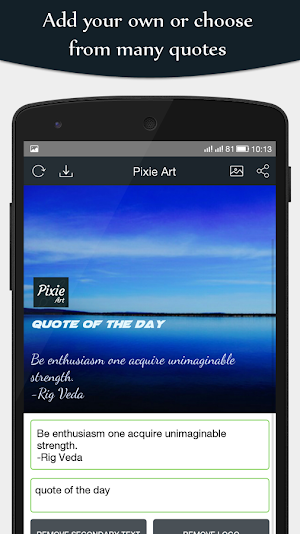

About Pixie Art
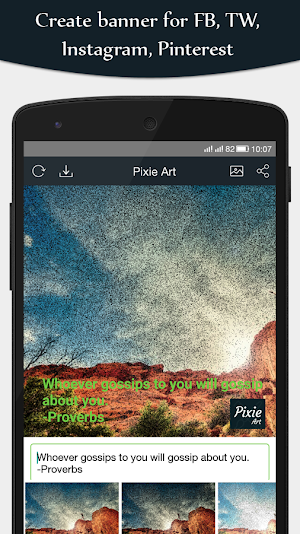
"Pixie Art" the application for creation of all kinds of the banners. You can create Wide banners for Facebook and Twitter; Square banners for Instagram; and Tall for Pinterest.
Let’s move on to how to create your first beautiful banner with the Pixie Art.
How it works:
Step 1:
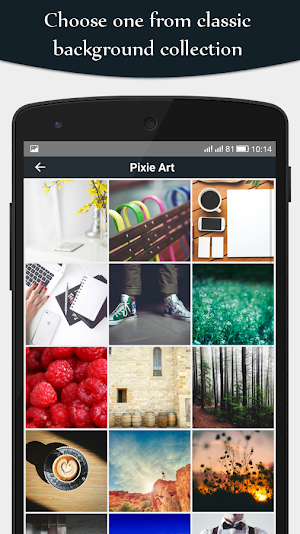
Import background photo from gallery or click the fresh from from camera. You can also choose from our hand picked collection of the default backgrounds.
Step 2:
There is an option to apply various filters over the background.
Step 3:
Add the custom text over the image or can use one from the existing thoughts. You can change thoughts by pressing top left button on navigation bar.
Step 4:
Press "Add secondary text" to enable the subtitle for the banner, or punchline to support the title text.
Step 5:
Press "Add Logo" to add the logo for your banner. Move, Re-size to set it to specific location.
Step 6:
Save it to gallery, or share the banner with your friends over the Facebook, Twitter, Instagram etc.. to get the review about your creation.
Features covered in the app:
- More than 10 filters for decorating your banners.
- Easy share the photo on Instagram, Twitter and Facebook to wow your friends.
- Add custom fonts
- Re-size the text with the pinch gestures
- All banner sizes supported!
- Wide banner: For Facebook and Twitter
- Tall banner: For Pinterest
- Square banner: For Instagram
I hope you will enjoy this pixie art application. and make the great impression amongst your friends by creating the wonderful banners using the app.
Feel free to contact us at: http://www.solwininfotech.com for any queries.
Let’s move on to how to create your first beautiful banner with the Pixie Art.
How it works:
Step 1:
Import background photo from gallery or click the fresh from from camera. You can also choose from our hand picked collection of the default backgrounds.
Step 2:
There is an option to apply various filters over the background.
Step 3:
Add the custom text over the image or can use one from the existing thoughts. You can change thoughts by pressing top left button on navigation bar.
Step 4:
Press "Add secondary text" to enable the subtitle for the banner, or punchline to support the title text.
Step 5:
Press "Add Logo" to add the logo for your banner. Move, Re-size to set it to specific location.
Step 6:
Save it to gallery, or share the banner with your friends over the Facebook, Twitter, Instagram etc.. to get the review about your creation.
Features covered in the app:
- More than 10 filters for decorating your banners.
- Easy share the photo on Instagram, Twitter and Facebook to wow your friends.
- Add custom fonts
- Re-size the text with the pinch gestures
- All banner sizes supported!
- Wide banner: For Facebook and Twitter
- Tall banner: For Pinterest
- Square banner: For Instagram
I hope you will enjoy this pixie art application. and make the great impression amongst your friends by creating the wonderful banners using the app.
Feel free to contact us at: http://www.solwininfotech.com for any queries.
What’s new
Version 1.2 · Updated July 20, 2016
V 1.2 - Fixed minor bugs V 1.1 - Provided support for large devices - Performance enhancement - Fixed minor bugs
User reviews

It's creative
It's a Awesome app
I like this app
It's perfect!~♡
its good enough.
It's just awesome....!!!
Alternatives to Pixie Art
Looking for apps like Pixie Art? Here are 6 similar Android apps on Google Play. The highest rated is Computer launcher Ultimate (3.1/5), and all 6 are free to download.
-
Computer launcher Ultimate 3.1
-
Baby Photo Frames +
-
Expense Manager Ultimate
-
Gujarati Bhajan
-
Chanakya Niti from A to Z
-
Recipes in Gujarati
| App | Rating | Price | Installs | Last updated | Compare |
|---|---|---|---|---|---|
| Pixie Art | 2.9 / 5 | Free | 5,000+ | Jul 20, 2016 | |
| Computer launcher Ultimate | 3.1 / 5 | Free | 500+ | Jun 1, 2021 | Compare |
| Baby Photo Frames + | – | Free | 1,000+ | Apr 18, 2022 | Compare |
| Expense Manager Ultimate | – | Free | 500+ | Apr 18, 2022 | Compare |
| Gujarati Bhajan | – | Free | 10,000+ | Nov 6, 2020 | Compare |
| Chanakya Niti from A to Z | – | Free | 1,000+ | Apr 18, 2022 | Compare |
| Recipes in Gujarati | – | Free | 5,000+ | Apr 18, 2022 | Compare |
Compare Pixie Art with the top alternatives: ratings, updates, ASO score and keyword gaps →