
OBDIAG: OBD Scan & Performance
TRANSFERAUTO ONLINE S.L. Auto & Vehicles
OBD2 Scanner: Reads and clears faults, live data and diagnostic report.
- Downloads
- 948+
- on Google Play
- Price
- Free
- No in-app purchases
- Updated
- Sep 9
- 2026 · v1.0.213
Screenshots
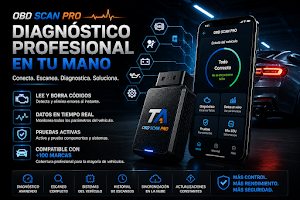
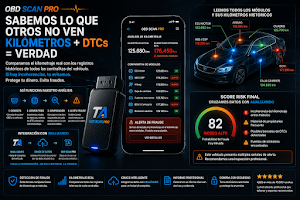
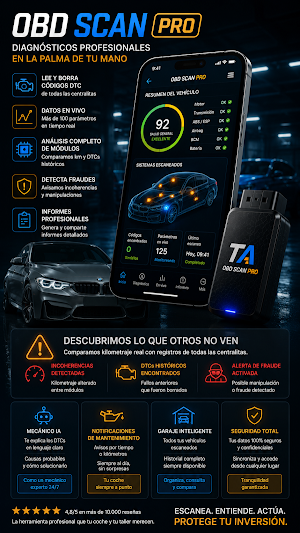
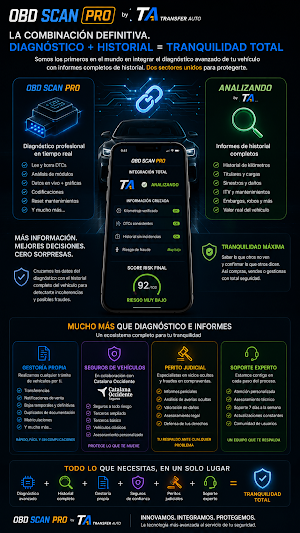


About OBDIAG: OBD Scan & Performance
OBDIAG turns your Android phone into an OBD2 scanner for compatible cars. Connect an ELM327 adapter via Bluetooth and perform vehicle diagnostics from your phone.
OBD2 SCANNER AND FAULT CODES
• Reads available OBD2 fault codes (DTCs).
• View a clear explanation of the detected fault.
• Clears codes and turns off the Check Engine light when the ECU allows it.
• Saves scan history for later review.
REAL-TIME ENGINE DATA
View parameters displayed by the vehicle and the adapter, such as:
• Engine RPM, speed, and load.
• Coolant and intake air temperature.
• Throttle position, voltage, and MAP pressure.
• MAF sensor readings and other compatible sensor readings.
• Status of OBD inspection readiness monitors.
VIN, MILEAGE, AND DIAGNOSTIC REPORT
• Retrieve the VIN when provided by the ECU.
• Check the electronic mileage available on compatible vehicles.
• Generate a report with the codes and data obtained.
Review faults and parameters before buying a used car or taking it to a mechanic.
VIN and mileage data are for guidance only and should be verified with the vehicle's documentation and a professional inspection.
OBD2 COMPATIBILITY
The Android version of OBDIAG uses classic Bluetooth SPP/RFCOMM and works with compatible ELM327 adapters. The number of modules, sensors, and functions available depends on the vehicle, the ECU, the OBD protocol, the adapter, and the permissions granted by Android.
As a general reference, OBD-II is usually available in gasoline passenger cars sold in Europe since 2001 and diesel cars since 2004, although there are exceptions. In the United States, it has generally been available since 1996.
HOW TO USE OBDIAG
1. Connect the adapter to the vehicle's OBD-II port.
2. Enable Bluetooth and pair the adapter from your Android device.
3. Open OBDIAG and grant permission for nearby devices.
4. Select the adapter and begin the diagnostic process.
DEVELOPED BY SOLUTIONLABS
OBDIAG was developed by SolutionLabs Systems, the technology division of the TransferAuto ecosystem for automotive solutions.
More information and compatible adapters:
https://solutionlabs.systems
Note: Clearing a code does not repair the underlying fault. Do not use the app while driving. Available functions depend on the actual vehicle and adapter performance.
OBD2 SCANNER AND FAULT CODES
• Reads available OBD2 fault codes (DTCs).
• View a clear explanation of the detected fault.
• Clears codes and turns off the Check Engine light when the ECU allows it.
• Saves scan history for later review.
REAL-TIME ENGINE DATA
View parameters displayed by the vehicle and the adapter, such as:
• Engine RPM, speed, and load.
• Coolant and intake air temperature.
• Throttle position, voltage, and MAP pressure.
• MAF sensor readings and other compatible sensor readings.
• Status of OBD inspection readiness monitors.
VIN, MILEAGE, AND DIAGNOSTIC REPORT
• Retrieve the VIN when provided by the ECU.
• Check the electronic mileage available on compatible vehicles.
• Generate a report with the codes and data obtained.
Review faults and parameters before buying a used car or taking it to a mechanic.
VIN and mileage data are for guidance only and should be verified with the vehicle's documentation and a professional inspection.
OBD2 COMPATIBILITY
The Android version of OBDIAG uses classic Bluetooth SPP/RFCOMM and works with compatible ELM327 adapters. The number of modules, sensors, and functions available depends on the vehicle, the ECU, the OBD protocol, the adapter, and the permissions granted by Android.
As a general reference, OBD-II is usually available in gasoline passenger cars sold in Europe since 2001 and diesel cars since 2004, although there are exceptions. In the United States, it has generally been available since 1996.
HOW TO USE OBDIAG
1. Connect the adapter to the vehicle's OBD-II port.
2. Enable Bluetooth and pair the adapter from your Android device.
3. Open OBDIAG and grant permission for nearby devices.
4. Select the adapter and begin the diagnostic process.
DEVELOPED BY SOLUTIONLABS
OBDIAG was developed by SolutionLabs Systems, the technology division of the TransferAuto ecosystem for automotive solutions.
More information and compatible adapters:
https://solutionlabs.systems
Note: Clearing a code does not repair the underlying fault. Do not use the app while driving. Available functions depend on the actual vehicle and adapter performance.
What’s new
Version 1.0.213 · Updated September 9, 2026
Planes GO, PRO y ULTRA, mejoras en compras REMAP y correcciones de estabilidad y diagnóstico.
Alternatives to OBDIAG: OBD Scan & Performance
Looking for apps like OBDIAG: OBD Scan & Performance? Here are 6 similar Android apps on Google Play. The highest rated is xHP Flashtool (4.8/5), and all 6 are free to download.
-
Tessie — Track your Tesla 4.7
-
xHP Flashtool 4.8
-
Benzinga Financial News & Data 4.5
-
Harley-Davidson 4.7
-
CryptoRank Tracker & Portfolio 4.7
-
Carista OBD2 3.9
| App | Rating | Price | Installs | Last updated | Compare |
|---|---|---|---|---|---|
| OBDIAG: OBD Scan & Performance | – | Free | 500+ | Sep 9, 2026 | |
| Tessie — Track your Tesla | 4.7 / 5 | Free | 100,000+ | Oct 3, 2026 | Compare |
| xHP Flashtool | 4.8 / 5 | Free | 100,000+ | Oct 27, 2026 | Compare |
| Benzinga Financial News & Data | 4.5 / 5 | Free | 100,000+ | Aug 19, 2025 | Compare |
| Harley-Davidson | 4.7 / 5 | Free | 500,000+ | Oct 15, 2026 | Compare |
| CryptoRank Tracker & Portfolio | 4.7 / 5 | Free | 500,000+ | Oct 22, 2026 | Compare |
| Carista OBD2 | 3.9 / 5 | Free | 1,000,000+ | Oct 23, 2026 | Compare |