
DailyPlan - Routine & Focus
snaptool Productivity Contains ads
See your day at a glance! Auto-copy routines, focus timer & templates
- Downloads
- 187+
- on Google Play
- Price
- Free
- No in-app purchases
- Updated
- Jul 3
- 2026 · v0.0.10
Screenshots


About DailyPlan - Routine & Focus
🎯 Focus on Today Only
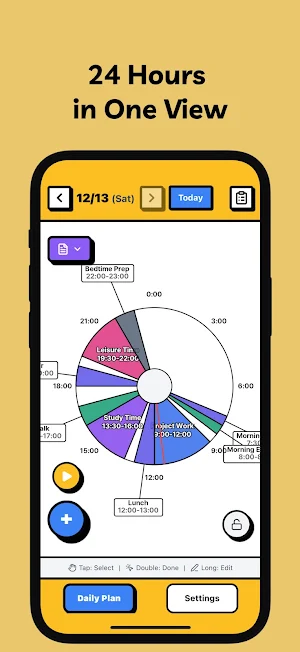
DailyPlan is a simple daily planner that represents 24 hours as a circular canvas, helping you plan and execute your day intuitively. Designed to let you focus on what matters today, without complex features.
✨ Key Features
📍 Circular 24-Hour Canvas
• Clock-like circular interface
• 24 hours represented as 360 degrees (1 hour = 15 degrees)
• Each task appears as a pie slice on the clock
• See start time and duration at a glance
• Current time shown with a red needle
🔄 Auto Routine Copy
• Set your schedule once
• Yesterday's routine automatically copies to tomorrow
• Just check off completed tasks each day
• No need to re-enter recurring schedules
• Build habits by automatically continuing routines
📋 Template System
• Save frequently used routines as templates
• Manage separate templates for weekdays/weekends
• Load and apply them anytime
• Complete your daily plan with one tap
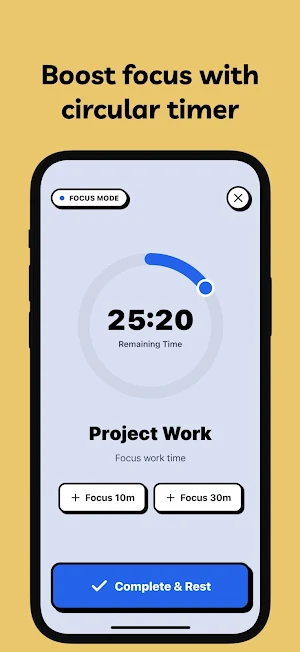
⏱️ Focus Mode Timer
• Circular timer to concentrate on current tasks
• Drag to adjust timer duration
• Quick add +10min, +30min buttons
• Keep-awake functionality prevents screen sleep
• Auto-check on completion
🔒 Lock Mode
• Prevent accidental edits to your plan
• Lock during execution, unlock only when editing
• Toggle with a single tap
• Execute your day safely
🎨 Color-Coded Categories
• Work (Blue) - Office tasks, meetings, projects
• Health (Green) - Exercise, meals, sleep
• Study (Purple) - Learning, reading, lectures
• Rest (Gray) - Relaxation, sleep, meditation
• Social (Orange) - Friends, family time
• Creative (Pink) - Writing, art, music
• Household (Teal) - Cleaning, cooking, organizing
• Personal (Indigo) - Hobbies, self-improvement
📦 Pool System
• Store unscheduled tasks in the pool
• Drag to place on canvas when needed
• Flexible schedule management
• Move tasks back to pool anytime
📱 Intuitive Gesture Controls
• Long press (0.5s): Edit task
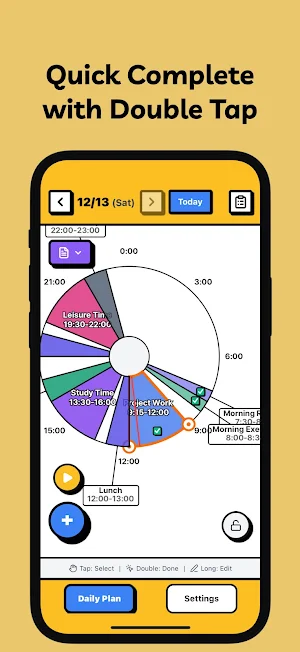
• Double tap: Check completion
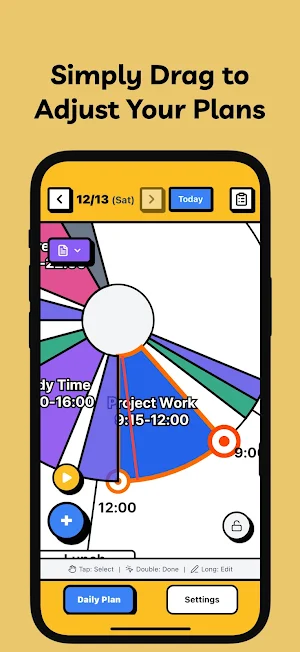
• Drag: Move time & adjust timer
• Pinch: Zoom in/out (0.4x ~ 2.5x)
📅 Date Record Management
• Past dates: View completion records
• Today: Plan and execute
• Quick navigation with weekly/monthly calendar
• Check completion rate by date
🌍 Multi-language Support
• 한국어, English, 日本語
• Switch language in settings
🎯 Why DailyPlan?
✅ Time Visualization
Time is represented as a circular clock, not a linear list. View your entire day at a glance and intuitively understand your time allocation.
✅ Automated Routines
Daily recurring routines are automatically copied. Once you create a plan, it continues every day - you just need to check off completions.
✅ Focus on Today
Future date planning is disabled. Focus only on today. Worry about tomorrow when tomorrow comes.
✅ Minimal Input
No complex settings or repeat rules - add tasks with one + button tap and adjust time by dragging.
✅ Privacy Protection
• All data stored only on your device
• No account registration required
• No server transmission
💡 Perfect For
📌 Those with daily recurring routines
→ Auto-copy means no daily re-entry needed
📌 Visual time managers
→ See your entire day on circular canvas
📌 Focus seekers
→ Immerse in current work with focus mode timer
📌 Simple planner lovers
→ Use without complex features
📌 Privacy-conscious users
→ All data stays on your device
📖 Usage Scenarios
[Morning Routine]
06:00 - Wake up & Stretch (30 min)
06:30 - Breakfast (30 min)
07:00 - Get ready for work (1 hour)
[Work Hours]
09:00 - Check emails (30 min)
09:30 - Project work (3 hours)
→ Immerse yourself with Focus Mode!
[Evening Routine]
18:00 - Dinner (1 hour)
19:00 - Exercise (1 hour)
→ Save as template for tomorrow!
🔑 Keywords
planner, schedule, time blocking, circular canvas, habit, routine, focus timer, time management, daily planner, productivity
DailyPlan is a simple daily planner that represents 24 hours as a circular canvas, helping you plan and execute your day intuitively. Designed to let you focus on what matters today, without complex features.
✨ Key Features
📍 Circular 24-Hour Canvas
• Clock-like circular interface
• 24 hours represented as 360 degrees (1 hour = 15 degrees)
• Each task appears as a pie slice on the clock
• See start time and duration at a glance
• Current time shown with a red needle
🔄 Auto Routine Copy
• Set your schedule once
• Yesterday's routine automatically copies to tomorrow
• Just check off completed tasks each day
• No need to re-enter recurring schedules
• Build habits by automatically continuing routines
📋 Template System
• Save frequently used routines as templates
• Manage separate templates for weekdays/weekends
• Load and apply them anytime
• Complete your daily plan with one tap
⏱️ Focus Mode Timer
• Circular timer to concentrate on current tasks
• Drag to adjust timer duration
• Quick add +10min, +30min buttons
• Keep-awake functionality prevents screen sleep
• Auto-check on completion
🔒 Lock Mode
• Prevent accidental edits to your plan
• Lock during execution, unlock only when editing
• Toggle with a single tap
• Execute your day safely
🎨 Color-Coded Categories
• Work (Blue) - Office tasks, meetings, projects
• Health (Green) - Exercise, meals, sleep
• Study (Purple) - Learning, reading, lectures
• Rest (Gray) - Relaxation, sleep, meditation
• Social (Orange) - Friends, family time
• Creative (Pink) - Writing, art, music
• Household (Teal) - Cleaning, cooking, organizing
• Personal (Indigo) - Hobbies, self-improvement
📦 Pool System
• Store unscheduled tasks in the pool
• Drag to place on canvas when needed
• Flexible schedule management
• Move tasks back to pool anytime
📱 Intuitive Gesture Controls
• Long press (0.5s): Edit task
• Double tap: Check completion
• Drag: Move time & adjust timer
• Pinch: Zoom in/out (0.4x ~ 2.5x)
📅 Date Record Management
• Past dates: View completion records
• Today: Plan and execute
• Quick navigation with weekly/monthly calendar
• Check completion rate by date
🌍 Multi-language Support
• 한국어, English, 日本語
• Switch language in settings
🎯 Why DailyPlan?
✅ Time Visualization
Time is represented as a circular clock, not a linear list. View your entire day at a glance and intuitively understand your time allocation.
✅ Automated Routines
Daily recurring routines are automatically copied. Once you create a plan, it continues every day - you just need to check off completions.
✅ Focus on Today
Future date planning is disabled. Focus only on today. Worry about tomorrow when tomorrow comes.
✅ Minimal Input
No complex settings or repeat rules - add tasks with one + button tap and adjust time by dragging.
✅ Privacy Protection
• All data stored only on your device
• No account registration required
• No server transmission
💡 Perfect For
📌 Those with daily recurring routines
→ Auto-copy means no daily re-entry needed
📌 Visual time managers
→ See your entire day on circular canvas
📌 Focus seekers
→ Immerse in current work with focus mode timer
📌 Simple planner lovers
→ Use without complex features
📌 Privacy-conscious users
→ All data stays on your device
📖 Usage Scenarios
[Morning Routine]
06:00 - Wake up & Stretch (30 min)
06:30 - Breakfast (30 min)
07:00 - Get ready for work (1 hour)
[Work Hours]
09:00 - Check emails (30 min)
09:30 - Project work (3 hours)
→ Immerse yourself with Focus Mode!
[Evening Routine]
18:00 - Dinner (1 hour)
19:00 - Exercise (1 hour)
→ Save as template for tomorrow!
🔑 Keywords
planner, schedule, time blocking, circular canvas, habit, routine, focus timer, time management, daily planner, productivity
Alternatives to DailyPlan - Routine & Focus
Looking for apps like DailyPlan - Routine & Focus? Here are 4 similar Android apps on Google Play. All of them are free to download.
-
한눈입찰 - 입찰공고 AI 요약
-
간단한글 - 한글뷰어 HWP HWPX 편집·PDF변환
-
NoSpend - Save Money Challenge
-
SnapSeat - Seating Chart Maker
| App | Rating | Price | Installs | Last updated | Compare |
|---|---|---|---|---|---|
| DailyPlan - Routine & Focus | – | Free | 100+ | Jul 3, 2026 | |
| 한눈입찰 - 입찰공고 AI 요약 | – | Free | 50+ | Aug 24, 2026 | Compare |
| 간단한글 - 한글뷰어 HWP HWPX 편집·PDF변환 | – | Free | 1,000+ | Oct 21, 2026 | Compare |
| NoSpend - Save Money Challenge | – | Free | 100+ | – | Compare |
| SnapSeat - Seating Chart Maker | – | Free | 500+ | Sep 6, 2026 | Compare |