
Brown Noise: Sleep & Focus
SmartToolsDev Music & Audio Contains ads
Brown, white & pink noise. Sleep timer, rain, ocean, lock-screen controls.
- Downloads
- 1.1K+
- on Google Play
- Price
- Free
- No in-app purchases
- Updated
- Sep 21
- 2026 · v1.2.2
Screenshots


About Brown Noise: Sleep & Focus
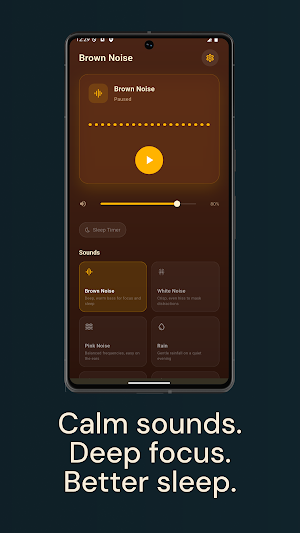
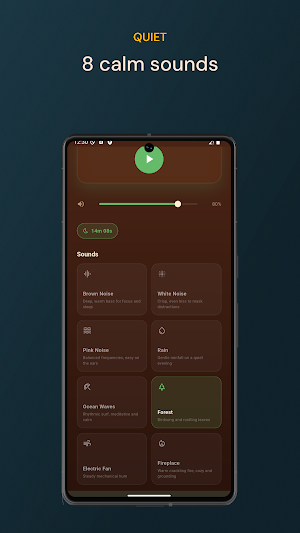
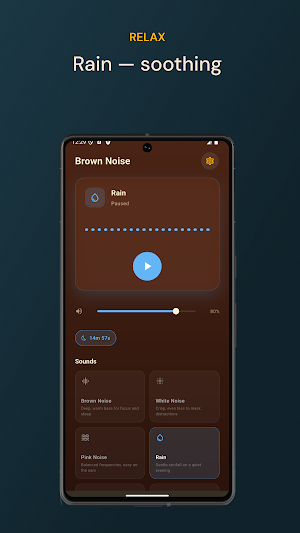
Brown Noise: Sleep & Focus is a calm, focused ambient sound player. Tap once to play deep brown noise — or pick white noise, pink noise, rain, ocean, forest, fan, or fireplace — set a sleep timer, and put the phone face-down.
FEATURES
• Eight ambient sounds — brown, white, pink noise plus rain, ocean, forest, fan, and fireplace
• Seamless looping — every sound repeats continuously without a gap or click
• Lock-screen controls — pause and resume from the notification shade without unlocking
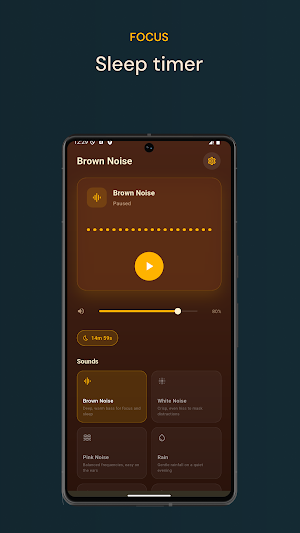
• Sleep timer — cycle 15, 30, 45, or 60 minutes; audio fades out over 30 seconds
• Volume slider — fine-tune the level for headphones or a bedroom speaker
• Warm, minimal interface — dark amber palette built for nighttime use, not daytime tech
• No account or sign-up — sound plays entirely on-device, no profile required
USE CASES
• Falling asleep with a steady wall of low-frequency brown noise
• Masking household sound, traffic, or office chatter during focused work
• Studying or reading with calm rain, fireplace, or forest ambience
• Steady white noise as a household masking layer
• Light sleepers who wake to small sounds and want a continuous mask through the night
NOISE COLOURS, EXPLAINED
Brown noise has stronger low frequencies — a deep, rumbling sound many listeners find soothing for sleep. White noise is balanced across the spectrum and is good for masking sudden noises. Pink noise sits between the two and is often used for relaxation and concentration.
WHAT MAKES THIS APP DIFFERENT
• A sleep timer that lives on the player screen — no digging into menus
• A warm, dark interface tuned for nighttime — no bright photographic backgrounds or moon-and-stars clichés
• No subscriptions and no paywalls — every sound plays without sign-up
PRIVACY
The app uses Firebase Analytics, Firebase Crashlytics, Firebase Remote Config, and Google AdMob for telemetry and ad serving. Sound playback itself is fully on-device. There is no account, no profile, and no audio recording.
A simple ambient player. Open it, tap a sound, set a timer, sleep.
FEATURES
• Eight ambient sounds — brown, white, pink noise plus rain, ocean, forest, fan, and fireplace
• Seamless looping — every sound repeats continuously without a gap or click
• Lock-screen controls — pause and resume from the notification shade without unlocking
• Sleep timer — cycle 15, 30, 45, or 60 minutes; audio fades out over 30 seconds
• Volume slider — fine-tune the level for headphones or a bedroom speaker
• Warm, minimal interface — dark amber palette built for nighttime use, not daytime tech
• No account or sign-up — sound plays entirely on-device, no profile required
USE CASES
• Falling asleep with a steady wall of low-frequency brown noise
• Masking household sound, traffic, or office chatter during focused work
• Studying or reading with calm rain, fireplace, or forest ambience
• Steady white noise as a household masking layer
• Light sleepers who wake to small sounds and want a continuous mask through the night
NOISE COLOURS, EXPLAINED
Brown noise has stronger low frequencies — a deep, rumbling sound many listeners find soothing for sleep. White noise is balanced across the spectrum and is good for masking sudden noises. Pink noise sits between the two and is often used for relaxation and concentration.
WHAT MAKES THIS APP DIFFERENT
• A sleep timer that lives on the player screen — no digging into menus
• A warm, dark interface tuned for nighttime — no bright photographic backgrounds or moon-and-stars clichés
• No subscriptions and no paywalls — every sound plays without sign-up
PRIVACY
The app uses Firebase Analytics, Firebase Crashlytics, Firebase Remote Config, and Google AdMob for telemetry and ad serving. Sound playback itself is fully on-device. There is no account, no profile, and no audio recording.
A simple ambient player. Open it, tap a sound, set a timer, sleep.
What’s new
Version 1.2.2 · Updated September 21, 2026
Fixed a crash some phones hit right at launch. Improved sleep timer reliability: changing the timer or sound no longer lets an old fade stop your new session. Slow sound loads now cancel cleanly instead of starting after an error. Bedtime reminders now use your local time zone.
Alternatives to Brown Noise: Sleep & Focus
Looking for apps like Brown Noise: Sleep & Focus? Here are 4 similar Android apps on Google Play. The highest rated is Momental: Relax & Sleep Sounds (4.4/5), and all 4 are free to download.
-
Momental: Relax & Sleep Sounds 4.4
-
SnoreLogic: Track Your Snoring 3.3
-
SleepTracker: Record & Improve 3.8
-
Slo: Sleep Sounds, Brown Noise 4.1
| App | Rating | Price | Installs | Last updated | Compare |
|---|---|---|---|---|---|
| Brown Noise: Sleep & Focus | – | Free | 1,000+ | Sep 21, 2026 | |
| Momental: Relax & Sleep Sounds | 4.4 / 5 | Free | 10,000+ | Oct 11, 2026 | Compare |
| SnoreLogic: Track Your Snoring | 3.3 / 5 | Free | 100,000+ | Sep 15, 2026 | Compare |
| SleepTracker: Record & Improve | 3.8 / 5 | Free | 500,000+ | Mar 26, 2026 | Compare |
| Slo: Sleep Sounds, Brown Noise | 4.1 / 5 | Free | 10,000+ | Nov 4, 2026 | Compare |