

OpenWords – Learn Vocabulary
Open Words Education
One-tap vocabulary builder. Flashcards, spaced repetition & dictionary.
- Downloads
- 1K+
- on Google Play
- Price
- Free
- No in-app purchases
- Updated
- Oct 11
- 2026 · v1.4.702
Screenshots


About OpenWords – Learn Vocabulary
OpenWords is a vocabulary app that helps you remember words. Whether you are learning English, Dutch, Polish, or Russian, you can save any word as a flashcard in just one tap and let spaced repetition lock it into your long-term memory.
Most apps show you a translation and then you forget it. OpenWords turns those lookups into lasting knowledge — using spaced repetition to schedule each flashcard review at exactly the right moment. The app provides translation support for English, Dutch, German, Spanish, French, Italian, Turkish, Russian, Polish and Czech.
HOW IT WORKS
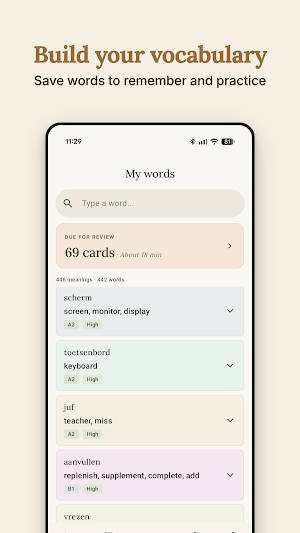
- One-tap learning: No manual typing. Tap the heart icon on a specific word meaning to save it as a flashcard and start learning immediately.
- Spaced repetition (SRS): The built-in algorithm schedules your flashcard reviews at the perfect interval so words move from short-term to long-term memory.
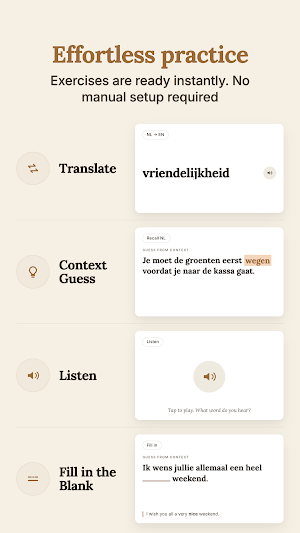
- Study modes: Master your vocabulary list with active recall tools designed to turn recognition into real retention.
- Offline: works without an internet connection — your dictionary and flashcard lists are always available.
A DICTIONARY WITH DEPTH
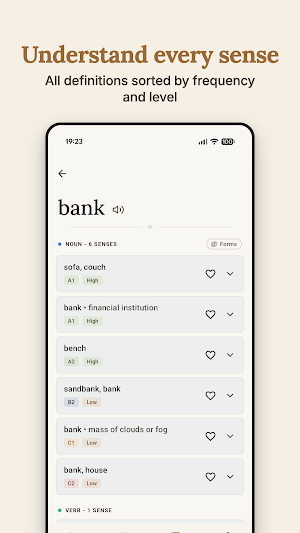
- Specific meanings: Don't just save a word. Save the exact sense that fits the context of what you are reading.
- Word families: View roots and related forms to understand how the language is built and grow your vocabulary faster.
- Levels and frequency: Know if a word is A1 or B2, and see how common it is in daily speech so you can prioritize your learning.
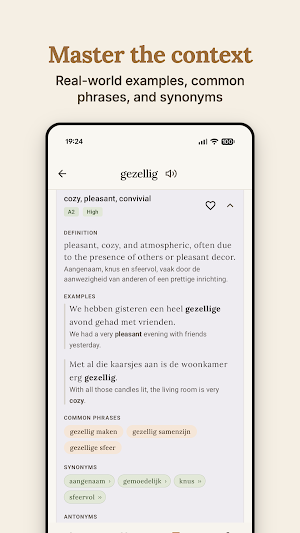
- Real examples: See how words actually function in real sentences.
TRACK YOUR PROGRESS
- Mastery levels: Watch your vocabulary grow through detailed memory strength categories — from "New" to "Learned."
- Visual stats: Stay consistent with an integrated activity calendar and daily review tracking.
PRIVACY AND ACCESS
- No accounts: No emails, no "Sign in with Google". Your data stays on your device.
- Truly free: No subscriptions, no ads, and no paywalls. Every feature is available from day one.
- Simple interface: Fast, clean, and supports your system's light or dark mode settings.
Whether you are studying for a CEFR exam or just trying to navigate a new city, OpenWords gives you the tools to build a vocabulary that actually sticks — one flashcard at a time.
Most apps show you a translation and then you forget it. OpenWords turns those lookups into lasting knowledge — using spaced repetition to schedule each flashcard review at exactly the right moment. The app provides translation support for English, Dutch, German, Spanish, French, Italian, Turkish, Russian, Polish and Czech.
HOW IT WORKS
- One-tap learning: No manual typing. Tap the heart icon on a specific word meaning to save it as a flashcard and start learning immediately.
- Spaced repetition (SRS): The built-in algorithm schedules your flashcard reviews at the perfect interval so words move from short-term to long-term memory.
- Study modes: Master your vocabulary list with active recall tools designed to turn recognition into real retention.
- Offline: works without an internet connection — your dictionary and flashcard lists are always available.
A DICTIONARY WITH DEPTH
- Specific meanings: Don't just save a word. Save the exact sense that fits the context of what you are reading.
- Word families: View roots and related forms to understand how the language is built and grow your vocabulary faster.
- Levels and frequency: Know if a word is A1 or B2, and see how common it is in daily speech so you can prioritize your learning.
- Real examples: See how words actually function in real sentences.
TRACK YOUR PROGRESS
- Mastery levels: Watch your vocabulary grow through detailed memory strength categories — from "New" to "Learned."
- Visual stats: Stay consistent with an integrated activity calendar and daily review tracking.
PRIVACY AND ACCESS
- No accounts: No emails, no "Sign in with Google". Your data stays on your device.
- Truly free: No subscriptions, no ads, and no paywalls. Every feature is available from day one.
- Simple interface: Fast, clean, and supports your system's light or dark mode settings.
Whether you are studying for a CEFR exam or just trying to navigate a new city, OpenWords gives you the tools to build a vocabulary that actually sticks — one flashcard at a time.
What’s new
Version 1.4.702 · Updated October 11, 2026
What’s new in this version: New language: German is now available to learn. Auto-play preference during study sessions is now remembered. Thank you for all your feedback, and stay tuned for the next update!
User reviews
No ads, easy to onboard.

nicely done!

It does exactly what I want. When I see a new word, I instantly get translation and then add it to cards to learn in future.
Alternatives to OpenWords – Learn Vocabulary
Looking for apps like OpenWords – Learn Vocabulary? Here are 3 similar Android apps on Google Play. The highest rated is Ella Verbs: Learn Spanish (4.9/5), and all 3 are free to download.


| App | Rating | Price | Installs | Last updated | Compare |
|---|---|---|---|---|---|
| OpenWords – Learn Vocabulary | – | Free | 1,000+ | Oct 11, 2026 | |
| Ella Verbs: Learn Spanish | 4.9 / 5 | Free | 100,000+ | Oct 24, 2026 | Compare |
| Learn languages with Mooveez | 4.6 / 5 | Free | 500,000+ | Oct 21, 2026 | Compare |
| Visual Verbs: Spanish Verb App | 4.6 / 5 | Free | 10,000+ | Jul 29, 2026 | Compare |