
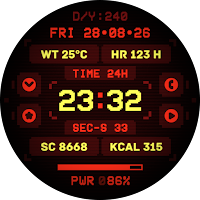
NukaBot 2000 Watch Face
Personalization
A modern, customizable experience Wear OS watch
- Downloads
- 8+
- on Google Play
- Price
- $0.49
- No in-app purchases
- Updated
- Sep 6
- 2026 · v1.0.1
Screenshots
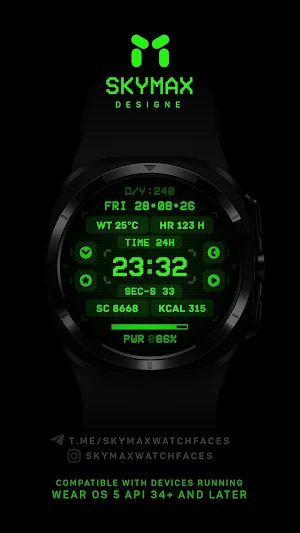
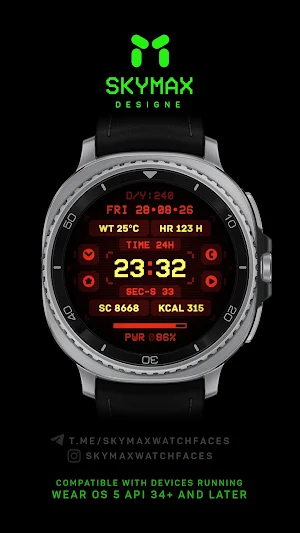


About NukaBot 2000 Watch Face
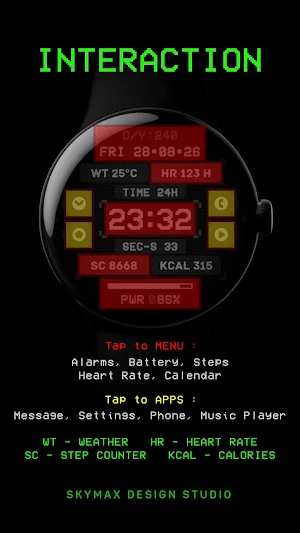
SkyMax «NukaBot 2000» Watch Face — This is a digital watch face for Wear OS smartwatch. Enjoy the minimalist design on your wrist. Colors, background and various indicators can be customized, allowing you to create the perfect layout for you!
Compatible with devices running Wear OS 5.0 API 34+ and later.
This app is designed for most Wear OS devices.
** Install > Select only the clock from the Install drop-down menu. If you see a "Your devices are not compatible" message or have any other installation issues, try using our companion app to install the app on your smartwatch. As a last resort, go to the Play Store in your browser to install.
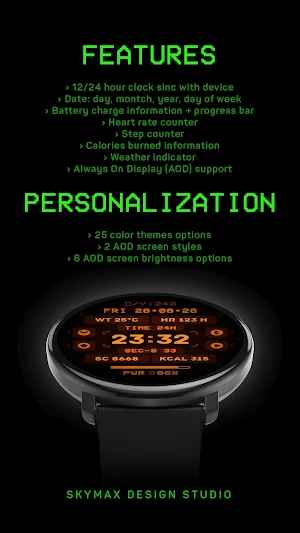
FUNCTIONS:
› 12 or 24 hour time format depending on your phone settings + seconds
› Date, day of the week, year, day of the year and week of the year
› Battery charge information with indicator
› Heart rate counter, beats per minute level
› Step counter
› Calories burned
› Weather forecast indicator
› Always On Display (AOD) supported
› 4 preinstalled application shortcuts
PERSONALIZATION:
** For full functionality, please enable required permissions for shortcuts and complications!
› 25 color options
› 2 AOD screen styles
› 6 AOD screen brightness options
NOTES:
** If after updating the watch face, updating the system or other situations, the step counter or other indicators show “0”, try the following. Touch and hold the watch display to get to the watch face selection menu → select any other available watch face → then remove our watch face from the watch face selection menu (not from the watch) and reinstall it on your watch using your smartphone, from the recently installed watch faces selection menu.
** If the heart rate or other indicators are also “0”, check the permissions in the settings. “Settings” → “Applications” → “Permissions”, find this watch face and configure the necessary permissions. Also make sure that the watch screen is on and that it is worn correctly on your wrist when measuring your heart rate.
Join us for live support and discussion:
Telegram https://t.me/skymaxwatchfaces
Instagram https://www.instagram.com/skymaxwatchfaces
Compatible with devices running Wear OS 5.0 API 34+ and later.
This app is designed for most Wear OS devices.
** Install > Select only the clock from the Install drop-down menu. If you see a "Your devices are not compatible" message or have any other installation issues, try using our companion app to install the app on your smartwatch. As a last resort, go to the Play Store in your browser to install.
FUNCTIONS:
› 12 or 24 hour time format depending on your phone settings + seconds
› Date, day of the week, year, day of the year and week of the year
› Battery charge information with indicator
› Heart rate counter, beats per minute level
› Step counter
› Calories burned
› Weather forecast indicator
› Always On Display (AOD) supported
› 4 preinstalled application shortcuts
PERSONALIZATION:
** For full functionality, please enable required permissions for shortcuts and complications!
› 25 color options
› 2 AOD screen styles
› 6 AOD screen brightness options
NOTES:
** If after updating the watch face, updating the system or other situations, the step counter or other indicators show “0”, try the following. Touch and hold the watch display to get to the watch face selection menu → select any other available watch face → then remove our watch face from the watch face selection menu (not from the watch) and reinstall it on your watch using your smartphone, from the recently installed watch faces selection menu.
** If the heart rate or other indicators are also “0”, check the permissions in the settings. “Settings” → “Applications” → “Permissions”, find this watch face and configure the necessary permissions. Also make sure that the watch screen is on and that it is worn correctly on your wrist when measuring your heart rate.
Join us for live support and discussion:
Telegram https://t.me/skymaxwatchfaces
Instagram https://www.instagram.com/skymaxwatchfaces
Alternatives to NukaBot 2000 Watch Face
Looking for apps like NukaBot 2000 Watch Face? Here are 6 similar Android apps on Google Play.
-
Futuristic Design Watch Face
-
NukaBot 3000 Watch Face
-
Neo Terminal X Watch Face
-
HMKWatch Digital 148 HUD
-
STerminal Watch - Customizable
-
TVV Digital 9 Watch Face
| App | Rating | Price | Installs | Last updated | Compare |
|---|---|---|---|---|---|
| NukaBot 2000 Watch Face | – | $0.49 | 5+ | Sep 6, 2026 | |
| Futuristic Design Watch Face | – | 0.49 USD | 500+ | Sep 12, 2025 | Compare |
| NukaBot 3000 Watch Face | – | 0.99 USD | 10+ | Sep 6, 2026 | Compare |
| Neo Terminal X Watch Face | – | 0.49 USD | 100+ | May 6, 2026 | Compare |
| HMKWatch Digital 148 HUD | – | 1.49 USD | 1,000+ | Oct 11, 2026 | Compare |
| STerminal Watch - Customizable | – | 0.99 USD | 100+ | – | Compare |
| TVV Digital 9 Watch Face | – | 1.49 USD | 100+ | Aug 19, 2026 | Compare |
Similar apps on Google Play
- Futuristic Design Watch Face
- NukaBot 3000 Watch Face
- Neo Terminal X Watch Face
- HMKWatch Digital 148 HUD
- STerminal Watch - Customizable
- TVV Digital 9 Watch Face
- Watch Face WF147
- Matrix Watchface
- JW249 jwstudio
- Stepox WatchFace
- Dx1 WatchFace
- ACRO Tion simple Digital Watch
- Sci-Fi Digital Pro Watch Face
- LMwatch E horizon
- Digital+ Matrix Watch Face
- SH075 Watch Face, WearOS watch
- JW325 jwstudio
- AMOLED Terminal Watch face
- JW104 jwstudio
- Linux Command Line Watch Face
- NukaBot 1000 Watch Face
- Dragon Radar Animated Face
- Unix Terminal - watch face
- Matrix Digital Watch Face
- Simple Glow Watch Face
- Cyber Circuit Watch face
- PixelTime - 8-Bit Watch Face