Visual Choices AAC
For autism: easy, fast way to communicate (choice boards/PECS); develops speech
About Visual Choices AAC
Visual Choices AAC is an app for early communicators with autism, speech delay, and other developmental differences.
It gives nonverbal, minimally verbal, and preverbal users a way to express what they want, and helps them build natural speech along the way.
Many children who start with Visual Choices end up talking.
SHOWS YOU WHAT TO DO
Most AAC apps give you a tool but no guidance. Visual Choices includes step-by-step video guides that teach you how to actually use it with your child. The guides follow a natural developmental path: offering choices, supporting requests, building language, and encouraging speech. Each stage shows you what to try first, what to do if it is not working, and how to build connection along the way.
HOW IT WORKS
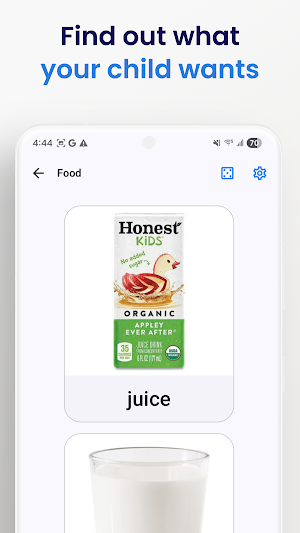
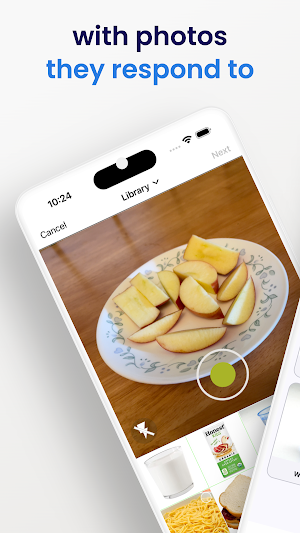
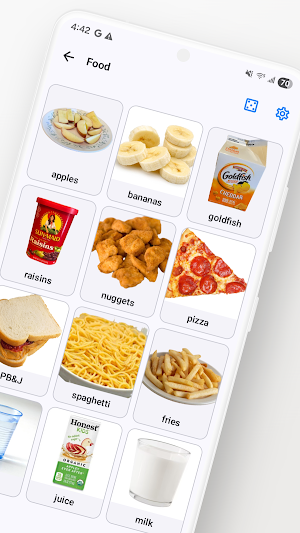
Visual Choices makes it easy to find out what your child wants. You start by creating choice and communication boards for your child, using real photos they respond to.
Once they tap an item, you give it to them. This provides motivation for further communication.
It is simpler than traditional AAC devices because it is not designed for lifelong nonverbal communication. It does not have ten thousand symbols arranged into folders. It is a teaching tool, with just enough provided to get them talking.
Many who find other AAC apps too complicated to use thrive on Visual Choices. And unlike PECS binders, setup takes minutes, not hours.
You can use your own photos, or choose from over 50,000 SymbolStix picture symbols.
Also works for visual schedules and general visual supports (e.g. first-then).
It works on its own or alongside an existing AAC system or communication device.
BUILDS SPEECH
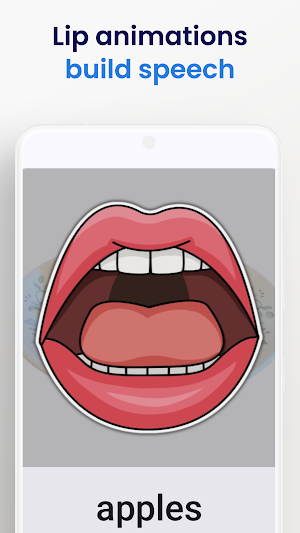
Visual Choices goes beyond augmentative and alternative communication. Built-in lip animations and expectant pauses promote speech production.
Children progress naturally from tapping pictures to speaking on their own.
BUILDS LANGUAGE
Sign language videos make it easy to teach core words and adjectives and verbs that your child can use even without a device.
WHO USES VISUAL CHOICES
Families use Visual Choices at home to communicate with their child during meals, play, routines, and daily activities.
Grandparents and caregivers use it to connect with children who are not yet verbal.
Speech-language pathologists (SLPs, also known as speech therapists), occupational therapists, and applied behavioral analysis (ABA) therapists use it in sessions.
Special education teachers and general education teachers use it in the classroom.
KEY FEATURES
• Choice boards with your own photos, videos, text, or 50,000+ SymbolStix symbols;
• PECS-style picture exchange communication;
• Promotes speech with lip animations;
• Sign language videos, user generated videos, and animated GIFs can be included in choice boards;
• Print boards for a no-tech, paper-based option;
• Supports English, Spanish, and Russian;
• Works on phones and tablets.
Questions or feedback? We would love to hear from you: [email protected]
Terms of use: https://skieslearn.com/visualchoices_terms_of_service
Visual Choices AAC details
Visual Choices AAC is a free Education app for Android with 500+ installs on Google Play and a 5.0/5 average rating from 1 rating. It was released on March 17, 2026 and last updated on May 8, 2026. It's developed by SKIES Inc. It requires Android 10 or later. The app offers in-app purchases.
- Category
- Education
- Rating
- 5.0 / 5 (1 rating)
- Installs
- 500+
- Price
- Free
- In-app purchases
- Yes
- Ads
- No ads
- Current version
- 1.0.5
- Requires Android
- 10
- Content rating
- PEGI 3
- Released
- March 17, 2026
- Last updated
- May 8, 2026
- Developer
- SKIES Inc
What’s new in Visual Choices AAC
What's New: * Board Formatting: Adjust the number of columns and spacing for each board, or set a global default that applies to all boards. * AAC Layout Settings: Choose how your AAC screen is organized — show both core words and choices, or focus on just one section at a time. * Parental Lock: Lock the app to prevent accidental edits. A simple math quiz keeps the lock secure while staying accessible for caregivers.
Version 1.0.5 · Updated May 8, 2026
Similar Apps

Gallery of Kalamata
Audio guide for 41 works of the Kalamata Art Gallery

Driving Theory NZ Road Code
Practice mock tests and road rule questions for New Zealand drivers.

PhysikVerstanden
Solve physics exercises by photo – explained step by step

소방안전24
This mobile app is the official app that provides various services, such as fire safety education, qualification information, and online civil complaints, so that you can conveniently use them on your smartphone.

Zoya Plus
welcome to zoya plus

DK Learn Danish Words
Learn Danish words and build vocabulary by browsing the web.

