

Translation lens
PSJ World Tools
Tap and your screen translates instantly. On-device — nothing sent to servers.
- Downloads
- 66+
- on Google Play
- Price
- Free
- No in-app purchases
- Updated
- May 18
- 2026 · v1.1
Screenshots

About Translation lens
🔍 Translation Lens - Real-Time Screen Translation & OCR
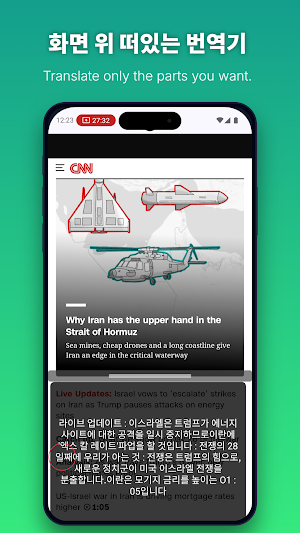
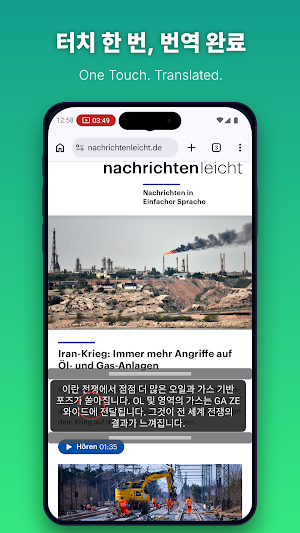
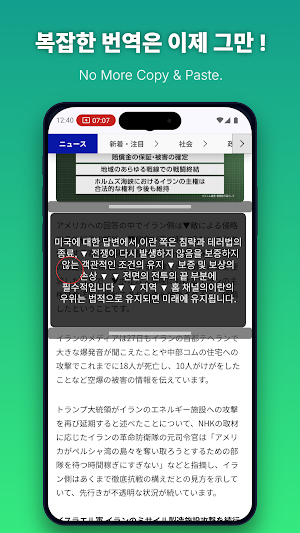
Translate any text on your screen with a single button — no app switching, no copy-pasting. The easiest way to read games, webtoons, and foreign news, right where you see them.
🌱 Key Features
📱 Overlay Screen Translation
A floating button stays on top of any app, ready to translate instantly. Works on mobile games, webtoons, foreign documents — if you can see it, you can translate it.
📐 Adjustable Translation Area
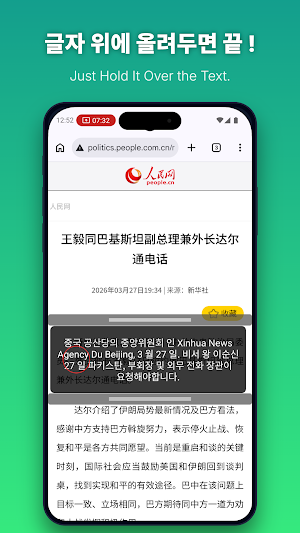
Resize the translation box with your finger to capture exactly what you need. A full paragraph or a single word — you're in control.
🌐 Smart On-Device OCR & 12 Languages Supported (more coming soon)
Powered by advanced OCR technology, Translation Lens recognizes text in 12 major languages worldwide.
Supported languages: English, Korean, Chinese, Japanese, Hindi, Spanish, Portuguese, German, Indonesian, French, Vietnamese, Thai
🔒 Privacy & Security
📵 Offline Translation — No Internet Required
Captured images and recognized text are never sent to external servers. Translate with complete peace of mind.
🧠 Fully On-Device Processing
All OCR and translation runs locally on your device via Google ML Kit — no internet connection needed after setup.
🗑️ Instant Image Deletion
The moment translation is complete, the captured frame is never saved — it's wiped from memory immediately.
📸 How Screen Capture Works
The "Start Recording" permission prompt you see at launch is Android's standard system procedure for reading on-screen text. No continuous recording or data storage ever occurs. Only a single still frame — captured the instant you lift your finger — is used for translation, then immediately discarded.
📋 How to Use
1️⃣ Open the app and select your languages (source ➔ target)
2️⃣ Grant overlay and screen capture permissions
3️⃣ While using any other app, drag the 🔵 button over the text you want to translate
4️⃣ Lift your finger — that area is captured and translated instantly
5️⃣ The captured image is automatically deleted after translation
⚠️ Permissions Explained
Display over other apps (SYSTEM_ALERT_WINDOW)
Required to show the floating translation button and result box on top of other apps.
Screen capture (MEDIA_PROJECTION)
Used only at the moment you lift your finger — a single still frame is captured to recognize text. No background capture ever takes place.
Foreground service (FOREGROUND_SERVICE)
Keeps the floating button stable and visible while you use other apps.
Show notifications (POST_NOTIFICATIONS)
Displays a transparent status notification while the service is running, so you can stop the app anytime directly from your notification bar.
📌 Notes
Translation language models are downloaded from Google's servers only once on first use. After that, the app works completely offline.
Avoid using the translation feature when sensitive information such as passwords or card numbers is visible on screen.
Requires Android 8.0 (API 26) or higher.
Translate any text on your screen with a single button — no app switching, no copy-pasting. The easiest way to read games, webtoons, and foreign news, right where you see them.
🌱 Key Features
📱 Overlay Screen Translation
A floating button stays on top of any app, ready to translate instantly. Works on mobile games, webtoons, foreign documents — if you can see it, you can translate it.
📐 Adjustable Translation Area
Resize the translation box with your finger to capture exactly what you need. A full paragraph or a single word — you're in control.
🌐 Smart On-Device OCR & 12 Languages Supported (more coming soon)
Powered by advanced OCR technology, Translation Lens recognizes text in 12 major languages worldwide.
Supported languages: English, Korean, Chinese, Japanese, Hindi, Spanish, Portuguese, German, Indonesian, French, Vietnamese, Thai
🔒 Privacy & Security
📵 Offline Translation — No Internet Required
Captured images and recognized text are never sent to external servers. Translate with complete peace of mind.
🧠 Fully On-Device Processing
All OCR and translation runs locally on your device via Google ML Kit — no internet connection needed after setup.
🗑️ Instant Image Deletion
The moment translation is complete, the captured frame is never saved — it's wiped from memory immediately.
📸 How Screen Capture Works
The "Start Recording" permission prompt you see at launch is Android's standard system procedure for reading on-screen text. No continuous recording or data storage ever occurs. Only a single still frame — captured the instant you lift your finger — is used for translation, then immediately discarded.
📋 How to Use
1️⃣ Open the app and select your languages (source ➔ target)
2️⃣ Grant overlay and screen capture permissions
3️⃣ While using any other app, drag the 🔵 button over the text you want to translate
4️⃣ Lift your finger — that area is captured and translated instantly
5️⃣ The captured image is automatically deleted after translation
⚠️ Permissions Explained
Display over other apps (SYSTEM_ALERT_WINDOW)
Required to show the floating translation button and result box on top of other apps.
Screen capture (MEDIA_PROJECTION)
Used only at the moment you lift your finger — a single still frame is captured to recognize text. No background capture ever takes place.
Foreground service (FOREGROUND_SERVICE)
Keeps the floating button stable and visible while you use other apps.
Show notifications (POST_NOTIFICATIONS)
Displays a transparent status notification while the service is running, so you can stop the app anytime directly from your notification bar.
📌 Notes
Translation language models are downloaded from Google's servers only once on first use. After that, the app works completely offline.
Avoid using the translation feature when sensitive information such as passwords or card numbers is visible on screen.
Requires Android 8.0 (API 26) or higher.
What’s new
Version 1.1 · Updated May 18, 2026
en-US Number one release version.
Alternatives to Translation lens
Looking for apps like Translation lens? Here are 6 similar Android apps on Google Play. 5 of the 6 are free to download.



| App | Rating | Price | Installs | Last updated | Compare |
|---|---|---|---|---|---|
| Translation lens | – | Free | 50+ | May 18, 2026 | |
| FixMedia | – | Free | 5+ | Jun 7, 2026 | Compare |
| PrivateLock | – | Free | 100+ | – | Compare |
| ZMatrix™ | – | 0.99 USD | 10+ | Apr 14, 2026 | Compare |
| Screen Translator All Screens | – | Free | 5,000+ | Apr 30, 2026 | Compare |
| Glas | – | Free | 50+ | Aug 25, 2026 | Compare |
| ROLMApp | – | Free | 500+ | – | Compare |
Compare Translation lens with the top alternatives: ratings, updates, ASO score and keyword gaps →
Similar apps on Google Play
- FixMedia
- PrivateLock
- ZMatrix™
- Screen Translator All Screens
- Glas
- ROLMApp
- Volu: Per-App Volume Control
- InfoDatabox: Secure Storage
- ShipDash
- PSX Games Downloader Pro
- JlyraPals
- FAParking
- Airglide:The Pc Utility
- NotifyBridge: IoT Push API
- ValuEx - AI Currency Converter
- Investor Management System
- Smarteaming
- IsnetCam
- DeepTrace: Is It Real or AI?
- SeaViewer
- Baxtoc - Prompt to AI Art
- RBX HUB PRO
- wazeyi
- Data Forensic
- Status Hub: Save, Chat, Repost