Promgrammer-AI Prompt Builder
Build AI image prompts with 1700+ tags in just a few clicks

About Promgrammer-AI Prompt Builder
Want to create AI images but struggling with prompts?
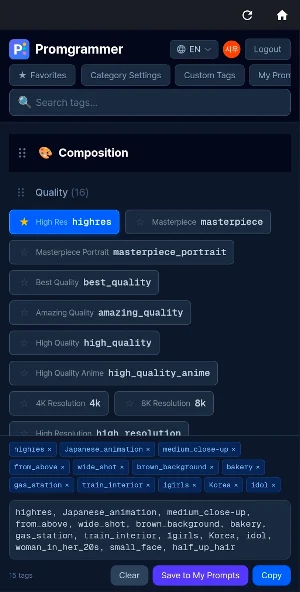
Promgrammer is a tool with 1700+ tags organized by category, letting you build prompts with just a few clicks. No need to memorize tags — just browse, click, and done.
How to Use
1. Browse categories or search for tags
2. Tap a tag to add it to your prompt automatically
3. Drag to reorder tags
4. Hit copy and paste into your AI tool
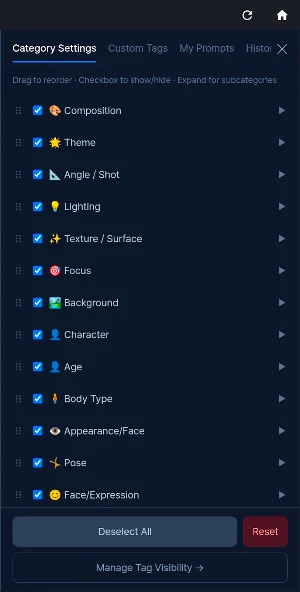
18 Tag Categories
• Composition — Close-up, wide shot, bird's eye view, framing
• Theme — Fantasy, cyberpunk, watercolor, anime, oil painting
• Focus — Depth of field, bokeh, blur, tilt-shift
• Background — City, forest, ocean, space, ruins, classroom
• Character Background — Aura, sparkles, petals, magic circle
• Body Type — Height, build, musculature, proportions
• Appearance — Hairstyle, eye color, skin tone, scars, freckles
• Pose — Standing, sitting, kneeling, jumping, floating
• Facial Expression — Smile, wink, tears, surprised, angry
• Action — Running, dancing, fighting, reading, cooking
• Colors — Warm tone, cool tone, monochrome, pastel, neon
• Negative — Low quality removal, deformed hands, extra limbs
• Clothing — Dress, armor, uniform, casual, swimwear, kimono
• Accessories — Glasses, earrings, crown, sword, wings, halo
• Angle — Front, side, back, three-quarter, from below
• Age — Child, teen, young adult, middle-aged, elderly
• Lighting — Backlight, neon, golden hour, rim light
• Texture — Smooth, metallic, glass, fabric, stone, wood
All tags are displayed in 4 languages: Korean, English, Japanese, and Chinese.
Key Features
• Real-time Search — Search by tag name, category, or subcategory for instant results.
• Favorites — Save frequently used tags and filter to show only your favorites.
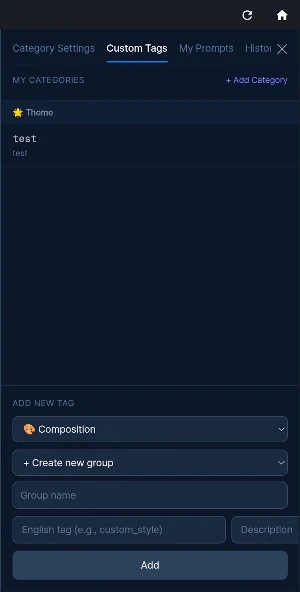
• Custom Tags — Create your own tags and categories for frequently used combinations.
• Prompt Saving — Save completed prompts with notes for future reference.
• Image Gallery — Attach generated images to saved prompts to visually manage results.
• Drag & Drop — Freely rearrange category order. Settings auto-save to your account.
• Tag Hiding — Hide unused tags to keep your screen clean.
• History — Previously copied prompts are auto-saved for easy recall.
• One-Click Copy — Copy your assembled prompt to clipboard instantly.
Recommended For
• Beginners just starting with AI image generation
• Creators tired of searching for tags every time
• Users who find writing English prompts difficult
• Those who want to manage prompts and result images together
• Power users who want custom workflows with personalized tags
Get Started
All core features are available. Sign in with Google to unlock favorites, prompt saving, custom tags, and image gallery.
Better prompts make better images.
Contact: [email protected]
Website: https://www.promgrammer.com
Similar Apps

Gencraft - AI Art Generator
AI Art and Image Generator, AI Art Social Network

Presets & Filters - Koloro
1000+ presets and filters for dng photo & video vintage effects editor

LightX AI Photo Editor Retouch
Photo & Video Editor: Face Retouch, BG Remove, AI Filters
FitRoom: Virtual Try On Clothe
Try on clothes virtually, mix & match outfits, and create your perfect wardrobe
Singit : Online Karaoke, KPOP
High-quality song accompaniment, All KPOP, Online social video karaoke

AIUTA Editorial
Fashion editorial content, no shoot required
