

ReverseCam:Backup Camera
shinyullab Auto & Vehicles In-app purchases Contains ads
Backup camera on your smartphone or tablet
- Downloads
- 10.6K+
- on Google Play
- Price
- Free
- In-app purchases
- Updated
- Sep 29
- 2026 · v2.0.1
Screenshots


About ReverseCam:Backup Camera
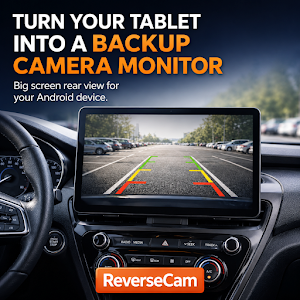
Turn your Android phone or tablet into a USB backup camera monitor.
ReverseCam lets you view your vehicle’s rear camera feed on an Android smartphone, tablet, or Samsung DeX setup using a USB video capture device.
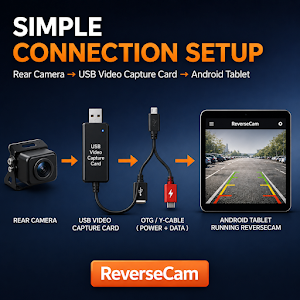
Connect your vehicle’s rear camera to a USB video capture device, then connect the capture device to your Android phone or tablet. You can then view the rear camera feed in real time on a larger and clearer screen while reversing or parking.
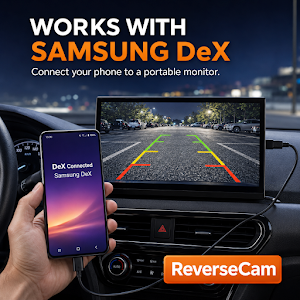
If you use a Samsung DeX-supported smartphone with a portable monitor, ReverseCam can help you build a large-screen backup camera setup using the mobile device you already own.
It is a flexible alternative for drivers who want a bigger rear-view display without installing an expensive Android head unit or dedicated in-car monitor.
Key Features
• Display rear camera video through a USB video capture device
• View the rear camera feed on an Android phone or tablet
• Use a larger screen with tablets and portable monitors
• Support for Samsung DeX-based in-car display setups
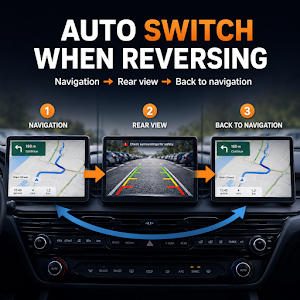
• Automatic rear-view switching when reversing
• Navigation auto launch support after rear-view use
• Fullscreen, guideline, and mute options for rear-view display
• Simple setup with compatible USB capture devices
How to Use
1. Connect your vehicle’s rear camera to a USB video capture device.
2. Connect the USB capture device to your Android phone or tablet.
3. Launch ReverseCam to view the rear camera feed.
For Samsung DeX-supported devices, you can connect your phone to a portable monitor for a larger display experience.
Recommended For
• Drivers using an Android tablet as a navigation display
• Users who want a larger rear-view screen than a factory display
• Drivers who want to avoid expensive Android head unit installation
• Samsung DeX users building a flexible in-car display setup
• RV, truck, SUV, van, and camping car users who need a larger rear camera view
• DIY users building a backup camera system with a USB capture device
Before You Start
• A USB video capture device is required.
• Your Android phone or tablet must support USB Host / OTG.
• A UVC-compatible USB video capture device is required.
• Many recent Android phones and many LTE-enabled tablets support USB Host / OTG, but compatibility may vary by device and manufacturer firmware.
• Some Wi-Fi-only tablets or low-cost devices may have limited USB camera support.
• Please check compatibility between your rear camera type, such as CVBS or AHD, and your USB capture device.
• Video quality and latency may vary depending on your phone, tablet, USB capture device, and rear camera.
ReverseCam lets you view your vehicle’s rear camera feed on an Android smartphone, tablet, or Samsung DeX setup using a USB video capture device.
Connect your vehicle’s rear camera to a USB video capture device, then connect the capture device to your Android phone or tablet. You can then view the rear camera feed in real time on a larger and clearer screen while reversing or parking.
If you use a Samsung DeX-supported smartphone with a portable monitor, ReverseCam can help you build a large-screen backup camera setup using the mobile device you already own.
It is a flexible alternative for drivers who want a bigger rear-view display without installing an expensive Android head unit or dedicated in-car monitor.
Key Features
• Display rear camera video through a USB video capture device
• View the rear camera feed on an Android phone or tablet
• Use a larger screen with tablets and portable monitors
• Support for Samsung DeX-based in-car display setups
• Automatic rear-view switching when reversing
• Navigation auto launch support after rear-view use
• Fullscreen, guideline, and mute options for rear-view display
• Simple setup with compatible USB capture devices
How to Use
1. Connect your vehicle’s rear camera to a USB video capture device.
2. Connect the USB capture device to your Android phone or tablet.
3. Launch ReverseCam to view the rear camera feed.
For Samsung DeX-supported devices, you can connect your phone to a portable monitor for a larger display experience.
Recommended For
• Drivers using an Android tablet as a navigation display
• Users who want a larger rear-view screen than a factory display
• Drivers who want to avoid expensive Android head unit installation
• Samsung DeX users building a flexible in-car display setup
• RV, truck, SUV, van, and camping car users who need a larger rear camera view
• DIY users building a backup camera system with a USB capture device
Before You Start
• A USB video capture device is required.
• Your Android phone or tablet must support USB Host / OTG.
• A UVC-compatible USB video capture device is required.
• Many recent Android phones and many LTE-enabled tablets support USB Host / OTG, but compatibility may vary by device and manufacturer firmware.
• Some Wi-Fi-only tablets or low-cost devices may have limited USB camera support.
• Please check compatibility between your rear camera type, such as CVBS or AHD, and your USB capture device.
• Video quality and latency may vary depending on your phone, tablet, USB capture device, and rear camera.
What’s new
Version 2.0.1 · Updated September 29, 2026
- Reverse detection mode options: Video Sensitivity, Video Size, or CAN Signal (smaller size reduces battery use & heat). - Screen size options: Original, 4:3, 16:9, and Full Screen. - Smoother reverse video display and better responsiveness when returning to the app. - Samsung DeX support to run the app alongside navigation on a monitor.
Alternatives to ReverseCam:Backup Camera
Looking for apps like ReverseCam:Backup Camera? Here are 6 similar Android apps on Google Play. 5 of the 6 are free to download.
-
Radio Code Generator - PIN
-
Ai Garage
-
EV Scout: Range, Charging cost
-
FLEETDTCO
-
ADR Premium
-
Find My Parked Car – EasySpot
| App | Rating | Price | Installs | Last updated | Compare |
|---|---|---|---|---|---|
| ReverseCam:Backup Camera | – | Free | 10,000+ | Sep 29, 2026 | |
| Radio Code Generator - PIN | – | Free | 1,000+ | Mar 19, 2026 | Compare |
| Ai Garage | – | 18.99 USD | 10+ | May 6, 2026 | Compare |
| EV Scout: Range, Charging cost | – | Free | 100+ | Aug 11, 2026 | Compare |
| FLEETDTCO | – | Free | 10+ | Dec 18, 2025 | Compare |
| ADR Premium | – | Free | 10+ | Dec 16, 2025 | Compare |
| Find My Parked Car – EasySpot | – | Free | 1,000+ | Oct 2, 2026 | Compare |
Similar apps on Google Play
- Radio Code Generator - PIN
- Ai Garage
- EV Scout: Range, Charging cost
- FLEETDTCO
- ADR Premium
- Find My Parked Car – EasySpot
- Mod Bussid STJ Basuri Draka
- RoadGuard
- Kapibara.
- CarCoding: OBD2 Car Coding
- Palma Track
- Middletrack
- Taghi car
- Refuel Tracker
- ThrottleX - Moto Lean Angle
- Zulu Rastreadores
- tesly(테슬리) - 가장 쉬운 테슬라 차량 관리 앱
- TicketPlea: Parking Appeal
- Road Community
- Sound Wave Judgement
- CHEXCAR - 딜러
- 2027 INFINITI Owner's Manual
- Hey Mati, ¿Donde esta mi auto?
- 4x4timing Organizator
- Car Radio Code Unlocker Wizard