

CostTalk: Team Expense Tracker
Awais K Niazi Business In-app purchases Contains ads
The chat-based project ledger. Track expenses, sync teams, and manage costs.
- Downloads
- 49+
- on Google Play
- Price
- Free
- In-app purchases
- Updated
- Sep 13
- 2026 · v6.8.0
Screenshots


About CostTalk: Team Expense Tracker
Manage Project Costs as Easily as Sending a Text.
Stop chasing receipts and scrolling through endless spreadsheets. CostTalk brings the simplicity of a group chat to the discipline of project accounting. Whether you are managing a construction site, a freelance project, or a small business team, CostTalk keeps your ledger updated in real-time.
💬 Chat-Based Accounting
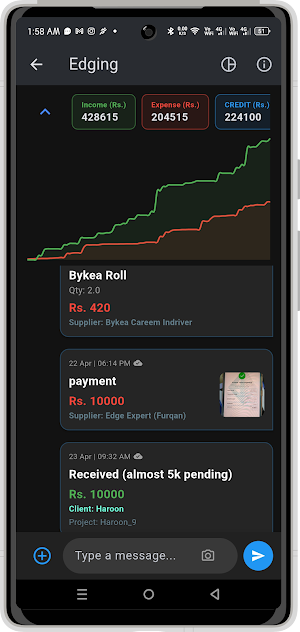
Send an expense or inflow just like a WhatsApp message. Group admins can edit or delete entries, while team members stay updated with a live "Total Cost" view at the top of every project.
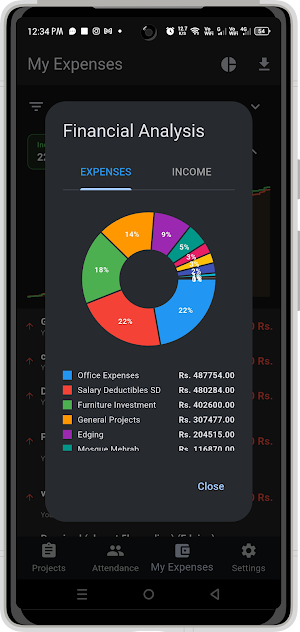
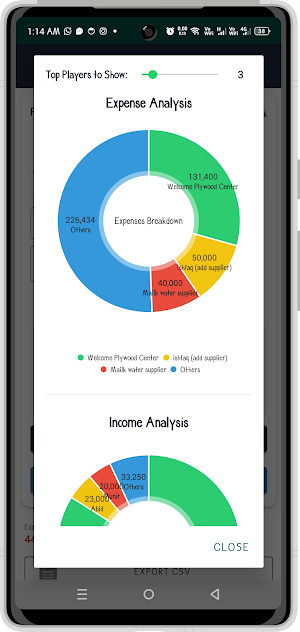
📊 Powerful Visualization
Don’t just track numbers—see them. CostTalk automatically generates instant graphs and visual reports, giving you a bird’s-eye view of your project’s financial health and spending trends.
🔌 Seamless Google Sheets Integration
Move your data where you need it.
Import: Bulk-load your customized Suppliers, Customers, and Other lists directly from Google Sheets.
Export: Generate professional CSV reports for your accountant or for further analysis in Excel with a single tap.
✈️ Offline First, Sync Later
Working on-site with a spotty connection? No problem. CostTalk stores your data locally and automatically syncs everything the moment you’re back online—just like your favorite messaging apps.
🛠️ Key Features:
Role-Based Permissions: Maintain full control with Admin and Member roles. Admins can moderate entries and manage permissions, while members focus on logging data.
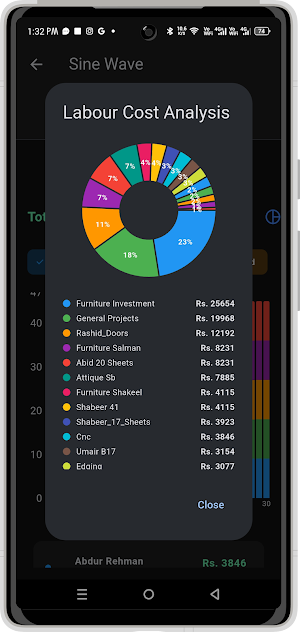
Labor & Attendance Tracking: A specialized module for tracking employee attendance and automatically calculating labor costs, making payroll a breeze. Available for premium users.
Multi-Project Management: Manage multiple projects or business ventures within a single app, keeping accounts separate and organized.
Smart Filters: Instantly search through months of data by category, user, or date.
Team Ledgers: Create dedicated groups for different projects.
Cloud Reliability: Powered by Firebase for real-time, secure data synchronization across all devices.
Large Screen Support: Support for Chromebooks, and Tablets makes data entry even more faster and convenient.
How to Use:
Create a Project: Start a new ledger for your specific business goal or job site.
Invite Your Team: Add members to the project so they can begin reporting costs as they happen.
Log Daily Activity: Use the intuitive interface to enter expenses (outflow) or payments received (inflow).
Track Attendance: Use the attendance feature to log which team members are on-site, ensuring labor costs are updated automatically.
Monitor & Export: Check the visual dashboard for a quick summary of your profit/loss, or export the full ledger to CSV for your records.
CostTalk: Because project tracking shouldn’t feel like a chore.
Stop chasing receipts and scrolling through endless spreadsheets. CostTalk brings the simplicity of a group chat to the discipline of project accounting. Whether you are managing a construction site, a freelance project, or a small business team, CostTalk keeps your ledger updated in real-time.
💬 Chat-Based Accounting
Send an expense or inflow just like a WhatsApp message. Group admins can edit or delete entries, while team members stay updated with a live "Total Cost" view at the top of every project.
📊 Powerful Visualization
Don’t just track numbers—see them. CostTalk automatically generates instant graphs and visual reports, giving you a bird’s-eye view of your project’s financial health and spending trends.
🔌 Seamless Google Sheets Integration
Move your data where you need it.
Import: Bulk-load your customized Suppliers, Customers, and Other lists directly from Google Sheets.
Export: Generate professional CSV reports for your accountant or for further analysis in Excel with a single tap.
✈️ Offline First, Sync Later
Working on-site with a spotty connection? No problem. CostTalk stores your data locally and automatically syncs everything the moment you’re back online—just like your favorite messaging apps.
🛠️ Key Features:
Role-Based Permissions: Maintain full control with Admin and Member roles. Admins can moderate entries and manage permissions, while members focus on logging data.
Labor & Attendance Tracking: A specialized module for tracking employee attendance and automatically calculating labor costs, making payroll a breeze. Available for premium users.
Multi-Project Management: Manage multiple projects or business ventures within a single app, keeping accounts separate and organized.
Smart Filters: Instantly search through months of data by category, user, or date.
Team Ledgers: Create dedicated groups for different projects.
Cloud Reliability: Powered by Firebase for real-time, secure data synchronization across all devices.
Large Screen Support: Support for Chromebooks, and Tablets makes data entry even more faster and convenient.
How to Use:
Create a Project: Start a new ledger for your specific business goal or job site.
Invite Your Team: Add members to the project so they can begin reporting costs as they happen.
Log Daily Activity: Use the intuitive interface to enter expenses (outflow) or payments received (inflow).
Track Attendance: Use the attendance feature to log which team members are on-site, ensuring labor costs are updated automatically.
Monitor & Export: Check the visual dashboard for a quick summary of your profit/loss, or export the full ledger to CSV for your records.
CostTalk: Because project tracking shouldn’t feel like a chore.
What’s new
Version 6.8.0 · Updated September 13, 2026
What's new: • Project checklists — admins can add tasks & notes to any project; checked items show strikethrough • Absences now appear as a clear "X" on the attendance chart, in each employee's colour • New in-app news bar for updates & announcements • "Contact Us" and "More Apps" added in Settings • Fixes and improvements
User reviews

wow impressive and very useful app to manage daily expenses

used this app which seems to be very user friendly and helpful for record expenses highly recommended from my side👌

This app is good I personally use this app I also recommend for business purpose thanks 👍

ln this app really good. I've used it myself, and I liked it a lot. I would definitely recommend it to anyone who wants to use it.

The app is great, just need a guide on how to add employees

Good job, Kindly assist on how to add other team members.
Alternatives to CostTalk: Team Expense Tracker
Looking for apps like CostTalk: Team Expense Tracker? Here are 4 similar Android apps on Google Play. All of them are free to download.
-
HospiCore PMS: Hotel Manager
-
Numberle: Guess the Number
-
Sheet Cutting Edging Optimizer
-
Sine Wave Doors Islamabad
| App | Rating | Price | Installs | Last updated | Compare |
|---|---|---|---|---|---|
| CostTalk: Team Expense Tracker | – | Free | 10+ | Sep 13, 2026 | |
| HospiCore PMS: Hotel Manager | – | Free | 50+ | Sep 13, 2026 | Compare |
| Numberle: Guess the Number | – | Free | 100+ | Aug 20, 2026 | Compare |
| Sheet Cutting Edging Optimizer | – | Free | 100+ | Aug 19, 2026 | Compare |
| Sine Wave Doors Islamabad | – | Free | 500+ | – | Compare |