
Silent Eye-Hidden Cam Finder
Tanusree Vandhar Entertainment Contains ads
Cyber-themed surveillance awareness simulator with cinematic roomscan UI.
- Downloads
- 50+
- on Google Play
- Price
- Free
- No in-app purchases
- Updated
- May 10
- 2026 · v1.0.0
Screenshots
About Silent Eye-Hidden Cam Finder
Silent Eye — Surveillance Awareness
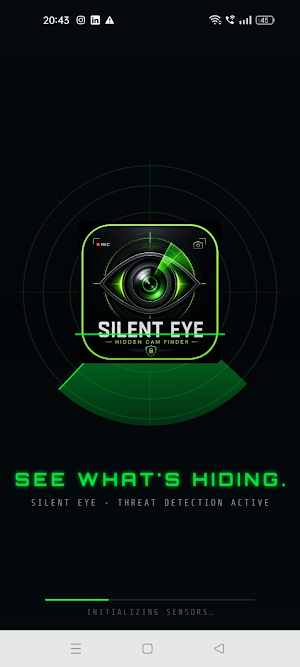
Built for privacy-conscious travelers, students, and anyone curious about personal security, Silent Eye walks you through cinematic, cyber-themed "scans" that introduce the kinds of checks privacy professionals consider. It's part awareness, part safety guide.
WHAT'S INSIDE
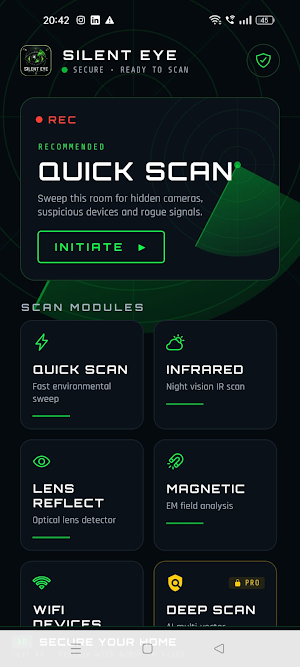
• QUICK SCAN — Radar-style sweep visualization that highlights areas worth physically inspecting yourself.
• INFRARED VIEWPORT — Simulated night-vision overlay. (Real-world tip: in a dark room, look at suspicious devices through your phone's regular camera — many IR LEDs glow faintly in camera sensors.)
• LENS REFLECTION — Animated optical sweep that reminds users to check shiny surfaces and pinhole-sized lenses by hand.
• MAGNETIC FIELD VISUALIZER — Simulated µT-style meter, modeled on the look of a real EM field detector.
• WIFI DEVICE LIST — Simulated network device inventory to help users build mental models for legitimate vs. unfamiliar smart-home devices.
• DEEP SCAN — Composite multi-vector visualization with an AI-style terminal output.
PRACTICAL SAFETY TIPS (NOT SIMULATED)
The Safety Tips section is real — practical, expert-recommended physical checks for:
• Hotel rooms
• Airbnb / short-term rentals
• Public restrooms
• Office spaces
• What to do if you actually suspect a device
EMERGENCY PROTOCOL
A 5-step suggested response checklist if you discover something genuinely suspicious, including one-tap call to local authorities.
PRIVACY-FIRST DESIGN
Silent Eye stores your scan history only on your device — it never goes to a server we control.
The app is supported by short rewarded video ads served by Google AdMob, which appear when you start a scan. To deliver these ads, AdMob's SDK collects a limited set of standard advertising data (resettable Advertising ID, approximate IP-based location, ad interactions, and crash diagnostics). The app requests non-personalized ads only. Full details, including how to reset your Advertising ID, are in our privacy policy.
Silent Eye does NOT:
✗ Require an account or sign-in
✗ Collect your name, email, contacts, or photos
✗ Track precise GPS location
✗ Send your scan history off your device
DISCLAIMER
Silent Eye is an awareness and simulation app. It is not a substitute for professional security inspections. Real hidden-camera detection requires physical inspection, RF detectors, and trained operators. Always physically check spaces you're concerned about, and contact local authorities if you suspect a real device.
WHO IT'S FOR
• Travelers staying in hotels and Airbnbs
• Privacy enthusiasts and security students
• Anyone curious about how surveillance-detection visualizations work
• Fans of cyber-aesthetic UI design
VERSION 1.0
First release. Future updates may add real sensor-backed scanning (camera-based IR check, magnetometer readings, Wi-Fi device enumeration) — see our roadmap on the Privacy Policy page.
⚠️ IMPORTANT: This is a simulation and awareness app. It does NOT perform real hidden-camera detection. The visual scans are illustrative — designed to educate users about what surveillance-detection workflows look and feel like, not to replace professional inspection equipment.
Built for privacy-conscious travelers, students, and anyone curious about personal security, Silent Eye walks you through cinematic, cyber-themed "scans" that introduce the kinds of checks privacy professionals consider. It's part awareness, part safety guide.
WHAT'S INSIDE
• QUICK SCAN — Radar-style sweep visualization that highlights areas worth physically inspecting yourself.
• INFRARED VIEWPORT — Simulated night-vision overlay. (Real-world tip: in a dark room, look at suspicious devices through your phone's regular camera — many IR LEDs glow faintly in camera sensors.)
• LENS REFLECTION — Animated optical sweep that reminds users to check shiny surfaces and pinhole-sized lenses by hand.
• MAGNETIC FIELD VISUALIZER — Simulated µT-style meter, modeled on the look of a real EM field detector.
• WIFI DEVICE LIST — Simulated network device inventory to help users build mental models for legitimate vs. unfamiliar smart-home devices.
• DEEP SCAN — Composite multi-vector visualization with an AI-style terminal output.
PRACTICAL SAFETY TIPS (NOT SIMULATED)
The Safety Tips section is real — practical, expert-recommended physical checks for:
• Hotel rooms
• Airbnb / short-term rentals
• Public restrooms
• Office spaces
• What to do if you actually suspect a device
EMERGENCY PROTOCOL
A 5-step suggested response checklist if you discover something genuinely suspicious, including one-tap call to local authorities.
PRIVACY-FIRST DESIGN
Silent Eye stores your scan history only on your device — it never goes to a server we control.
The app is supported by short rewarded video ads served by Google AdMob, which appear when you start a scan. To deliver these ads, AdMob's SDK collects a limited set of standard advertising data (resettable Advertising ID, approximate IP-based location, ad interactions, and crash diagnostics). The app requests non-personalized ads only. Full details, including how to reset your Advertising ID, are in our privacy policy.
Silent Eye does NOT:
✗ Require an account or sign-in
✗ Collect your name, email, contacts, or photos
✗ Track precise GPS location
✗ Send your scan history off your device
DISCLAIMER
Silent Eye is an awareness and simulation app. It is not a substitute for professional security inspections. Real hidden-camera detection requires physical inspection, RF detectors, and trained operators. Always physically check spaces you're concerned about, and contact local authorities if you suspect a real device.
WHO IT'S FOR
• Travelers staying in hotels and Airbnbs
• Privacy enthusiasts and security students
• Anyone curious about how surveillance-detection visualizations work
• Fans of cyber-aesthetic UI design
VERSION 1.0
First release. Future updates may add real sensor-backed scanning (camera-based IR check, magnetometer readings, Wi-Fi device enumeration) — see our roadmap on the Privacy Policy page.
⚠️ IMPORTANT: This is a simulation and awareness app. It does NOT perform real hidden-camera detection. The visual scans are illustrative — designed to educate users about what surveillance-detection workflows look and feel like, not to replace professional inspection equipment.
Alternatives to Silent Eye-Hidden Cam Finder
Looking for apps like Silent Eye-Hidden Cam Finder? Here are 3 similar Android apps on Google Play. All of them are free to download.


| App | Rating | Price | Installs | Last updated | Compare |
|---|---|---|---|---|---|
| Silent Eye-Hidden Cam Finder | – | Free | 50+ | May 10, 2026 | |
| FPS Unlock Pro - 90Hz/120Hz | – | Free | 10,000+ | May 8, 2026 | Compare |
| Liemeter-Truth & Lie Detector | – | Free | 100+ | May 8, 2026 | Compare |
| Indian Land Area Converter | – | Free | 50+ | Mar 14, 2026 | Compare |