
Fire Alarm Pull Trainer
Signal Fathom, LLC Education
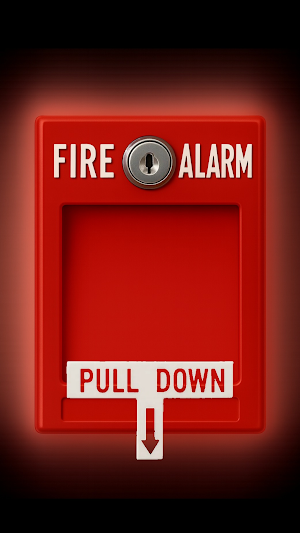
Fire Alarm Pull Trainer. Pull the handle. Sound the alrarm.
- Downloads
- 98+
- on Google Play
- Price
- $0.99
- No in-app purchases
- Updated
- Sep 13
- 2025 · v1.0.5
Screenshots
About Fire Alarm Pull Trainer
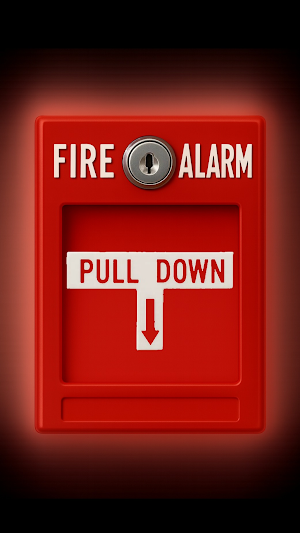
Turn your phone into a realistic fire alarm box for training, demos, and education. Pull the handle to blast a looping alarm tone, tap the lock to open settings, and switch between classic alarms and clear voice prompts. Everything works offline—no ads, no tracking, no surprises.
Designed by an Emergency Manager and US Army Veteran with over 15 years of experience in public safety and emergency management.
WHY YOU’LL LIKE IT
• Realistic interaction: pull-to-activate handle with smooth animation
• Instant selection: tap the lock, pick a tone, lock snaps back
• Loud & clear: multiple alarm tones + voice prompts
• Offline by design: all audio is bundled in the app
• No ads. No analytics. No data collection.
HOW IT WORKS
1) Start: pull the on-screen handle down until it clicks—your selected alarm loops.
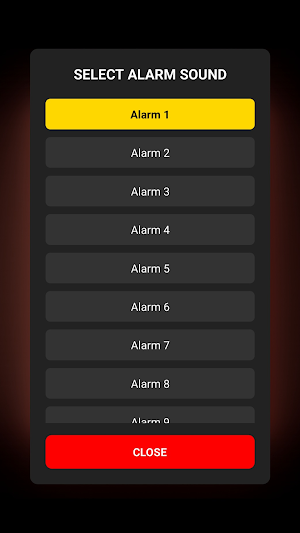
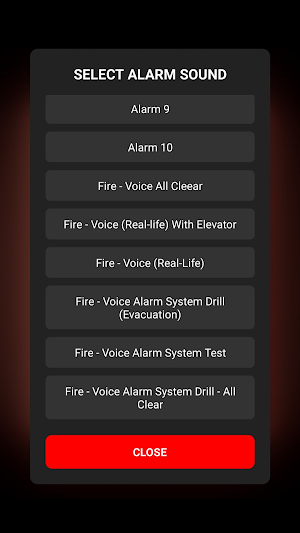
2) Choose a sound: tap the lock to open settings, then tap any tone or voice.
3) Play the new selection: close the menu (it closes automatically), then pull again.
4) Stop the alarm: Pull the handle buck to the top.
5) Volume: use your device’s volume buttons (there’s no in-app volume).
WHAT’S INSIDE
• A curated set of alarm tones (Alarm 1–10)
• Voice prompts such as “All Clear,” “Drill (Evacuation),” “System Test,” and more
• Subtle click sounds when the lock rotates and when the handle completes a pull
• Clean, high-contrast UI that’s easy to use in a hurry
PERFECT FOR
•First Responders
•Emergency Managers
•Hosptial and Health Careworkers
•Churches
•Public Safety Officers
• Fire safety training and classroom demos
• Drill rehearsals and on-site walkthroughs
• Sound design reference and quick alarm tests
• Educators, facility managers, and anyone who needs a reliable alarm simulator
DESIGN PHILOSOPHY
• Simple on purpose: one screen, no clutter
• Predictable behavior: what you tap is what you hear
• Works anywhere: no network required after install
TIPS • Device volume (Media) controls loudness. Check silent/vibrate switches on your device.
PRIVACY
We do not collect, store, or share personal data. The app does not use analytics or third-party trackers. All audio is bundled locally and plays offline.
SAFETY NOTE
Always follow local policies, laws, and the direction of safety professionals.
SUPPORT
• Email: [email protected]
• Help & Instructions: https://signalfathom.github.io/fire-alarm-privacy/support.html
• Privacy Policy: https://signalfathom.github.io/fire-alarm-privacy/
Designed by an Emergency Manager and US Army Veteran with over 15 years of experience in public safety and emergency management.
WHY YOU’LL LIKE IT
• Realistic interaction: pull-to-activate handle with smooth animation
• Instant selection: tap the lock, pick a tone, lock snaps back
• Loud & clear: multiple alarm tones + voice prompts
• Offline by design: all audio is bundled in the app
• No ads. No analytics. No data collection.
HOW IT WORKS
1) Start: pull the on-screen handle down until it clicks—your selected alarm loops.
2) Choose a sound: tap the lock to open settings, then tap any tone or voice.
3) Play the new selection: close the menu (it closes automatically), then pull again.
4) Stop the alarm: Pull the handle buck to the top.
5) Volume: use your device’s volume buttons (there’s no in-app volume).
WHAT’S INSIDE
• A curated set of alarm tones (Alarm 1–10)
• Voice prompts such as “All Clear,” “Drill (Evacuation),” “System Test,” and more
• Subtle click sounds when the lock rotates and when the handle completes a pull
• Clean, high-contrast UI that’s easy to use in a hurry
PERFECT FOR
•First Responders
•Emergency Managers
•Hosptial and Health Careworkers
•Churches
•Public Safety Officers
• Fire safety training and classroom demos
• Drill rehearsals and on-site walkthroughs
• Sound design reference and quick alarm tests
• Educators, facility managers, and anyone who needs a reliable alarm simulator
DESIGN PHILOSOPHY
• Simple on purpose: one screen, no clutter
• Predictable behavior: what you tap is what you hear
• Works anywhere: no network required after install
TIPS • Device volume (Media) controls loudness. Check silent/vibrate switches on your device.
PRIVACY
We do not collect, store, or share personal data. The app does not use analytics or third-party trackers. All audio is bundled locally and plays offline.
SAFETY NOTE
Always follow local policies, laws, and the direction of safety professionals.
SUPPORT
• Email: [email protected]
• Help & Instructions: https://signalfathom.github.io/fire-alarm-privacy/support.html
• Privacy Policy: https://signalfathom.github.io/fire-alarm-privacy/
What’s new
Version 1.0.5 · Updated September 13, 2025
1.0.5 Updated app icon and Play Store listing to match the in-app experience. No feate changes; same sounds and controls. Minor polish only.
Alternatives to Fire Alarm Pull Trainer
Looking for apps like Fire Alarm Pull Trainer? Here are 6 similar Android apps on Google Play. 5 of the 6 are free to download.





| App | Rating | Price | Installs | Last updated | Compare |
|---|---|---|---|---|---|
| Fire Alarm Pull Trainer | – | $0.99 | 50+ | Sep 13, 2025 | |
| Stumio - Student & Parent App | – | Free | 10+ | Jan 30, 2026 | Compare |
| Codju: Learn Coding & AI | – | Free | 5,000+ | May 11, 2026 | Compare |
| urkhatun | – | Free | 1+ | May 3, 2026 | Compare |
| EMC | – | Free | 50+ | Jul 9, 2026 | Compare |
| Solsync | – | Free | 10+ | – | Compare |
| Factory EMS | – | 22.99 USD | 1+ | Jul 29, 2026 | Compare |
Similar apps on Google Play
- Stumio - Student & Parent App
- Codju: Learn Coding & AI
- urkhatun
- EMC
- Solsync
- Factory EMS
- AWAR N ARIF
- Hafızlık Egzersizi
- HK-Teach-Kids Fun Learning App
- USECS
- FEPI
- OBPS Setu
- CRISC Prep 2026 ® ExamCert
- Camões
- FlowChinese: Learn Chinese
- NepalAmer
- Riva Pro
- Grand Omar Mosque
- RLCP
- Project Fluency™
- Gleegather LMS
- Prepful: SAT Exam Prep
- Colégio Santa Amélia
- EVA GO
- FTP26