

Full Battery & Theft Alarm
Shiv Apps Studio Tools Contains ads
Full Battery Charging is the best charger alarm & theft alarm apps.
- Rating
- 3.4
- 464 ratings
- Downloads
- 100K+
- on Google Play
- Price
- Free
- No in-app purchases
- Updated
- Aug 3
- 2026 · v1.9
Screenshots
Save to Pinterest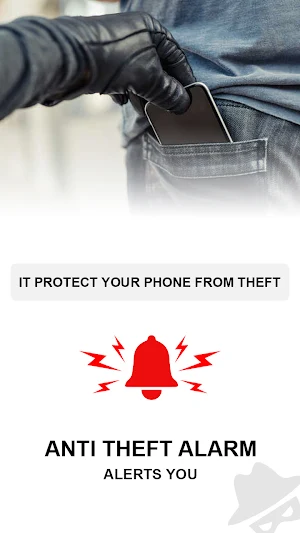

About Full Battery & Theft Alarm
Don't worry use Battery Charge and Theft Alarm. Now you can leave your device charged with ease because Battery Charge Alarm will notify you when your device is fully charged or from theft.
By keeping the Energy Conservation and also to protect device from theft, we have developed ‘Battery Charge and Theft Alarm' app which will alert you by alarming on the desired percentage of battery charge and also has more lot features in it.
How to use Battery Charge and Theft Alarm App:
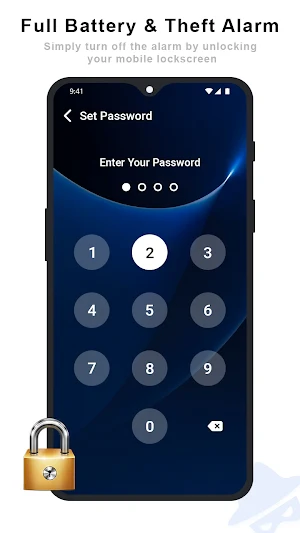
• First set your PIN. Go to Battery Charge and Theft Alarm settings screen and select Set PIN.
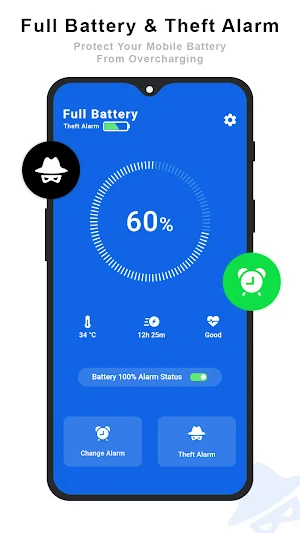
• From Home Screen select your desired alarm or anti-theft alert button.
• The alarm will be activated after specified seconds and selected button will turn red colour.
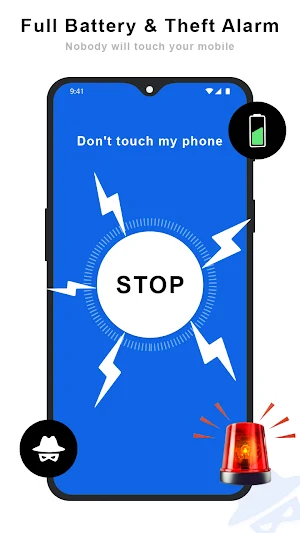
• With respective alert mode you will get notified through a loud alarm or by notification.
• Enter your PIN to stop the alarm.
Designed with simplicity in mind to make sure it's simple for everyone to use.
New optional features like Low Battery, High Temperature, Motion/Un-plug detection, Ringtone, Vibration and Flash etc... are added (turn it on in settings first to use the feature)
Batteries have a limited lifespan, every time you over charge the device it wears out the battery.
Full Battery & Theft Alarm - Full Charging main features :
** Status message about application
** Auomatically adjustable volume of ringtone.
** Full Battery Theft Alarm.
** Light & Dark User Interface.
** Automatic set start on reboot.
** Show status on charging or not charging.
** Start automatically alarm option.
** Different type of thief alarm sound option.
** Automatically start thef alarm when your phone charged .
** Fast and lightweight.
** Automatic start on reboot.
** Notification if app is closed by task killer.
Auto enable fully battery charge alarm feature :
When your phone charger is plugged in full battery alarm is auto enabled making features easy to use.
Set battery level :
Customization an alarm battery level Just Like 10%, 20%, 40%, 60%, 80%, 100% etc...
Thef alarm protection main feature :
Set a unique digit PIN code so that when the phone alarm activate, when your phone only be unlocked and alarm is muted with the correct successfull PIN entering.
Automatic set charger alarm feature :
Show alerts on your phone screen with audio and vibration when your phone is compltelly finish charged.
Full battery alarm will even eradicate this quarrel of yours with an intelligent Theft Alert feature. In between charging, if anyone unplugs your Smartphone Theft Security alarm will start ringing and won’t stop unless you will verify it with authentication.
Notice:
1) If you use any task killer app, please add this app to ignore list or white list. Otherwise, application will not work properly.
2) Turn off battery saver/restrictions for this app.
3) Users with custom launchers: Go to Battery charge and theft alarm settings and select give permission options and enable the required permissions.
4) Above Android 10 users: Go to Battery charge and theft alarm settings select Display over the other apps and enable it.
Disclaimer:
1) This app doesn't claim that it can avoid theft completely. It's the owner's responsibility to be vigilant. With battery charge and theft alarm, you can avert theft.
2) In case of any damages or loses occur due to improper usage of app functions or forgotten pin code or pattern, no responsibility be drawn at developer side for such incidents.
By keeping the Energy Conservation and also to protect device from theft, we have developed ‘Battery Charge and Theft Alarm' app which will alert you by alarming on the desired percentage of battery charge and also has more lot features in it.
How to use Battery Charge and Theft Alarm App:
• First set your PIN. Go to Battery Charge and Theft Alarm settings screen and select Set PIN.
• From Home Screen select your desired alarm or anti-theft alert button.
• The alarm will be activated after specified seconds and selected button will turn red colour.
• With respective alert mode you will get notified through a loud alarm or by notification.
• Enter your PIN to stop the alarm.
Designed with simplicity in mind to make sure it's simple for everyone to use.
New optional features like Low Battery, High Temperature, Motion/Un-plug detection, Ringtone, Vibration and Flash etc... are added (turn it on in settings first to use the feature)
Batteries have a limited lifespan, every time you over charge the device it wears out the battery.
Full Battery & Theft Alarm - Full Charging main features :
** Status message about application
** Auomatically adjustable volume of ringtone.
** Full Battery Theft Alarm.
** Light & Dark User Interface.
** Automatic set start on reboot.
** Show status on charging or not charging.
** Start automatically alarm option.
** Different type of thief alarm sound option.
** Automatically start thef alarm when your phone charged .
** Fast and lightweight.
** Automatic start on reboot.
** Notification if app is closed by task killer.
Auto enable fully battery charge alarm feature :
When your phone charger is plugged in full battery alarm is auto enabled making features easy to use.
Set battery level :
Customization an alarm battery level Just Like 10%, 20%, 40%, 60%, 80%, 100% etc...
Thef alarm protection main feature :
Set a unique digit PIN code so that when the phone alarm activate, when your phone only be unlocked and alarm is muted with the correct successfull PIN entering.
Automatic set charger alarm feature :
Show alerts on your phone screen with audio and vibration when your phone is compltelly finish charged.
Full battery alarm will even eradicate this quarrel of yours with an intelligent Theft Alert feature. In between charging, if anyone unplugs your Smartphone Theft Security alarm will start ringing and won’t stop unless you will verify it with authentication.
Notice:
1) If you use any task killer app, please add this app to ignore list or white list. Otherwise, application will not work properly.
2) Turn off battery saver/restrictions for this app.
3) Users with custom launchers: Go to Battery charge and theft alarm settings and select give permission options and enable the required permissions.
4) Above Android 10 users: Go to Battery charge and theft alarm settings select Display over the other apps and enable it.
Disclaimer:
1) This app doesn't claim that it can avoid theft completely. It's the owner's responsibility to be vigilant. With battery charge and theft alarm, you can avert theft.
2) In case of any damages or loses occur due to improper usage of app functions or forgotten pin code or pattern, no responsibility be drawn at developer side for such incidents.
What’s new
Version 1.9 · Updated August 3, 2026
- Fixed Issues
User reviews

GOPALAKRISHNAN
Alternatives to Full Battery & Theft Alarm
Looking for apps like Full Battery & Theft Alarm? Here are 6 similar Android apps on Google Play. The highest rated is Love Video Ringtone for Incomi (4.7/5), and all 6 are free to download.
-
PDF Editor – Edit Everything!
-
Whats Deleted messages - photo 4.2
-
Love Video Ringtone for Incomi 4.7
-
Set Photo On Phone Dialer - My
-
Change Background Of Photos
-
Add Video Background - Video B 2.6
| App | Rating | Price | Installs | Last updated | Compare |
|---|---|---|---|---|---|
| Full Battery & Theft Alarm | 3.4 / 5 | Free | 100,000+ | Aug 3, 2026 | |
| PDF Editor – Edit Everything! | – | Free | 10,000+ | – | Compare |
| Whats Deleted messages - photo | 4.2 / 5 | Free | 100,000+ | Jul 26, 2021 | Compare |
| Love Video Ringtone for Incomi | 4.7 / 5 | Free | 10,000+ | – | Compare |
| Set Photo On Phone Dialer - My | – | Free | 10,000+ | Feb 1, 2020 | Compare |
| Change Background Of Photos | – | Free | 1,000+ | Nov 30, 2019 | Compare |
| Add Video Background - Video B | 2.6 / 5 | Free | 50,000+ | Nov 14, 2019 | Compare |