

Asset Mobile
Asset Improvements and Maintenance Productivity
Manage job sheets, log timesheets, and upload site photos with ease.
- Downloads
- 16+
- on Google Play
- Price
- Free
- No in-app purchases
- Updated
- Apr 17
- 2026 · v1.0.9
Screenshots
About Asset Mobile
The Asset Improvements Worker App is a dedicated tool for builders, subcontractors, and on-site staff working with Asset Improvements and Maintenance. It brings together job schedules, job details, timesheets, photos, and key documents in one simple, reliable place. The app is designed to reduce paperwork, make communication clearer, and help workers complete each job accurately and efficiently.
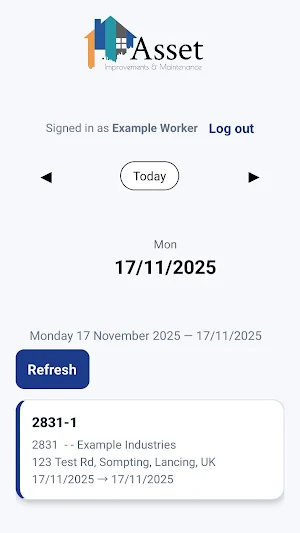
🚧 Daily Job Schedule
View all scheduled work for each day in a clean, swipeable calendar that uses correct New Zealand date formatting.
Workers can move forward or backwards by day, jump to “Today,” and instantly see which jobs are assigned.
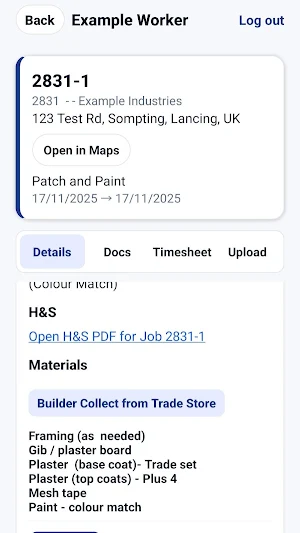
📍 Full Job Details
Every job includes:
• Job number and description
• Site address with an “Open in Maps” shortcut
• Scope of works
• Time allowance
• Start and end dates
• Parent project details
• Notes and project information
This ensures the worker knows exactly what needs to be done before arriving on site.
📄 Files and Documents
Workers can open all job-related files directly in the app, including:
• PDFs
• H&S documents
• Mark-ups
• Before photos
• Progress and after photos
• Any site documents uploaded by the office
Files open instantly with a single tap.
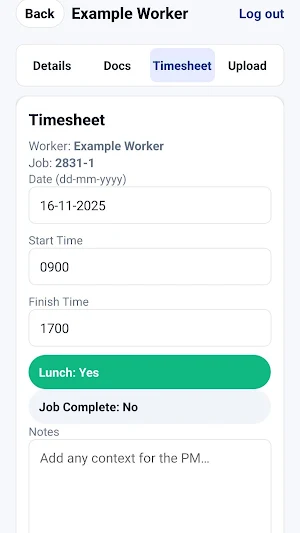
⏱️ Timesheet Entry
Submit clean, accurate timesheets straight from the job card. Workers can:
• Pick the work date (dd-mm-yyyy)
• Enter start and finish times
• Select whether lunch was taken
• Add notes
• Automatically calculate total hours
• Mark the job as complete
Timesheets are sent straight to the office for approval, keeping payroll accurate and organised.
📸 Fast Photo Uploads
Upload job photos using the camera or photo library.
The app automatically:
• Resizes images
• Compresses photos
• Attaches them to the correct job
• Displays them under Before, Progress, or Documents
This keeps job records complete and clear.
🔔 Push Notifications
Receive alerts when:
• New jobs are assigned
• Job details change
• Documents are updated
• The office sends important messages
Workers stay informed throughout the day.
🔐 Simple and Secure Login
Quick sign-in using email and a 4-digit PIN.
No complicated passwords or account recovery needed.
📶 Offline-Friendly Access
Key job details are cached on the device so workers can still view essential information even in low-reception areas.
👷♂️ Built for the Field
The app is specifically designed for people working on tools, moving between sites, and needing quick access to the right information.
It removes paperwork, reduces delays, and helps the whole team stay aligned.
🚧 Daily Job Schedule
View all scheduled work for each day in a clean, swipeable calendar that uses correct New Zealand date formatting.
Workers can move forward or backwards by day, jump to “Today,” and instantly see which jobs are assigned.
📍 Full Job Details
Every job includes:
• Job number and description
• Site address with an “Open in Maps” shortcut
• Scope of works
• Time allowance
• Start and end dates
• Parent project details
• Notes and project information
This ensures the worker knows exactly what needs to be done before arriving on site.
📄 Files and Documents
Workers can open all job-related files directly in the app, including:
• PDFs
• H&S documents
• Mark-ups
• Before photos
• Progress and after photos
• Any site documents uploaded by the office
Files open instantly with a single tap.
⏱️ Timesheet Entry
Submit clean, accurate timesheets straight from the job card. Workers can:
• Pick the work date (dd-mm-yyyy)
• Enter start and finish times
• Select whether lunch was taken
• Add notes
• Automatically calculate total hours
• Mark the job as complete
Timesheets are sent straight to the office for approval, keeping payroll accurate and organised.
📸 Fast Photo Uploads
Upload job photos using the camera or photo library.
The app automatically:
• Resizes images
• Compresses photos
• Attaches them to the correct job
• Displays them under Before, Progress, or Documents
This keeps job records complete and clear.
🔔 Push Notifications
Receive alerts when:
• New jobs are assigned
• Job details change
• Documents are updated
• The office sends important messages
Workers stay informed throughout the day.
🔐 Simple and Secure Login
Quick sign-in using email and a 4-digit PIN.
No complicated passwords or account recovery needed.
📶 Offline-Friendly Access
Key job details are cached on the device so workers can still view essential information even in low-reception areas.
👷♂️ Built for the Field
The app is specifically designed for people working on tools, moving between sites, and needing quick access to the right information.
It removes paperwork, reduces delays, and helps the whole team stay aligned.
What’s new
Version 1.0.9 · Updated April 17, 2026
More time shees loading, and clearer timesheet input instructions, plus additional of other trades
Alternatives to Asset Mobile
Looking for apps like Asset Mobile? Here are 6 similar Android apps on Google Play. All of them are free to download.
-
Selyst for Professionals
-
UCO Setu
-
Doramasflix - Ver Doramas
-
Zirasya
-
ScribeAI Pro
-
Annual Leave Calculator
| App | Rating | Price | Installs | Last updated | Compare |
|---|---|---|---|---|---|
| Asset Mobile | – | Free | 10+ | Apr 17, 2026 | |
| Selyst for Professionals | – | Free | 500+ | Aug 30, 2026 | Compare |
| UCO Setu | – | Free | 10,000+ | – | Compare |
| Doramasflix - Ver Doramas | – | Free | 1,000+ | Apr 5, 2026 | Compare |
| Zirasya | – | Free | 100+ | Aug 7, 2026 | Compare |
| ScribeAI Pro | – | Free | 500+ | Sep 30, 2026 | Compare |
| Annual Leave Calculator | – | Free | 100+ | Jan 30, 2026 | Compare |
Compare Asset Mobile with the top alternatives: ratings, updates, ASO score and keyword gaps →
Similar apps on Google Play
- Selyst for Professionals
- UCO Setu
- Doramasflix - Ver Doramas
- Zirasya
- ScribeAI Pro
- Annual Leave Calculator
- EasyPGL Careggi
- Conecta Lagoa Formosa
- Zinti
- Haby - Time, Todos and Notes
- Sponge Sales India
- V1 Landlords
- DokuSign - Scan & Sign PDF Doc
- SMIRP
- نيترو بلس
- سورة القصص للشيخ المعيقلي
- PDF Viewer+
- Grupo Alliance Profesional SRV
- Kips Warranty
- AZLogistics
- Kiosco Digital
- HRMS NN Dehradun
- eLegere
- Kansas City Hyundai Connect
- PDF Master - Modifier Tout